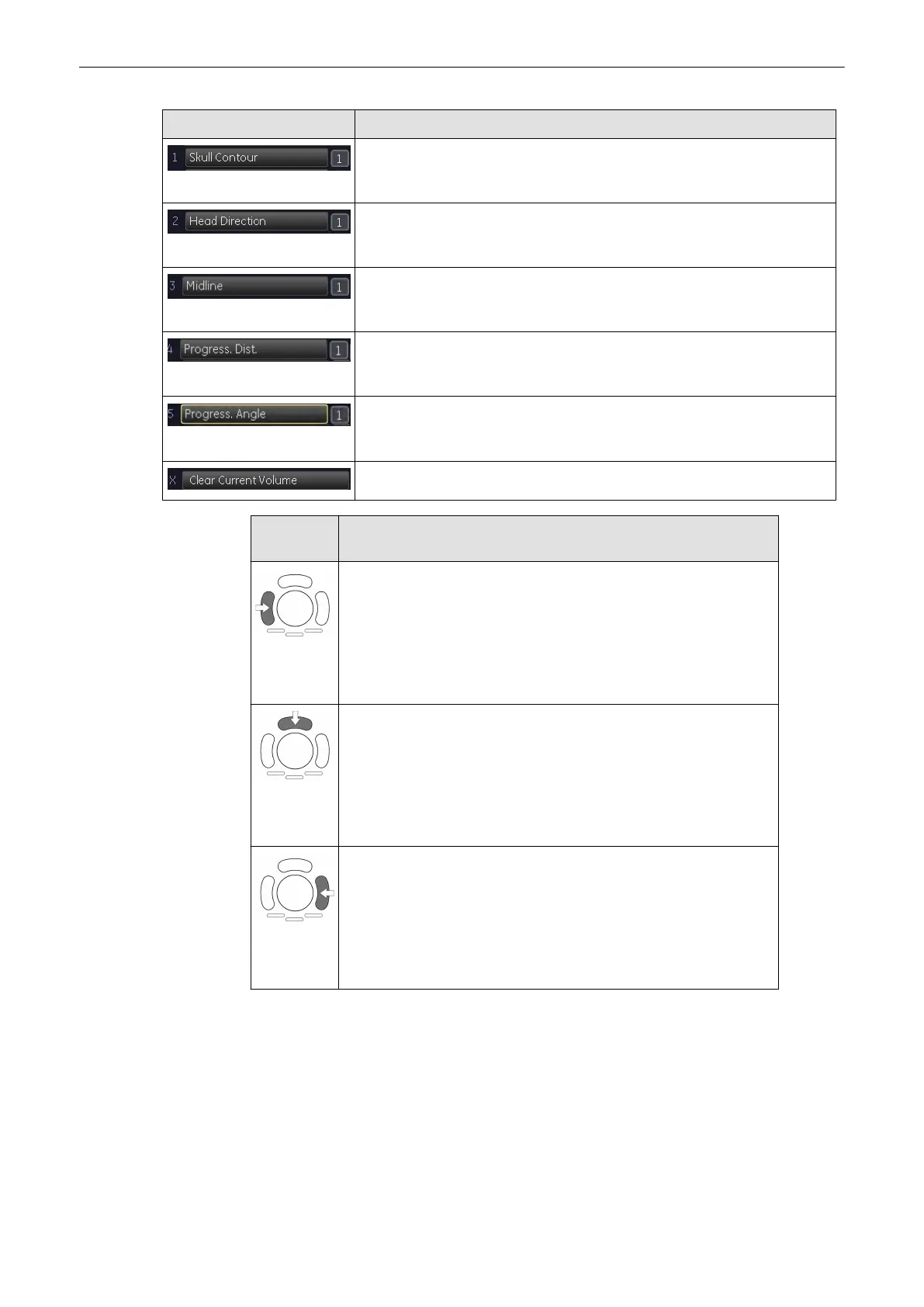
Menu item Description
Click this menu item to set the skull contour as described in 'Set fetal
contour'
on page 9-146
. The checkbox controls whether or not the contour
line is displayed in the ultrasound image.
Click this menu item to set the head direction as described in 'Set head
direction'
on page 9-146
. The checkbox controls whether or not the line is
displayed in the ultrasound image.
Click this menu item to set the mid line as described in 'Set midline'
on page
9-147
. The checkbox controls whether or not the line is displayed in the
ultrasound image.
Click this menu item to measure the progression of the fetal head as
described in
'Head progression distance'
on page 9-148
. The checkbox
controls whether or not the line is displayed in the ultrasound image.
Click this menu item to measure the progression of the fetal head as
described in
'Head progression angle'
on page 9-148
. The checkbox
controls whether or not the line is displayed in the ultrasound image.
Click this menu item to delete all measurements for the current volume.
Trackball
function
What it does
•
Skull Contour: Set a new anchor point.
•
Head Direction: Set start / end point.
•
Mid Line: Set start / end point.
•
Progression distance: Set end point.
•
Progression angle: Set end point.
•
SonoVCAD labor main: Set reference image.
•
Skull Contour: Finish drawing.
•
Head Direction: No function assigned.
•
Mid Line: No function assigned.
•
Progression distance: No function assigned.
•
Progression angle: No function assigned.
•
SonoVCAD labor main: No function assigned.
•
Skull Contour: Undo last anchor point setting.
•
Head Direction: Undo last start / end point setting.
•
Mid Line: Undo last start / end point setting.
•
Progression distance: Undo end point setting.
•
Progression angle: Undo end point setting.
•
SonoVCAD labor main: Exit to Volpre.
9.15.2 Mark pubis position - Auto Adjust
Auto Adjust is a convenient feature to automatically align the ultrasound image.
Draw a line consisting of an start and end point along the pubic bone either in image plane A,
B or both. The other image planes are aligned automatically. You can tweak the result using
rotation, translation and zoom. Confirm the correct alignment by clicking the
Set Position
menu
item.
Volume Mode
9-144
Voluson® S6/S8 Basic User Manual
5433669-100 Revision 4



 To Next Page