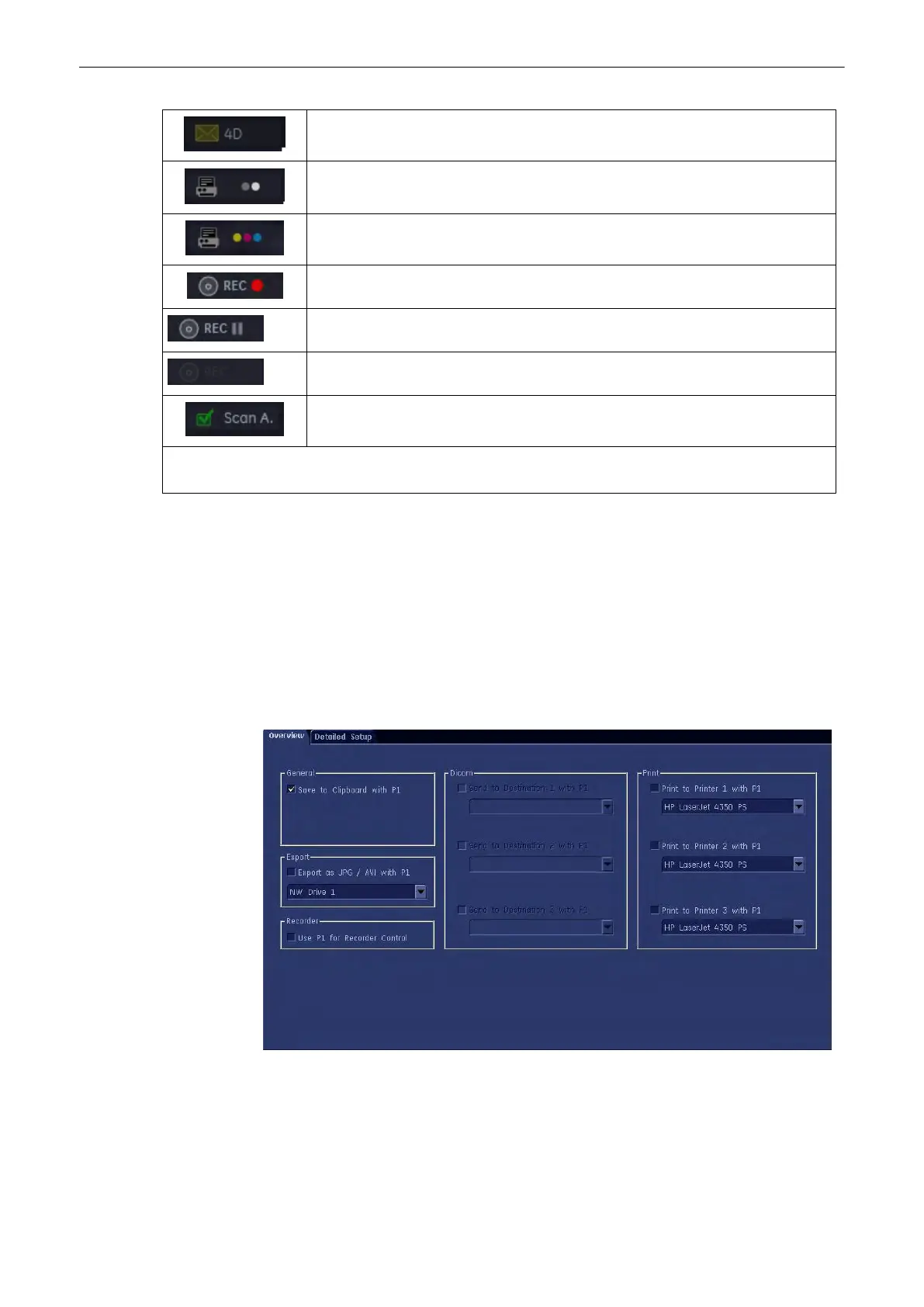
Sends a volume cine to external destination.
Sends the selected item to a black&white printer.
Sends the selected item to a color printer.
DVR REC mode
DVR REC-PAUSE mode
DVR status: Disabled
Confirm Scan Assistant.
If an option is not possible, a little red cross is displayed in front of the icon. e.g.:when a 2D Cine can not be
saved as a 3D Volume.
With P-keys there are two different tabs:
1.
Overview tab: In the Overview Tab you select which basic actions you want to be
performed when pressing a particular P-key.
2. Detailed Setup tab: In the Detailed Setup tab you can choose what exactly happens at
the pressing of a P-Key.(i.e.: If in the overview tab you choose to save an image to a
particular location, then in the detailed setup tab you choose which format you want to
save.)
14.2.1 Overview tab
1. Clipboard: To copy images or cines to the clipboard check this checkbox .
2.
Recorder: To record images or cines to an external recording device (DVR) check this
checkbox.
Note
If this checkbox is marked, no other functions are available.
Programmable Keys
14-6
Voluson® S6/S8 Basic User Manual
5433669-100 Revision 4



 To Next Page