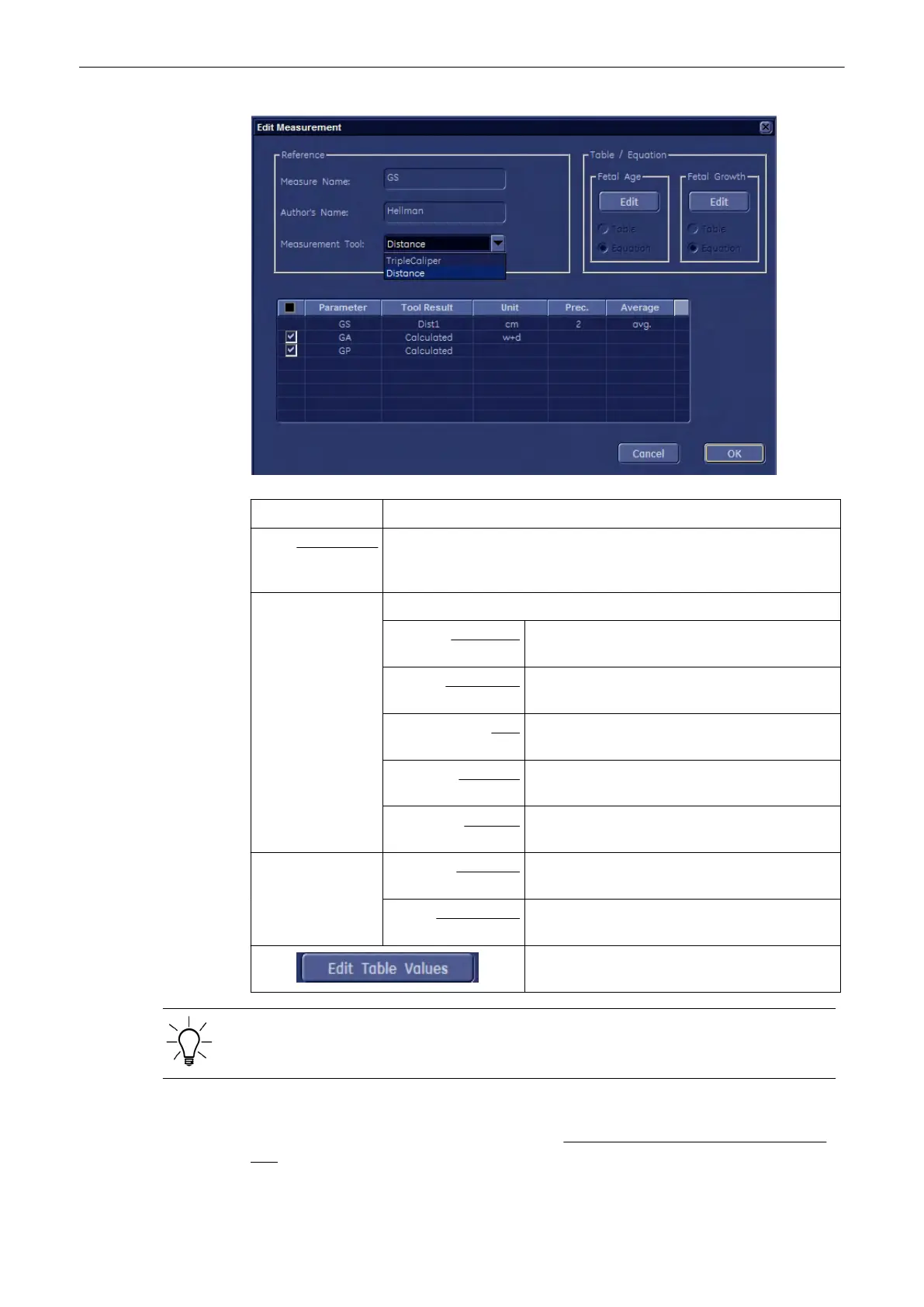
Measurement Tool: If available, choose the desired Measurement Tool.
For example: Select, if the GS (Gestational Sack) is to be measured using one
Distance (value = GS diameter), or by using 3 Distances (mean value =
GS diameter)
“Selection Field”: Adjust the display in the worksheet and the measure result field.
Parameter: set check mark(s) individual or all (check mark in
“black box)
Tool Result: shows parameters to measure and items that will
be calculated
Unit: click into the line desired to change the
dimension
Precision: click into the line desired to change the precision
(# after comma)
Average: click into the line desired to change the average
display
Table / Equation: Fetal Age: select either Table or Equation and then click
[Edit]
Fetal Growth: select either Table or Equation and then click
[Edit]
If it is desired to edit a table, click this button.
Only “user defined” tables and equations can be edited. Factory default tables and equations
can only be viewed!
To Display the exact Table or Equation
1. Invoke the “Edit Measurement” window. review: To Edit a Sub Category, Study or Measure
Item
(chapter
'To Edit a Sub Category, Study or Measure Item'
on page 11-118
)
Measurements and Patient Worksheets (Reports)
Voluson® S6/S8 Basic User Manual
5433669-100 Revision 4 11-119



 To Next Page