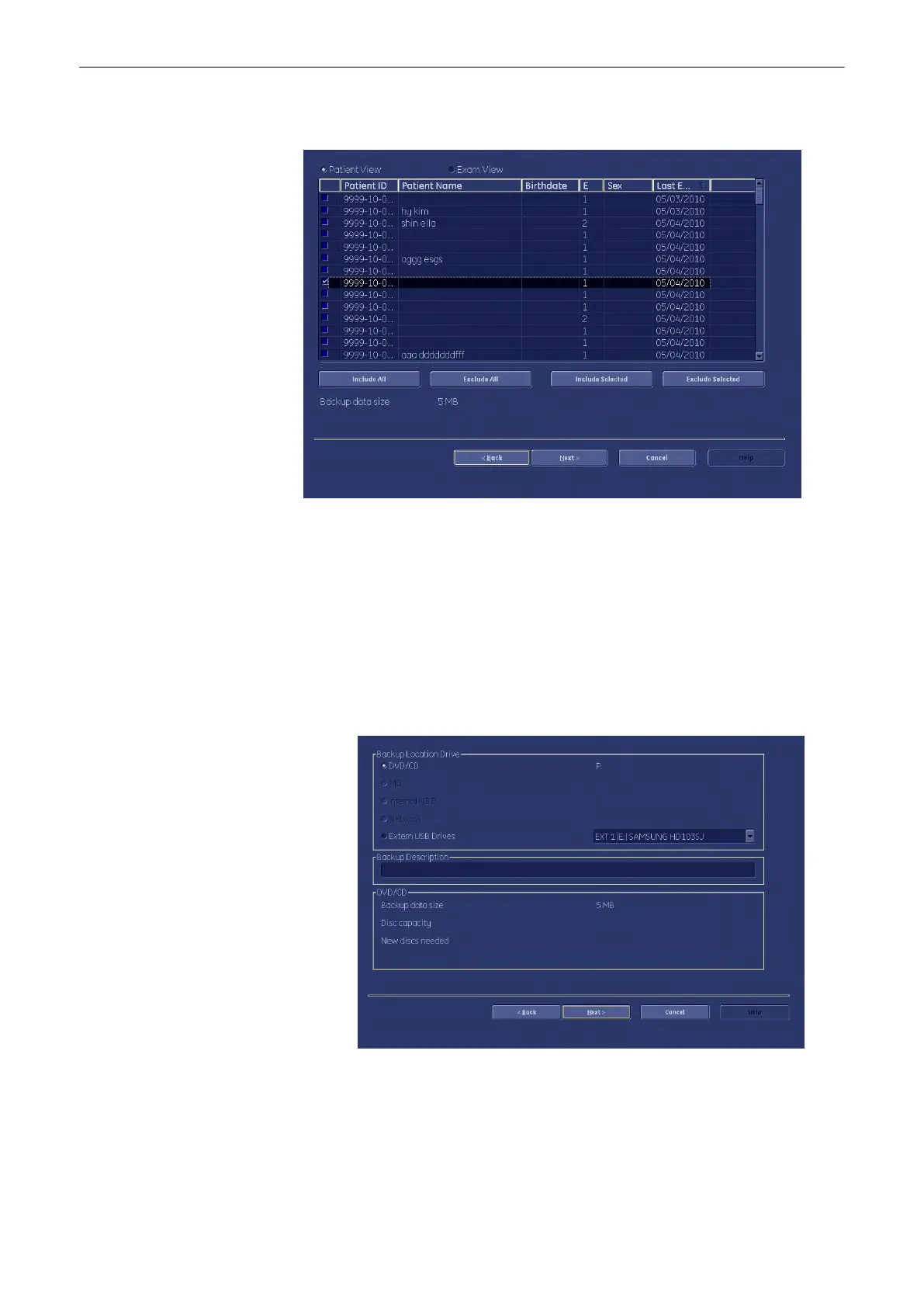
If you want to choose exams or patients arbitrarily, press [Advanced]. The following
window appears:
Here you can choose between [Patient View] and [Exam View]. Depending on which
view you choose you can select patients or exams to save in your backup. It is also
possible to choose a singular patient or a singular exam.
To deselect a patient or an exam check the appropriate check box on the left side of the
screen. To select this patient or exam again check the checkbox again. Use the [Select
All] button or the [Deselect All] button below the information screen to select all exams or
patients or deselect them. [Include Selected]: The selected patients will be saved.
[Exclude Selected]: The selected patients will no be saved.
Note
It is possible to use the [Shift] key on the keyboard to select more than one patient!
After selecting the patients or exams you desire confirm with [Next]. The following dialog
appears:
5. Firstly, choose a destination, where to save your backup to, by toggling one of the radio
buttons.
6.
You can also enter a description for your backup: Click into the area designated for
“Backup Description”. Now you can start typing.
7. Confirm with [Next].
Utilities and System Setup
13-60
Voluson® S6/S8 Basic User Manual
5433669-100 Revision 4



 To Next Page