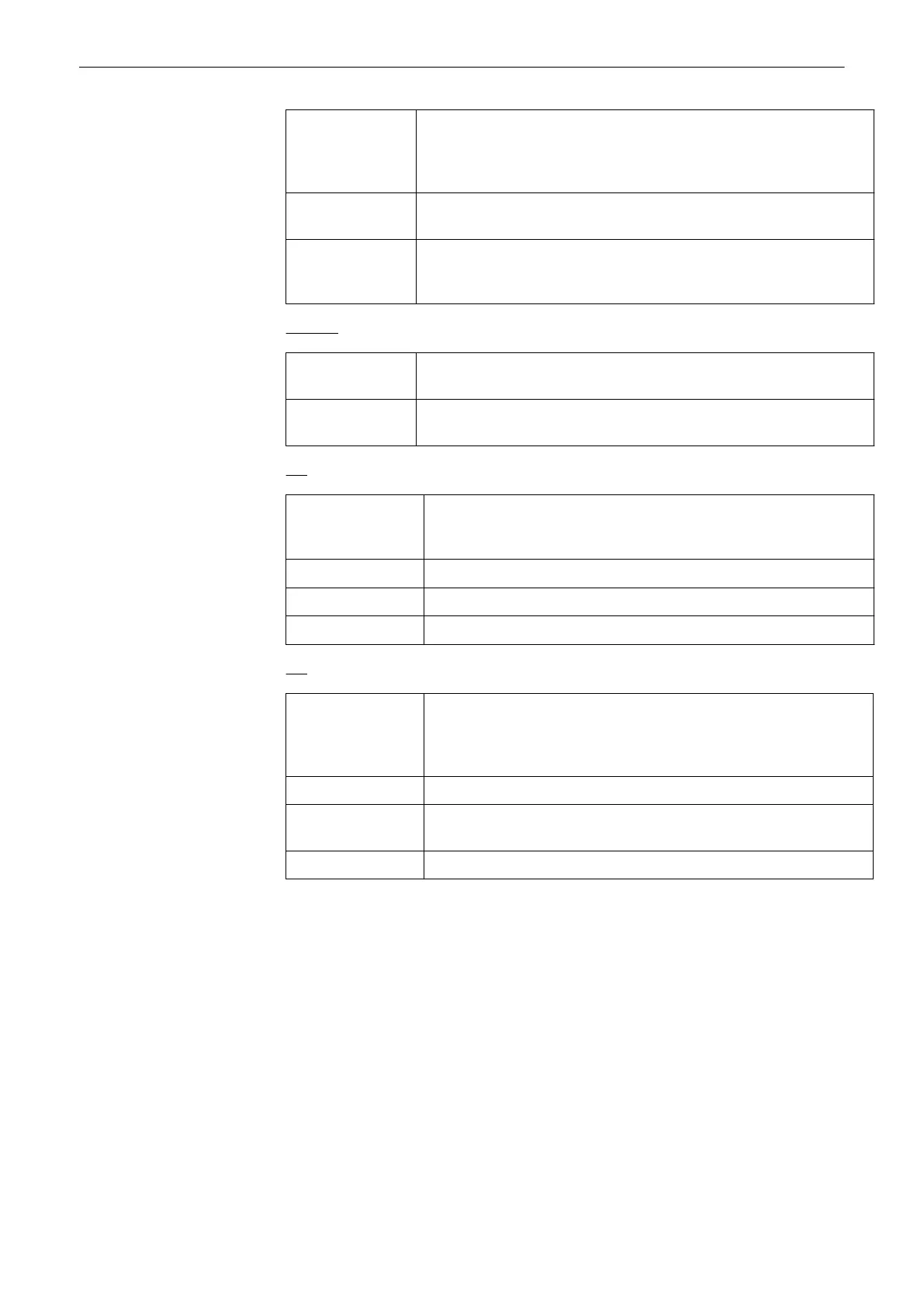
Automatic: Basically, save the data that is displayed on screen. In Freeze Mode:
save a single 2D image In Auto Cine Mode: save Cine as defined in
Auto Cine Menu In write mode save Cine according to “Default Cine
Length” setting.
Single: Always save a single image, regardless of the selected mode.(Default
Cine Length is disabled.)
Cine: Always save a 2D cine. In Write and Freeze Mode save the cine
according to “Default Cine Length”. In Auto Cine Mode save the cine as
defined in Auto Cine.
Doppler: Select between:
Single: Save a single image containing both current Doppler data and current
2D data.
Cine: Save two cines. One containing the Doppler data and the other one
containing the 2D data. (Raw Data= 1 file, BMP=2 files)
3D:
Automatic: Basically, save the data that is displayed on screen. In 3D Rot. Cine
Mode save Static + Rot.Cine In normal 3D Mode save Single Volume
without Rot. Cine
Single Volume: Always save a Single Volume. Never include a rot. Cine
Static + Rot. Cine: Include a Rot. Cine, if available
Screenshot: Save a single 2D Image.
4D:
Automatic: Basically, save the data that is displayed on screen. In Freeze Mode
save a Single Volume. In Auto Cine Mode save a Volume Cine as
defined in the Auto Cine Menu. In Write Mode save Cine according to
“Default Cine Length” setting.
Single Volume: Always save a Single Volume, regardless of the selected mode.
4D Cine: Always save a 4D cine. In Write and Freeze Mode save Cine
according to “ Default Cine Length” setting.
Screenshot: Save a single 2D Image.
Programmable Keys
14-8
Voluson® S6/S8 Basic User Manual
5433669-100 Revision 4



 To Next Page