214603 143 Revision A
1010019
DIAGNOSTIC MODE?
NO/YES
C###
X###
A
B
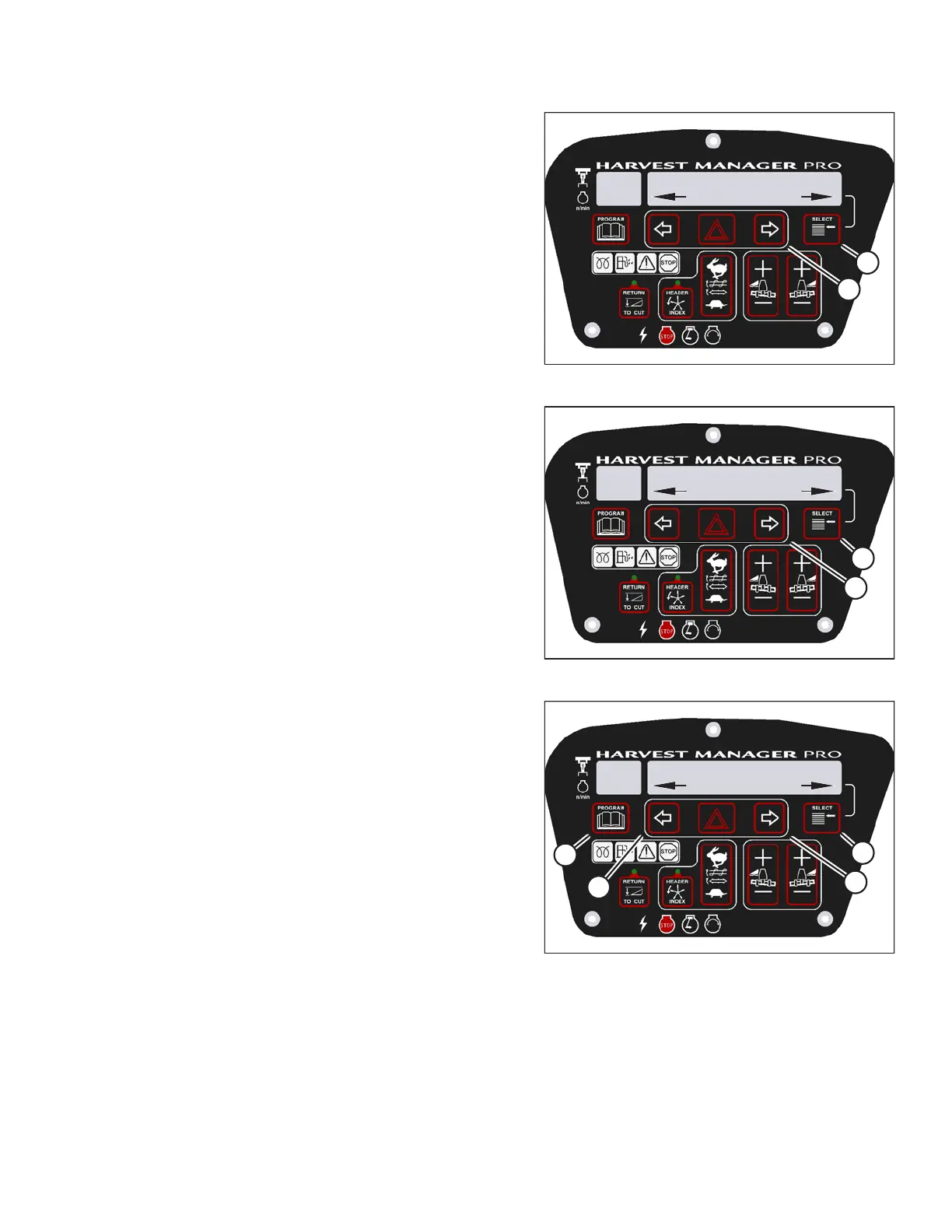
Figure 3.189: M205 Diagnostic Functions
3. Press SELECT (B) until DIAGNOSTIC MODE? is
displayed in upper line.
• NO/YES is displayed on the lower line.
4. Press right arrow (A) to select YES. Press SELECT (B).
1010024
ACTIVATE FUNCTIONS?
NO/YES
C###
X###
B
A
Figure 3.190: M205 Functions
5. Press SELECT (B) until ACTIVATE FUNCTIONS? is
displayed on the upper line.
• NO/YES is displayed on the lower line.
6. Press right arrow (A) to select YES. Press SELECT (B).
1010027
ACTIVATE HDR TILT
IN/OUT
C###
X###
D
C
B
A
Figure 3.191: M205 Header Tilt Angle
7. Press SELECT (D) until ACTIVATE HDR TILT is
displayed on the upper line.
• IN/OUT is displayed on the lower line.
8. Press and hold left arrow (B) to decrease header tilt.
Press and hold right arrow (C) to increase header tilt.
IMPORTANT:
Verify header is functioning properly.
9. Press PROGRAM (A) to exit programming mode or
press SELECT (D) to proceed to next ACTIVATE
FUNCTION.
OPERATOR’S STATION





 To Next Page