214603 64 Revision A
3.14 Radio
A radio is available as optional equipment from your Dealer.
3.14.1 AM/FM Radio
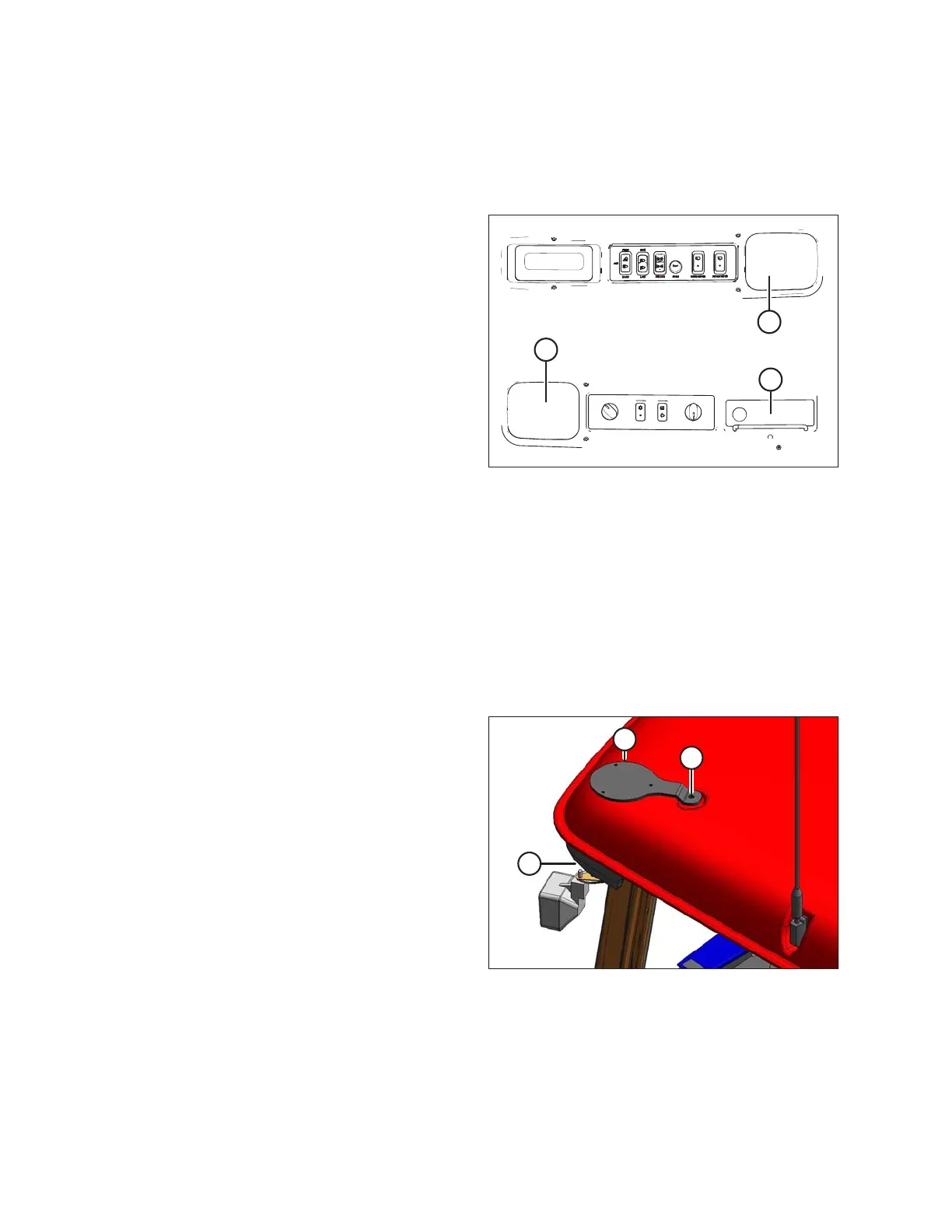
Figure 3.46: Speakers in Headliner
A - Speakers B - Radio Mounting Location
A space (B) is provided in the cab headliner to
accommodate the installation of an AM/FM radio that is
available as optional equipment from your Dealer. In order
to retain radio settings and preset memory with the battery
disconnect turned off, select a radio with non-volatile
settings memory.
Two pre-wired speakers (A) have been factory-installed in
the headliner.
For radio installation procedures, refer to the M155 and
M205 Self-Propelled Windrower Unloading and Assembly
Instructions: North American Shipments or M Series Self-
Propelled Windrower Unloading and Assembly Instructions
for Container Shipments.
Operating instructions are supplied with the radio.
3.14.2 Mounting the Antenna
An optional base for a magnetic roof-mounted antenna is available from your Dealer.
IMPORTANT:
Antenna base can only be installed on the left cab-forward and right rear cab roof bolts.
Order antenna mount (MD #160288 [B]) or refer to 3.49, page 65 for part dimensions to make an improvised
version. A knockout (C) for the antenna lead is provided on the cab post.
Figure 3.47: Antenna Mount
1. Remove existing bolt (A).
2. Install antenna mount (B) and secure with bolt (A).
OPERATOR’S STATION





 To Next Page