214603 77 Revision A
3.19.2 Header Functions
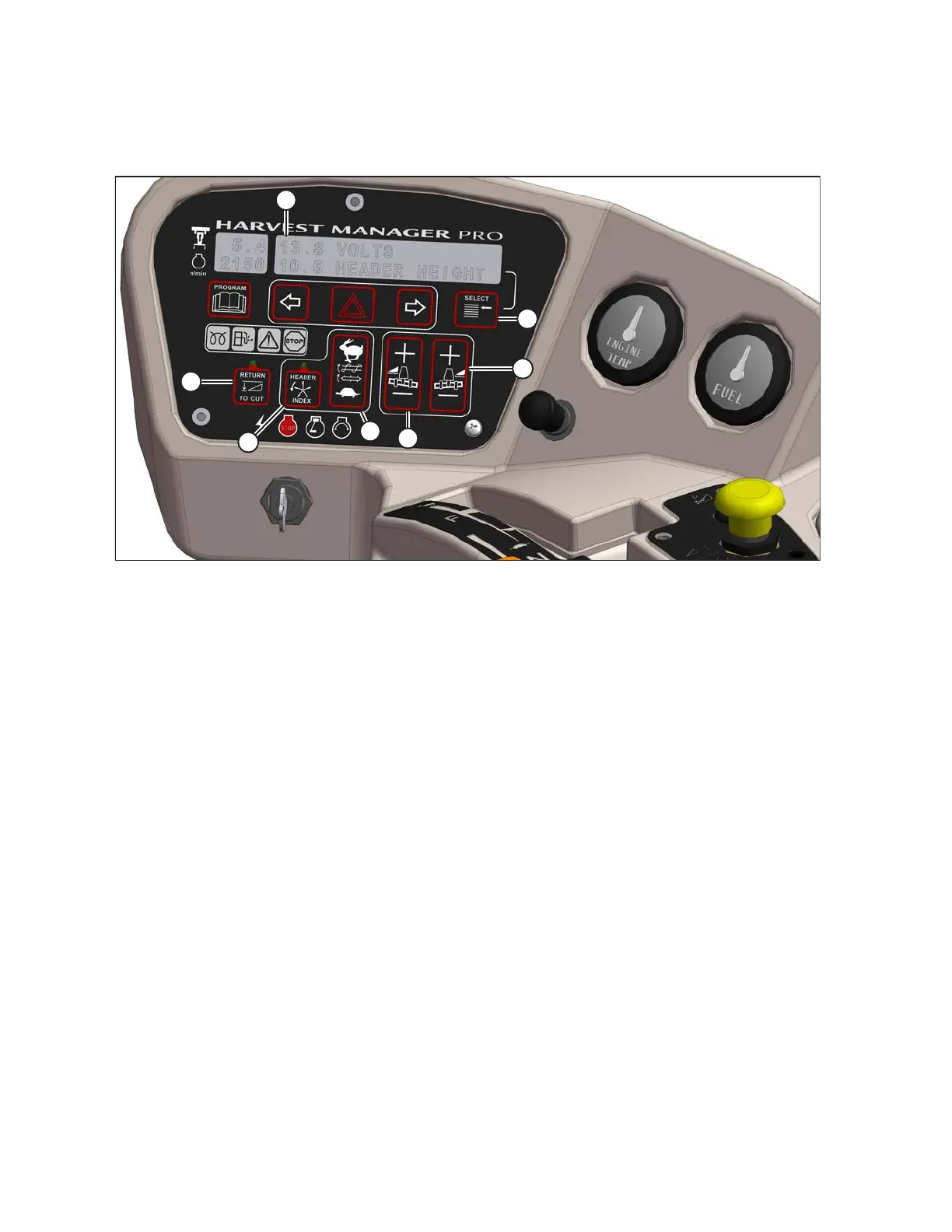
Figure 3.69: Cab Display Module (CDM)
• (A) DISPLAY – Header functions.
• (B) SELECT SWITCH – Allows Operator to select display item on lower line. Push to SELECT.
• (C) FLOAT SWITCH – Header Right Side: Changes header float. The system remembers setting with deck shift
option if activated with float setting switch. Push + to Increase. Push – to Decrease.
• (D) FLOAT SWITCH – Header Left Side: Changes header float. The system remembers setting with deck shift
option if activated with float setting switch. Push + to Increase. Push – to Decrease.
• (E) AUGER/DRAPER SPEED ADJUST: Changes auger/draper speed INDEX with INDEX SWITCH ON.
Changes auger/draper SPEED with INDEX SWITCH OFF. Push upper switch to increase. Push lower switch to
decrease.
• (F) HEADER INDEX SWITCH: Links reel and conveyor speed to ground speed. Push-ON/Push-OFF.
NOTE:
Illuminates in ON position. (Header must be engaged)
• (G) RETURN TO CUT HEIGHT SWITCH: Allows cutting height preset. Push-ON/Push-OFF.
NOTE:
Illuminates in ON position (Header must be engaged).
OPERATOR’S STATION





 To Next Page