214603 59 Revision A
3.10.3 Climate Controls
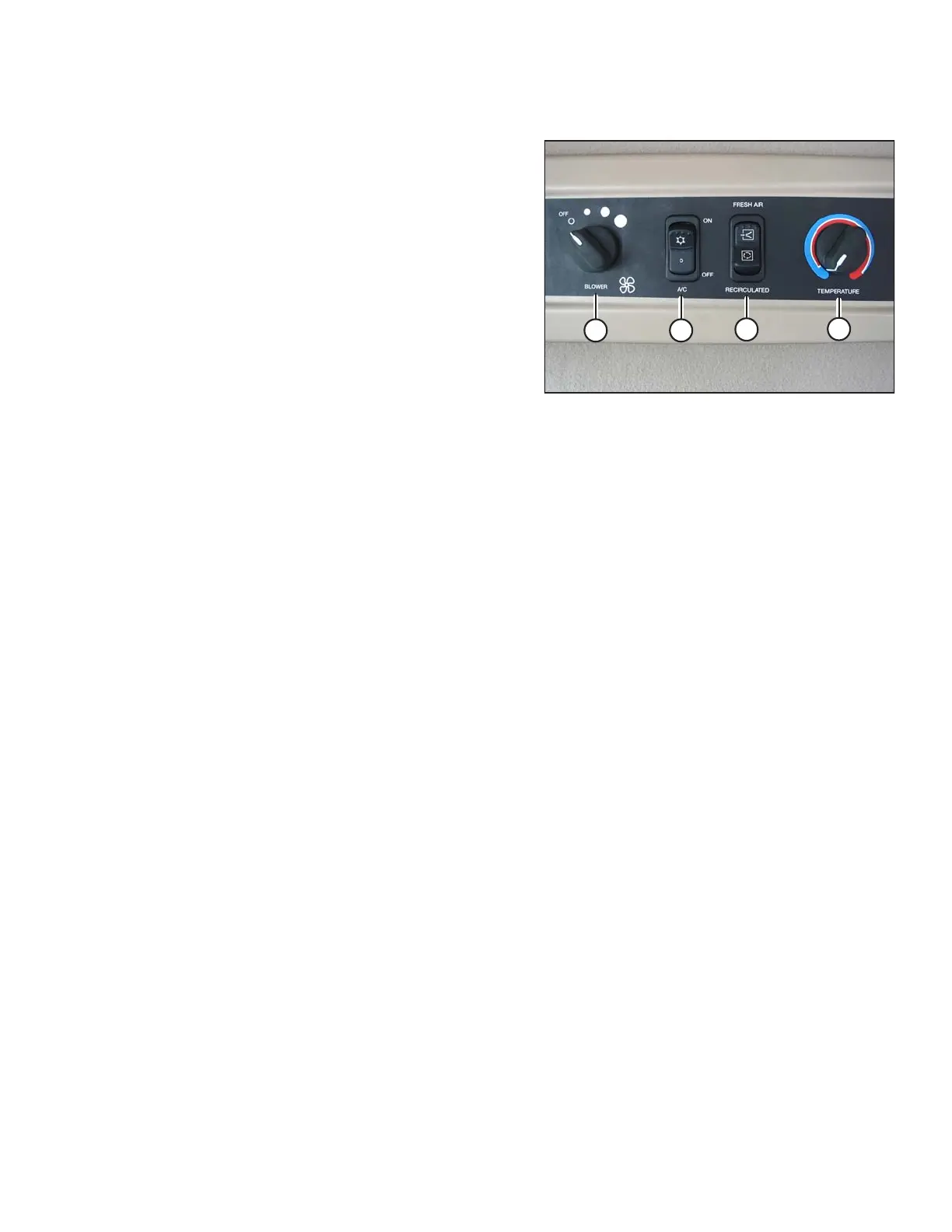
Figure 3.37: Climate Controls
A – BLOWER Switch controls the blower speed
• OFF / LOW / MEDIUM / HIGH
B – Air Conditioning (A/C) Switch controls A/C system
• OFF: A/C does not operate
• ON: A/C operates with blower switch ON
C – Outside Air Switch controls the air source
• FRESH AIR: Starts booster fan and filtered outside air is
drawn into cab
• RECIRCULATE: Stops booster fan and cab air
is recirculated
D – TEMPERATURE Control Dial controls cab
temperature
• Turning the dial clockwise increases temperature
• Turning the dial counterclockwise decreases
temperature
IMPORTANT:
To distribute the refrigerant oil throughout the A/C system, perform the following steps when starting the windrower
after more than one week of storage:
1. Ensure heater shut-off valve at engine is OPEN. Refer to 3.10.1 Heater Shut-Off, page 58.
2. Turn blower switch to the first position, turn temperature control switch to MAXIMUM heating, and A/C control
to OFF.
3. Start the engine and operate at low idle until the engine is warm.
4. Click A/C switch from OFF to ON for 1 second, then back to OFF for 5 to 10 seconds. Repeat this step
ten times.
Refrigerant Oil
Perform the following steps when starting the windrower after more than one week of storage to distribute the
refrigerant oil throughout the A/C system:
1. Ensure heater shut-off valve at engine is OPEN. Refer to 3.10.1 Heater Shut-Off, page 58.
2. Turn blower switch to the first position, turn temperature control switch to MAXIMUM heating, and A/C control
to OFF.
3. Start the engine and operate at low idle until the engine is warm.
4. Click A/C switch from OFF to ON for 1 second, then back to OFF for 5 to 10 seconds. Repeat this step
ten times.
OPERATOR’S STATION





 To Next Page