214603 208 Revision A
4.4.6 Controlling Cutting Height
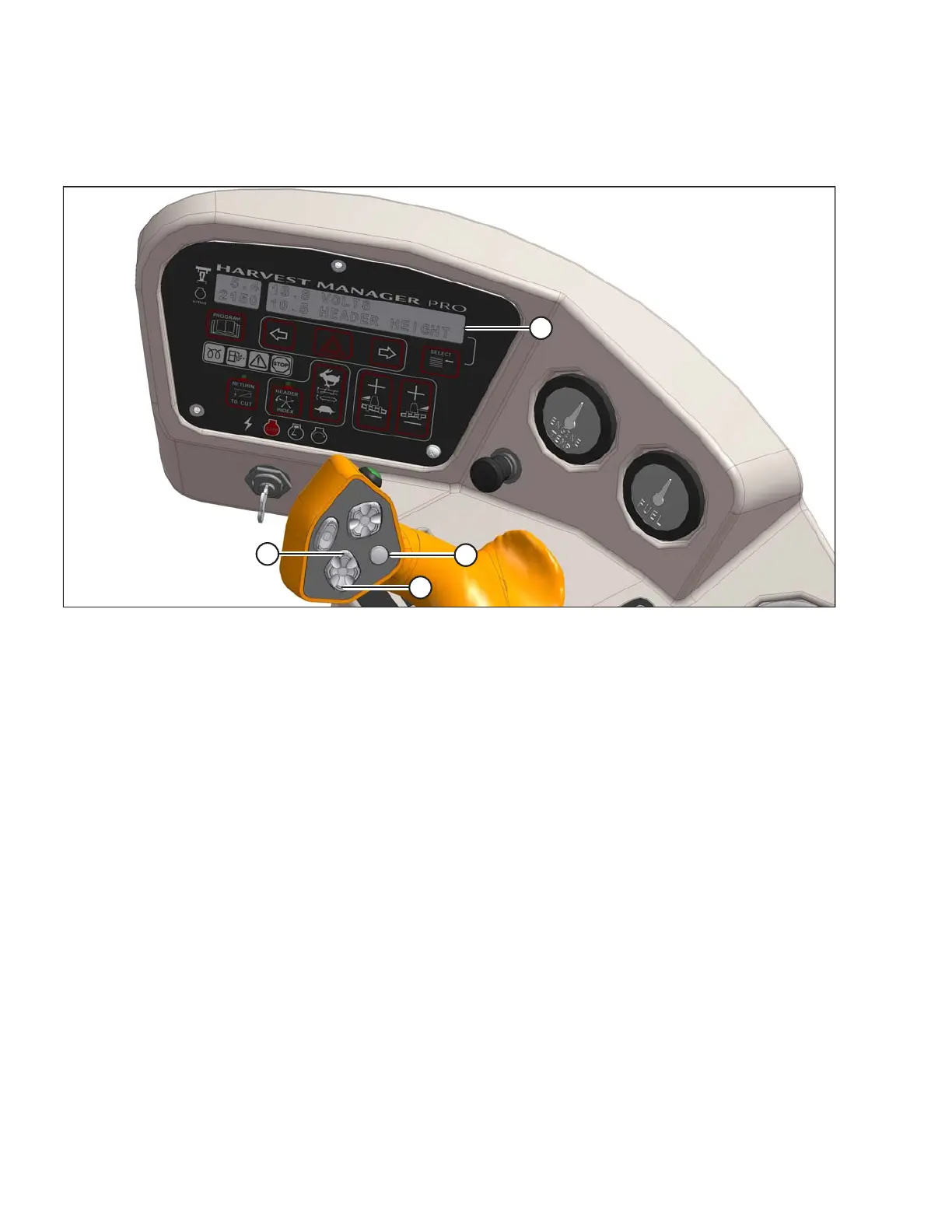
Figure 4.87: Operator Console
Cutting height is adjusted by raising or lowering the header with the HEADER UP (B) or HEADER DOWN (C)
switches on the ground speed lever (GSL).
The cab display module (CDM) indicates header height with a reading on the DISPLAY (A) lower line between 00.0
and 10.0, with 00.0 being on the ground.
Use DISPLAY SELECTOR switch (D) to display the current setting.
4.4.7 Return to Cut
The monitoring system will assist you in maintaining the desired cutting height with the RETURN TO CUT feature.
This feature can be turned OFF or ON with a switch on the cab display module (CDM).
The return to cut (RTC) feature provides preset cutting height and tilt angle settings for the header.
If desired, the CDM can be programmed so that only the cutting height feature is active.
The AUTO RAISE HEIGHT feature allows you to raise the header to a preselected height while in the RETURN TO
CUT mode. Refer to Programming the Auto Raise Height Feature, page 211.
Refer to the following for RTC programming and operating procedures:
• Programming the Return to Cut Feature, page 209
• Using the Return to Cut Feature, page 210
OPERATION





 To Next Page