214603 211 Revision A
4.4.8 Auto Raise Height
The header can be raised to a preset height by enabling the auto raise height feature in the cab display
module (CDM).
Refer to the following topics:
• Programming the Auto Raise Height Feature, page 211
• Using the Auto Raise Height Feature, page 212
Programming the Auto Raise Height Feature
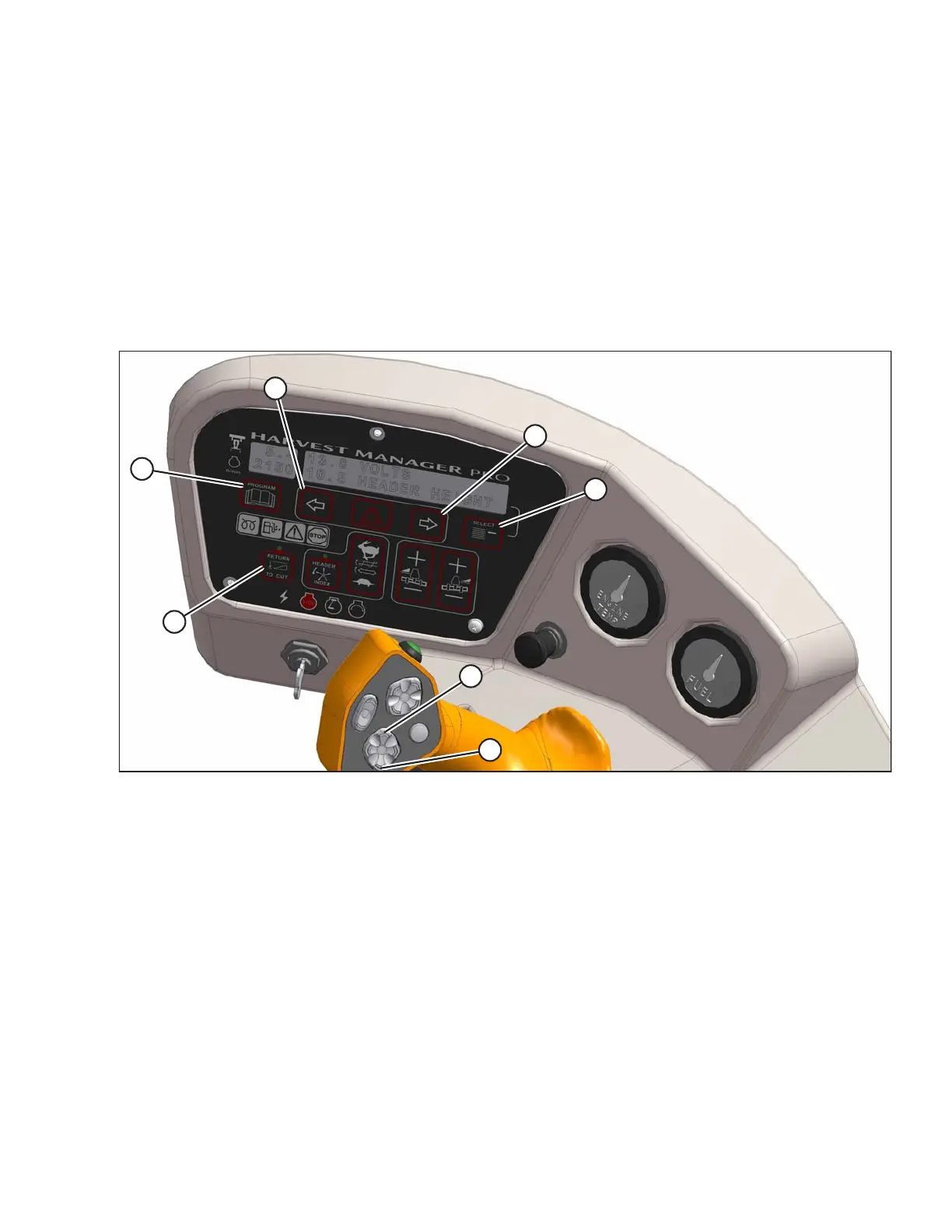
Figure 4.90: Operator Console
A - Return to Cut B - Program C - Select D - Right Arrow
E - Left Arrow F - Header Up G - Header Down
Program the auto raise height feature as follows:
NOTE:
RETURN TO CUT switch (A) can be OFF or ON.
1. Turn ignition ON or run engine.
2. Press PROGRAM (B) and SELECT (C) on cab display module (CDM) to enter programming mode.
3. Press SELECT (C). WINDROWER SETUP? is displayed on upper line (B).
4. Press right arrow (D), then SELECT. SET KNIFE SPEED? is displayed.
5. Press SELECT (C) until AUTO RAISE HEIGHT is displayed.
6. Press left arrow (E) or right arrow (D) to change value on lower line. Working range is 4.0 to 9.5. At 10.0, the
feature is disabled and OFF is displayed.
OPERATION





 To Next Page