214603 212 Revision A
7. When finished entering desired values, press PROGRAM to exit programming mode.
Using the Auto Raise Height Feature
IMPORTANT:
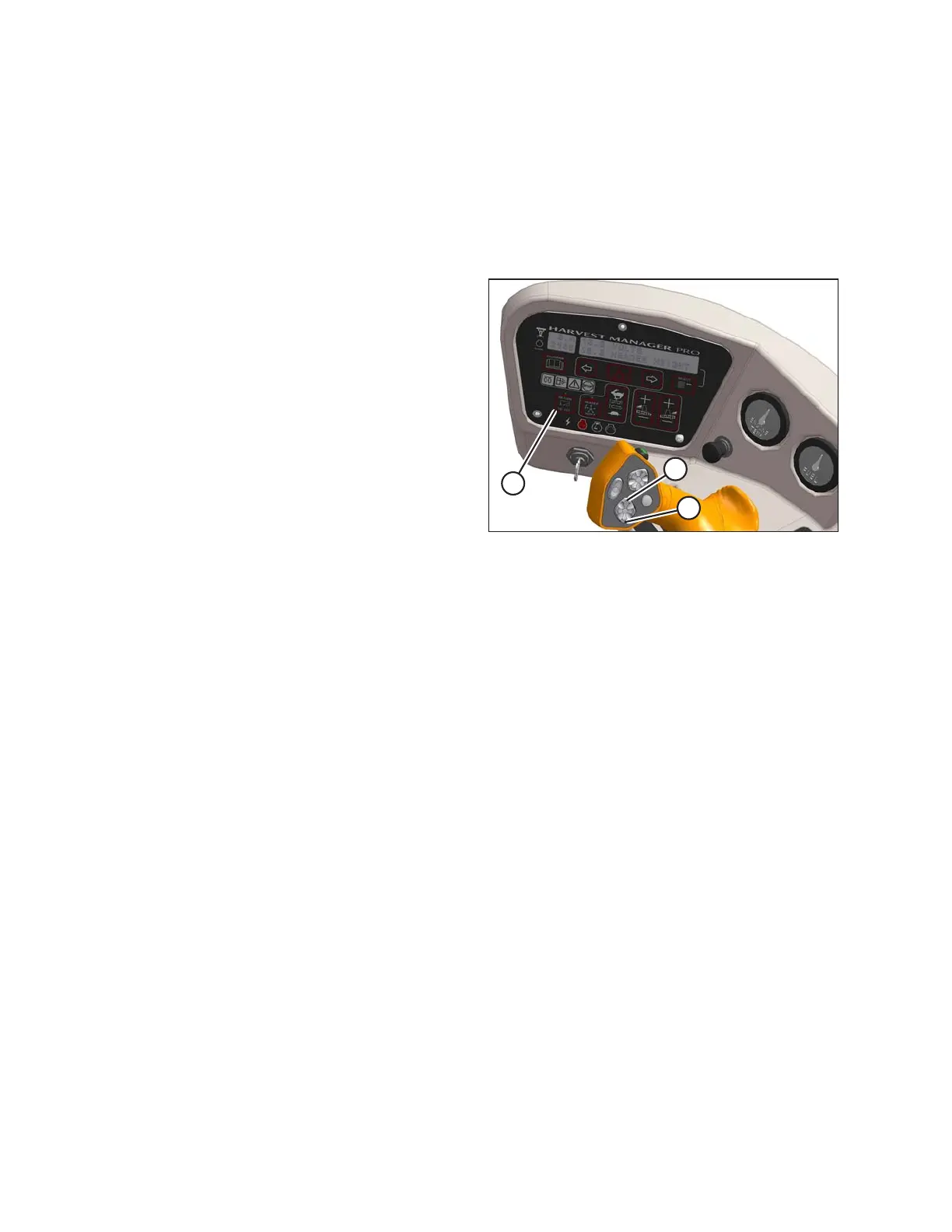
The windrower must be running with the header engaged at the cutting height and the RETURN TO CUT
switch (A) activated.
Use the auto raise height feature as follows:
Figure 4.91: Operator’s Station
1. To raise the header to the auto raise height set point,
double-click (two clicks within 0.5 seconds) the
HEADER UP switch (B) on the ground speed
lever (GSL).
NOTE:
With AUTO RAISE HEIGHT turned ON, the ACRE
counter will be disabled when header height greater
than preset cutting height.
2. If desired, press HEADER UP switch while header is
being raised to disable auto raise height and maintain
current height.
NOTE:
With AUTO RAISE HEIGHT turned OFF, the ACRE
counter will be disabled when header height value is
greater than 9.5. OFF is displayed on the cab display
module (CDM).
3. To return the header to the preset cutting height,
momentarily press HEADER DOWN switch (C).
4.4.9 Header Drop Rate
The header should lower gradually when the HEADER DOWN switch is pressed. From full height to ground should
take 3–4 seconds.
If the drop rate requires adjustment, refer to Adjusting Header Drop Rate, page 396.
OPERATION





 To Next Page