214603 197 Revision A
Checking Float
M Series windrowers are equipped with primary (coarse) and secondary (fine) float adjustment systems. The
primary adjustment uses drawbolts to change the tension on the springs in the lift linkages. The secondary
adjustment uses hydraulic cylinders to change the spring tension.
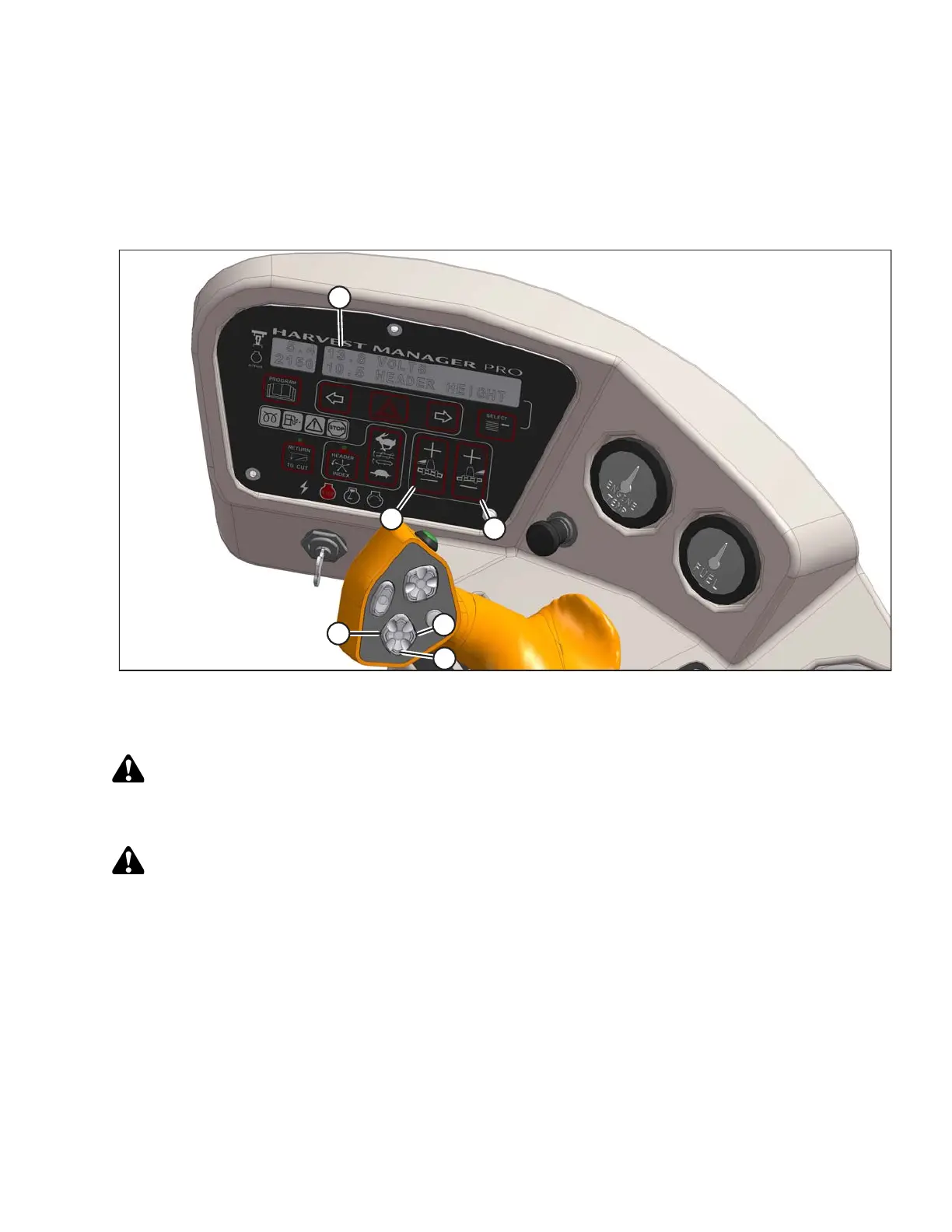
Figure 4.67: Cab Display Module (CDM) Float Adjustment
A - CDM Display B - Left Float Adjustment C - Right Float Adjustment
D - Header Tilt Down E - Header Lower F - Header Tilt Up
Check header float as follows:
DANGER
To avoid bodily injury or death from unexpected startup of the machine, always stop the engine and
remove the key from the ignition before leaving the operator’s seat for any reason.
CAUTION
Check to be sure all bystanders have cleared the area.
1. Start the engine.
2. Lower header to ground.
3. Using HEADER TILT switches (D) and (F), set center-link to mid-range position (5.0 on CDM [A]).
NOTE:
If equipped with the optional draper header reel drive (MD #B5496), adjust reel fore-aft to your normal
operating position.
4. Using HEADER DOWN switch (E), lower header fully with lift cylinders fully retracted.
5. Set left (B) and right (C) float fine adjustments on CDM to approximately 5.0 as follows:
OPERATION





 To Next Page