214603 73 Revision A
Header Position Switches
Use the header position switches on the ground speed lever (GSL) to adjust the position of the header relative to
the ground.
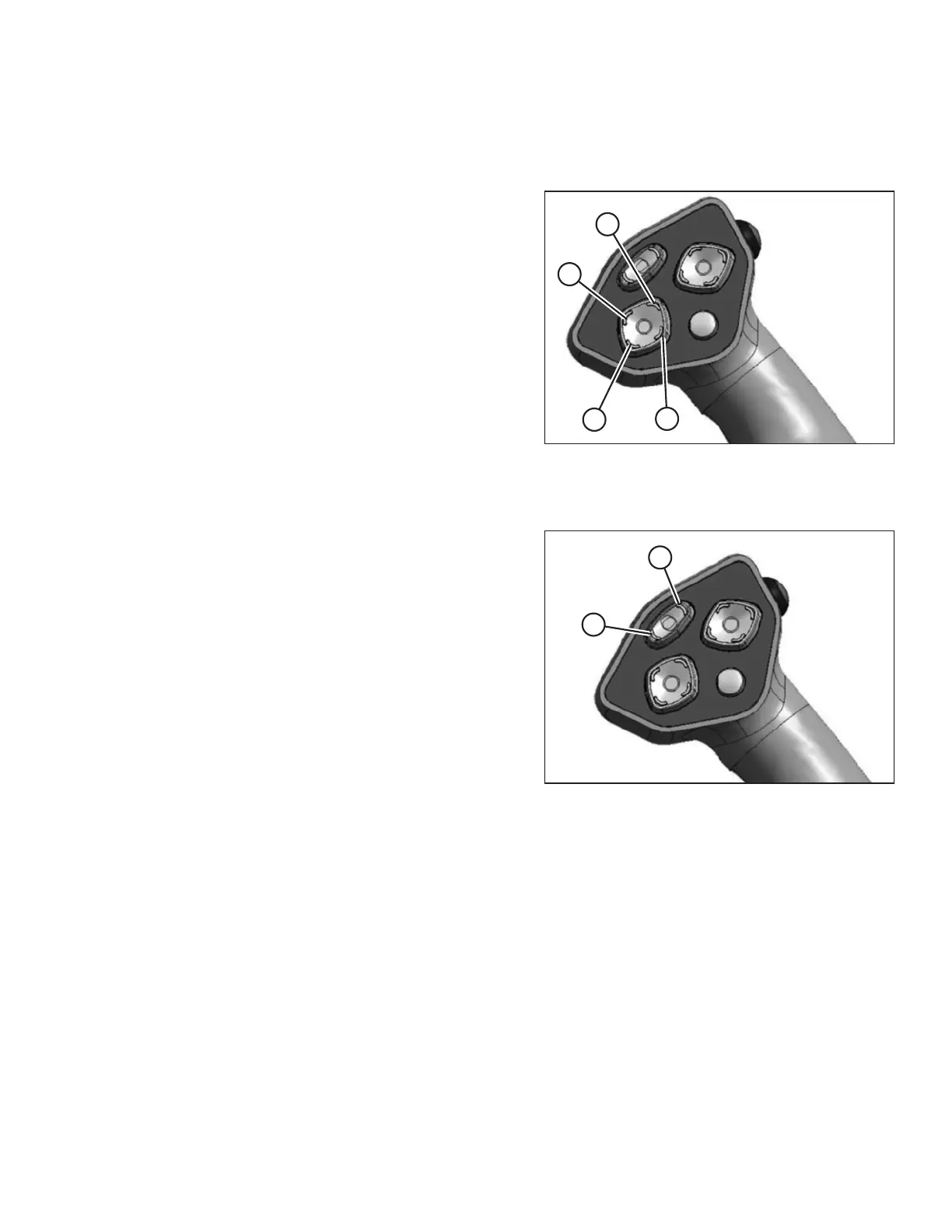
Figure 3.63: Ground Speed Lever
• To lower the header, press switch (A)
• To raise the header, press switch (C)
• To tilt the header down, press switch (B)
• To tilt the header up, press switch (D)
Release switch at desired position.
NOTE:
Refer to the section in this manual that is specific to your
header for detailed switch operating modes.
Reel and Disc Speed Switches
Figure 3.64: Ground Speed Lever
Press and hold switch (A) to increase the reel or disc speed.
Press and hold switch (B) to decrease the reel or disc
speed. Release switch at desired speed.
Auger Header
• A30 header: Not applicable
• A40 header: Auger speed is automatically maintained
when reel speed is changed
IMPORTANT:
Reel speed on auger header MUST NOT EXCEED 85 rpm.
Auger speed MUST NOT EXCEED 320 rpm.
Draper Header
• Reel speed is limited in INDEX HEADER SPEED mode
Rotary Disc Header
• Conditioner speed automatically adjusts when DISC SPEED is changed
OPERATOR’S STATION





 To Next Page