214603 276 Revision A
4.7.1 Auger Speed
Auger Speed on A30D Headers
On A30D and A30S Auger Headers, the auger speed is fixed to the knife speed. The auger speed is NOT
monitored and cannot be displayed.
Setting the Auger Speed on A40D Headers
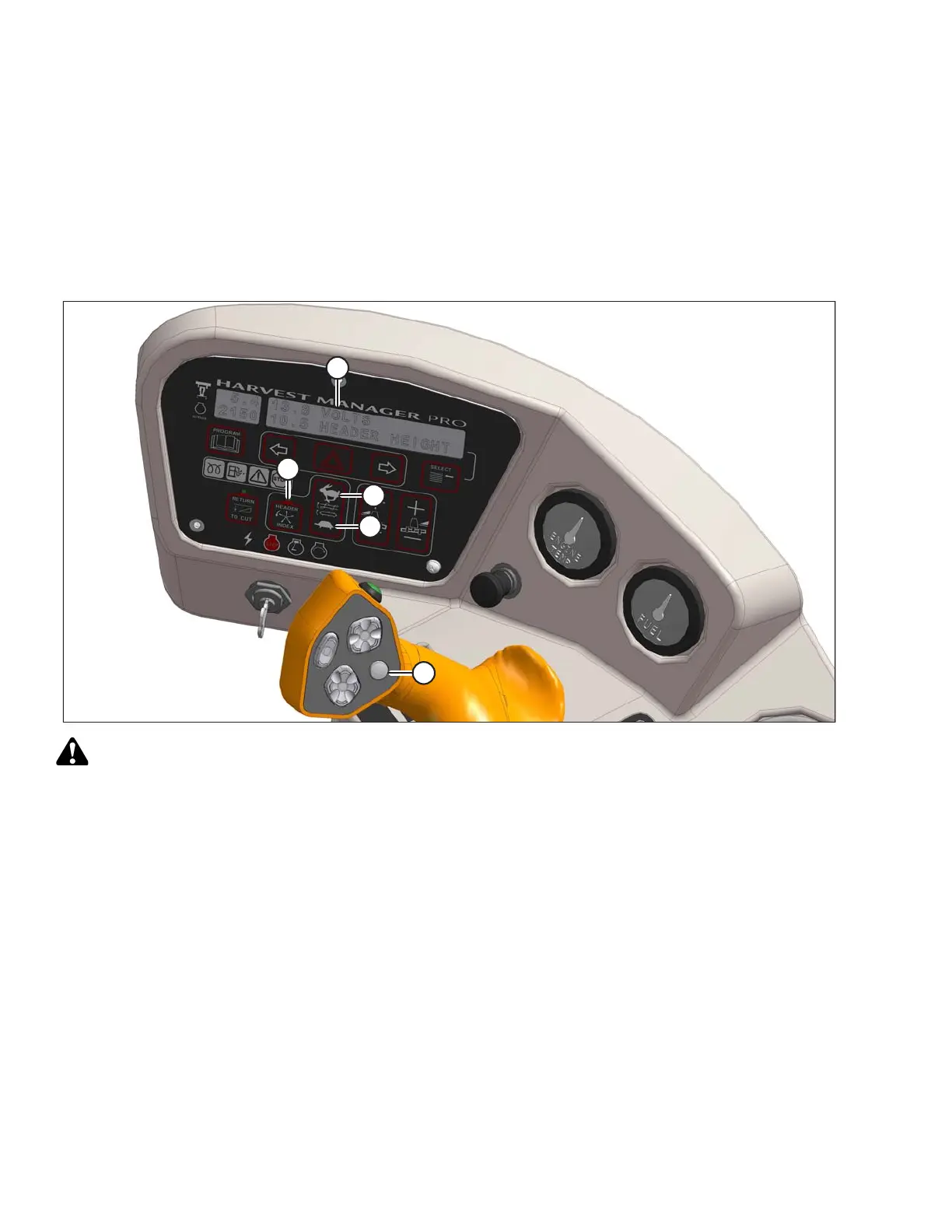
Figure 4.235: Operator Console
CAUTION
Check to be sure all bystanders have cleared the area.
To set the auger speed, follow these steps:
1. Engage header.
2. Set the HEADER INDEX switch (B) to OFF.
3. Set the REEL SPEED to the minimum setting. For instructions, refer to Reel and Disc Speed Switches, page
73.
4. Press DISPLAY SELECTOR switch (E) on the ground speed lever (GSL) or press FAST (C) or SLOW (D) on
the cab display module (CDM) until ##.# AUGER SPEED is displayed at (A).
The displayed value (##.#) = auger speed setting.
NOTE:
Changes to reel speed will affect the auger speed directly. However, when adjusting reel speed, the auger
speed value displayed on the CDM will not change.
5. Press FAST (C) or SLOW (D) on the CDM until the desired auger speed is achieved.
OPERATION




 To Next Page