214603 398 Revision A
Checking Charge Pump Pressure
DANGER
To avoid bodily injury or death from unexpected startup of the machine, always stop the engine and
remove the key from the ignition before leaving the operator’s seat for any reason.
Incorrect charge pressure settings may result in the inability to build required system pressure and/or inadequate
loop flushing flows.
Correct charge pressure MUST be maintained under all conditions to maintain pump control performance and to
operate the brake release.
Check charge pump pressure as follows:
1. Open hood fully. Refer to 5.2.3 Opening Hood (Highest Position), page 286.
2. Attach a 0–4000 kPa (600 psi) pressure gauge to a hose that is long enough to allow pressure gauge to be
read from the operator’s seat.
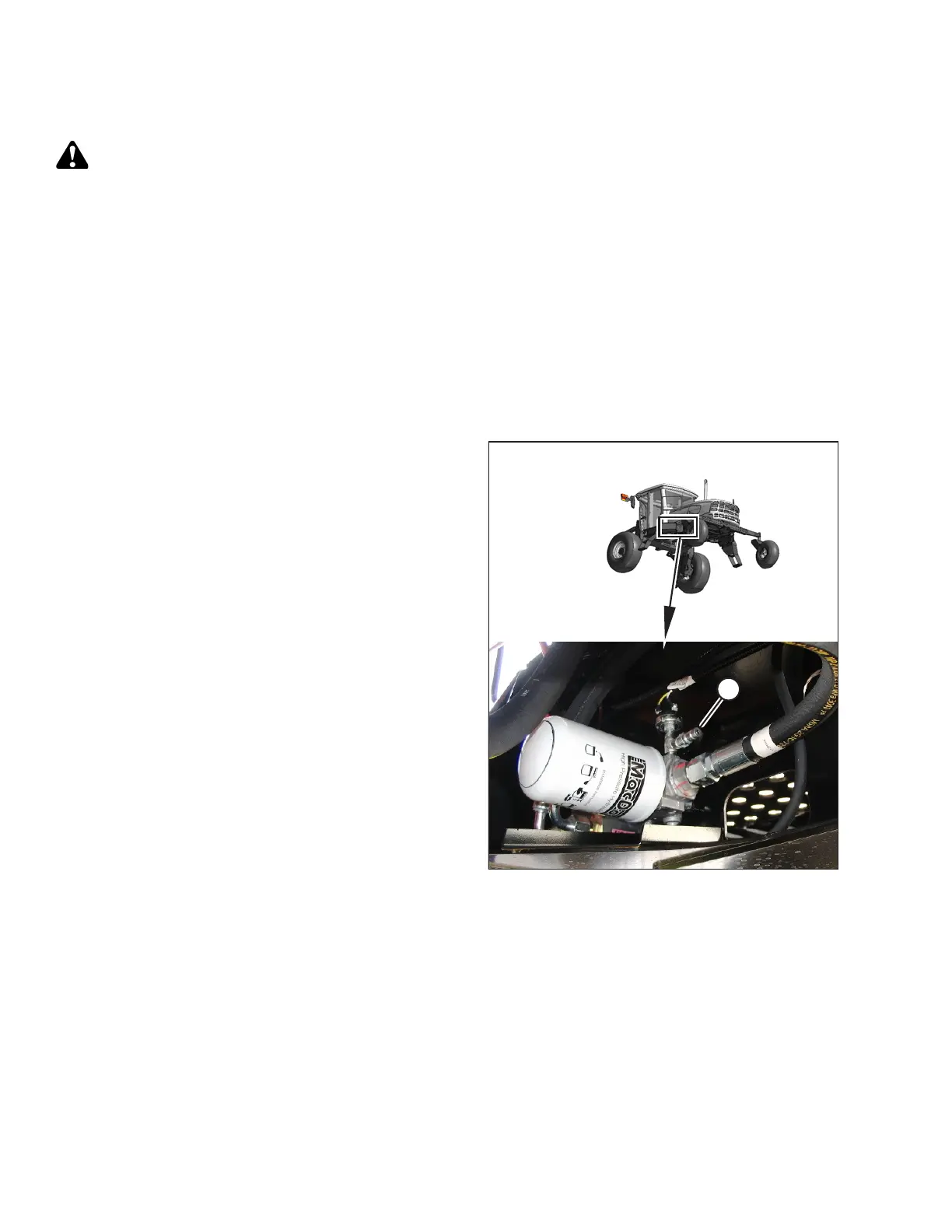
Figure 5.201: Charge Pump Test Port
3. Locate test port (A) on the charge filter head. Clean the
test port fitting, and then attach hose to the fitting.
4. Start engine, and leave at idle. Pressure should be
1862–2068 kPa (270–300 psi) with the hydraulic oil at
40°C (100°F) minimum.
5. Make note of the reading and shut down the windrower.
6. If pressure is NOT within this range, contact your
MacDon Dealer.
7. If pressure is within range, remove the hose from the
test port and close the hood. Refer to 5.2.4 Closing
Hood (Highest Position), page 287.
MAINTENANCE AND SERVICING





 To Next Page