214603 131 Revision A
3.19.12 Calibrating the Swath Compressor Sensor
To calibrate the swath compressor sensor, follow these steps:
NOTE:
To calibrate the swath compressor sensor, the DWA must be disabled, and the swath compressor must be enabled
in WINDROWER SETUP on the CDM.
1007188
C###
X###
WINDROWER SETUP?
NO/YES
A
B
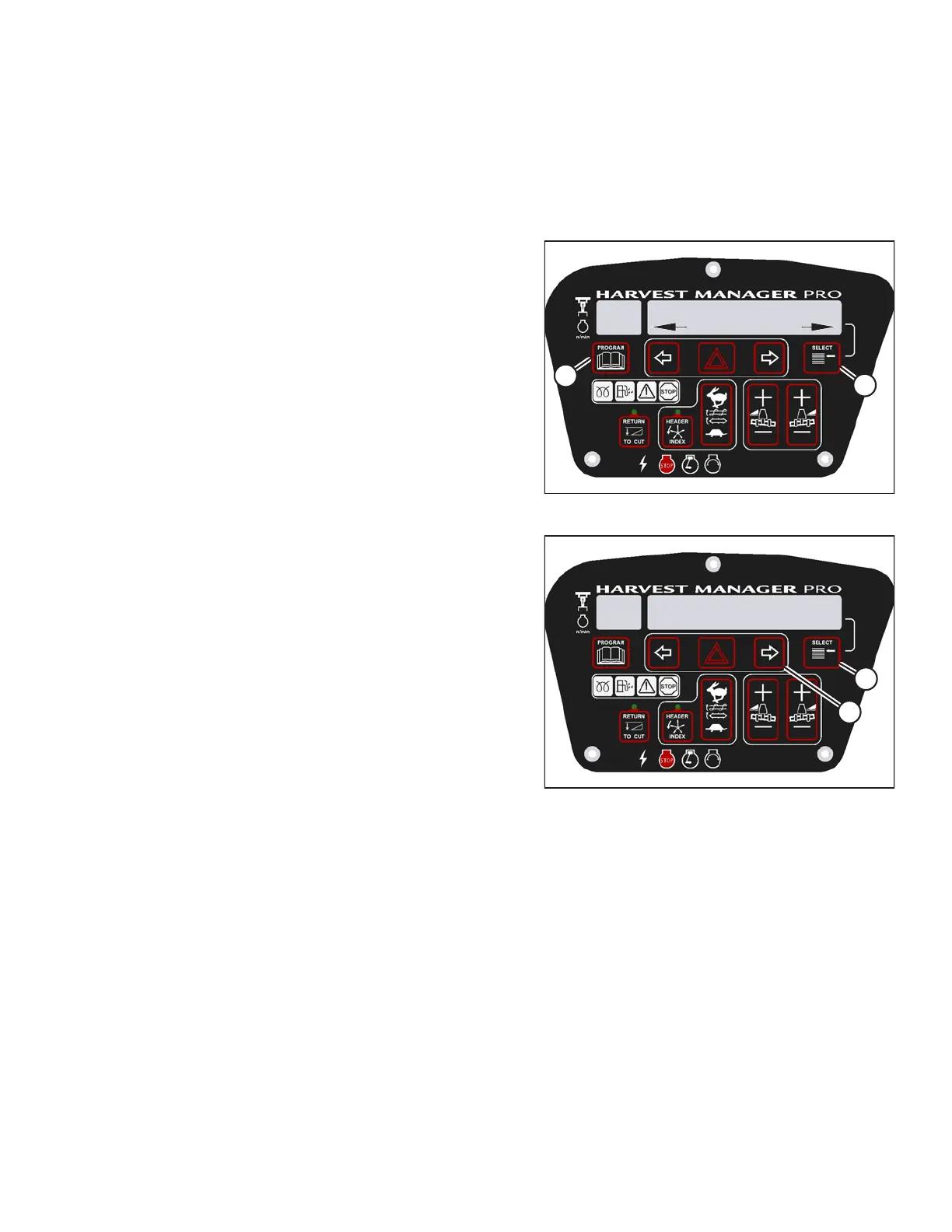
Figure 3.161: CDM Programming Buttons
1. Turn ignition key to RUN, or start the engine.
2. Press PROGRAM (A) and SELECT (B) on cab display
module (CDM) to enter programming mode.
• WINDROWER SETUP? is displayed on the
upper line.
3. Press SELECT (B) until CALIBRATE SENSORS? is
displayed on the upper line.
• NO/YES is displayed on the lower line.
1025130
SWATH SENSOR CAL
SWATH UP TO START
C###
X###
B
A
Figure 3.162: Swath Compressor Sensor
Calibration
4. Press right arrow (A) to select YES. Press SELECT (B).
• TO CALIBRATE SELECT is displayed in upper line.
5. Press right arrow (A) to scroll through the choices until
SWATH COMPR HT is displayed on the lower line.
Press SELECT (B).
• SWATH SENSOR CAL is displayed on the
upper line.
• SWATH UP TO START is displayed on the
lower line.
OPERATOR’S STATION





 To Next Page