214603 151 Revision A
1022066
C###
X###
WINDROWER SETUP?
NO/YES
A
B
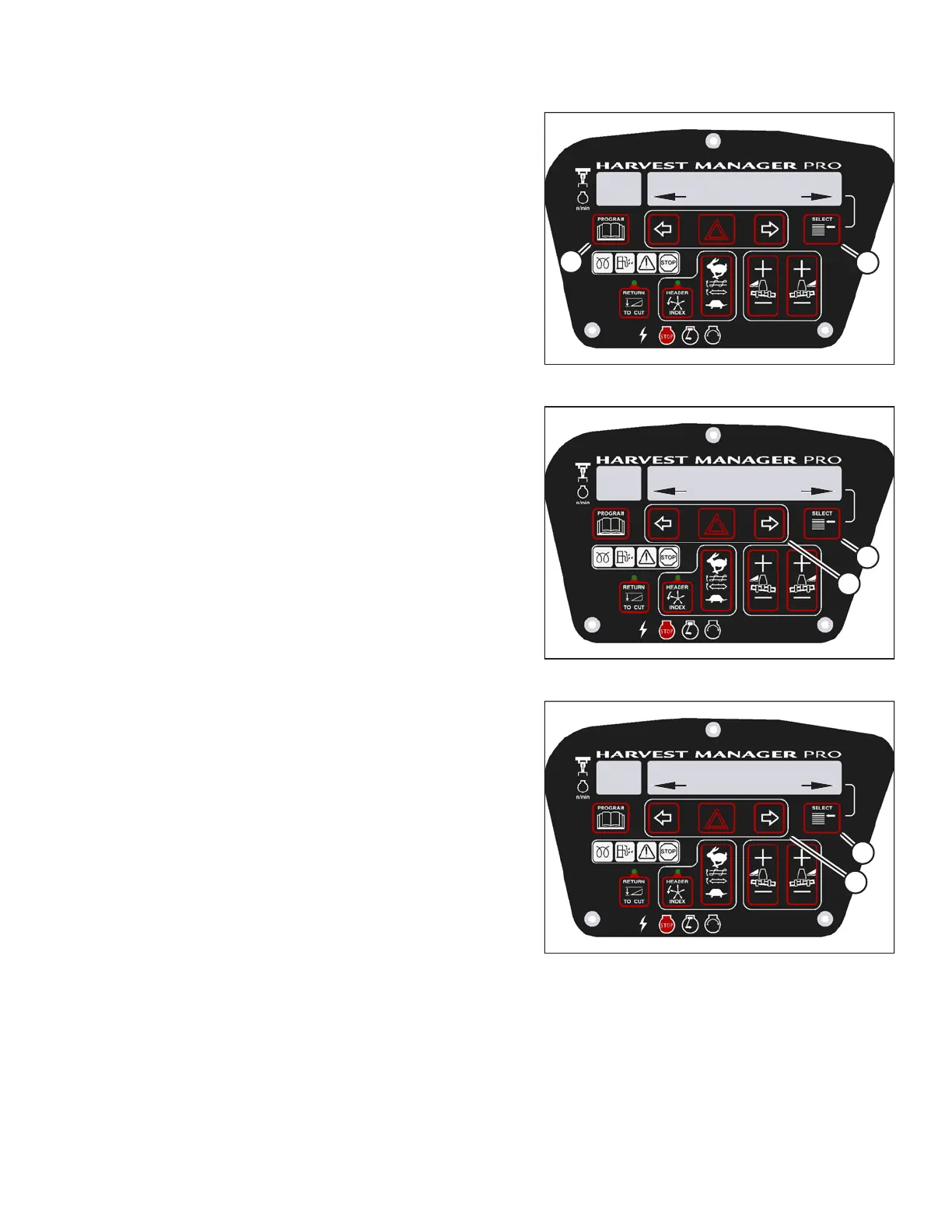
Figure 3.208: M205 CDM Programming Buttons
1. Start the engine.
2. Press PROGRAM (A) and SELECT (B) on cab display
module (CDM) to enter programming mode. Press
SELECT (B).
• WINDROWER SETUP? is displayed on the
upper line.
1010019
DIAGNOSTIC MODE?
NO/YES
C###
X###
A
B
Figure 3.209: M205 Diagnostic Functions
3. Press SELECT (B) until DIAGNOSTIC MODE? is
displayed in upper line.
• NO/YES is displayed on the lower line.
4. Press right arrow (A) to select YES. Press SELECT (B).
1010024
ACTIVATE FUNCTIONS?
NO/YES
C###
X###
B
A
Figure 3.210: M205 Functions
5. Press SELECT (B) until ACTIVATE FUNCTIONS? is
displayed on the upper line.
• NO/YES is displayed on the lower line.
6. Press right arrow (A) to select YES. Press SELECT (B).
• ACTIVATE HEADER HT is displayed on the
upper line.
OPERATOR’S STATION





 To Next Page