214603 216 Revision A
2. Start the windrower in cab-forward mode.
1023437
CXXX
MXXX
# SWATH COMPR HT
A
B
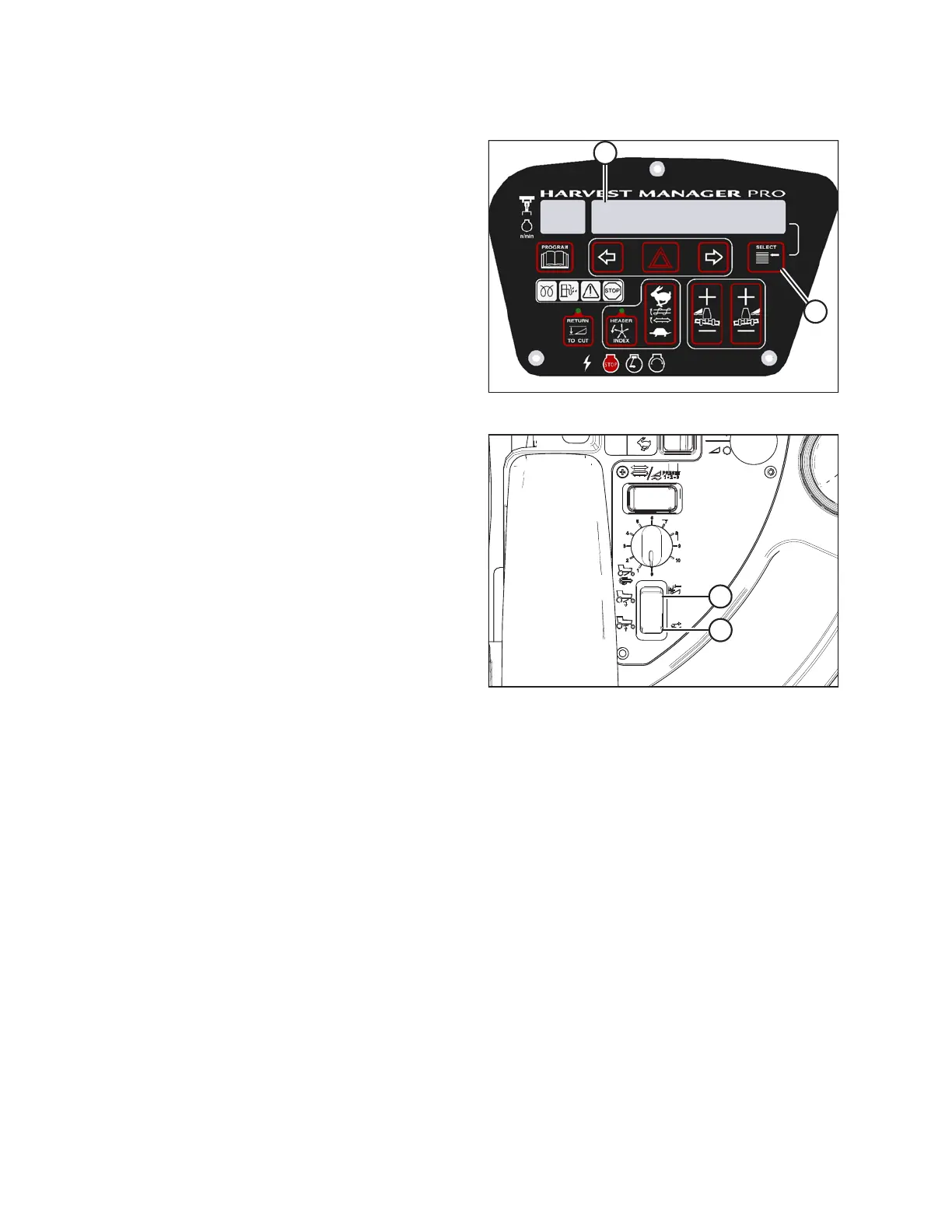
Figure 4.99: CDM Display
3. Press SELECT switch (B) on CDM to show SWATH
COMPR HT (A) on display. Height is displayed using an
arbitrary scale from 0 to 10. Fully raised is 0.
Figure 4.100: Operator’s Console
4. Lower swath compressor by pressing button (A) on the
operator’s console, and raise it by pressing button (B).
The CDM display indicates the position of the swath
compressor. Release the switch to stop movement at
the desired height.
NOTE:
The last position set with the console buttons becomes
the target height. When an adjustment is made, the
display shows the target value. The system immediately
adjusts to attain the target position. After the last
adjustment, the display shows target value for 5
seconds then the display reverts to the previous screen.
Swath compressor automated functions: header engaged, cab-forward
• When ground speed higher than 2.5 km/h (1.6 mph) is detected, the swath compressor lowers to target
height.
• When ground speed transitions through 1.6 km/h (1 mph) during deceleration, the swath compressor is
fully raised.
• When ground speed is faster than 1.6 km/h (1 mph) and the HEADER ENGAGE switch is OFF, the swath
compressor will fully raise.
• The swath compressor remains inactive in engine-forward mode.
OPERATION





 To Next Page