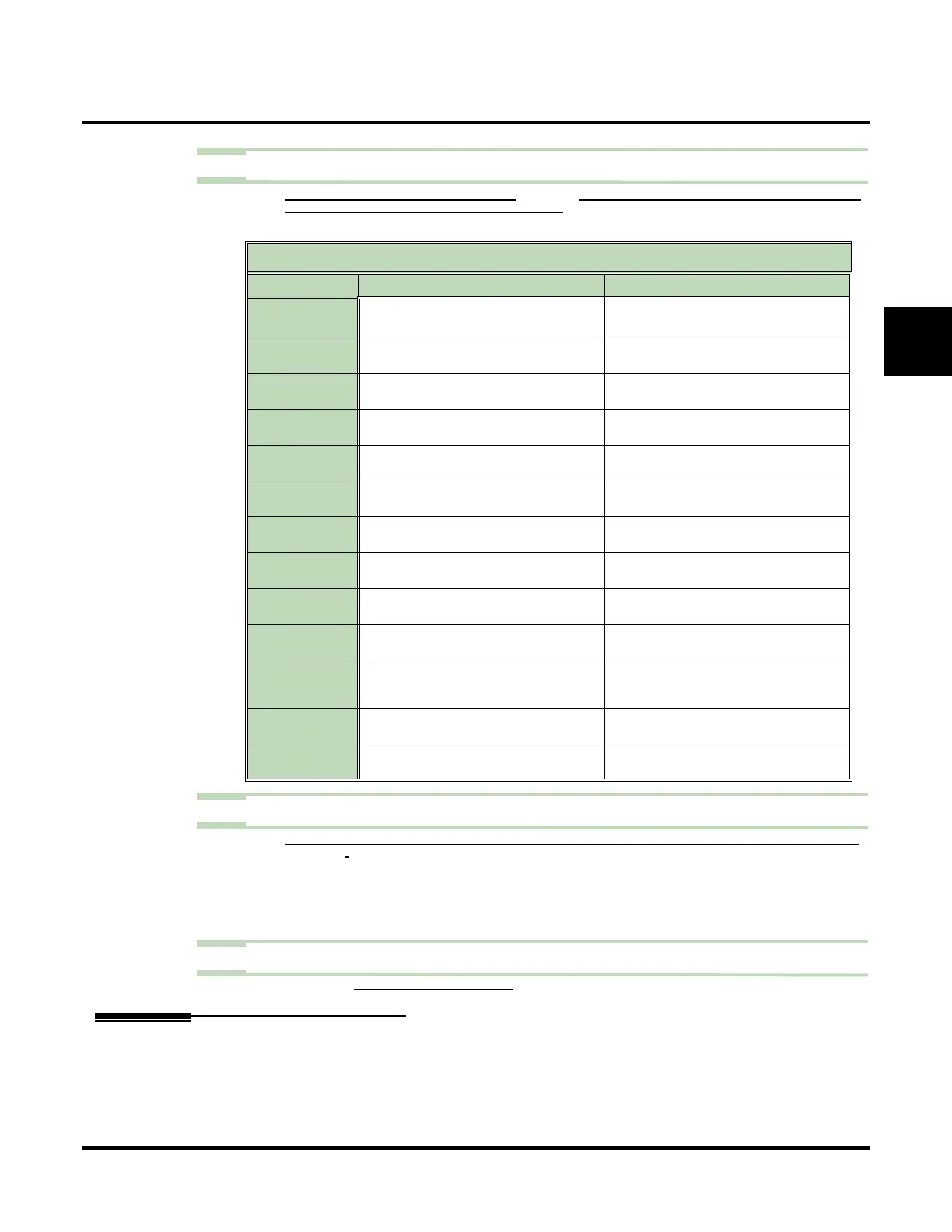
Dial Action Table
UX Mail Manual Chapter 2: Features ◆ 119
2
Step 2 Customize the Dial Action Table options.
2.1 TURN TO CUSTOMIZE: DIAL ACTION TABLES (PAGE 333) FOR A DESCRIPTION OF ALL THE DIAL ACTION TABLE
OPTIONS AND THE FEATURES TO WHICH THEY APPLY.
✔ The default Dial Action Table dialing options are:
Step 3 Set how long Automated Attendant caller have to dial commands.
3.1 CUSTOMIZE: MAILBOX OPTIONS EDIT: CALL ROUTING [CALL HANDLING] TIME LIMIT FOR DIALING COMMANDS
(
PAGE 360).
- If the Dial Action Table has a TIMEOUT action programmed, the caller routes to that
action after the timeout.
- If you Dial Action Table does not have a TIMEOUT action programmed, the caller hears
the Instruction Menu repeat twice and then voice mail hangs up.
Step 4 Optionally review the following report to show the Dial Action Table options.
- Report: DIAL ACTION TABLES REPORT (PAGE 493).
Operation
N/A
Dial Action Table Default Settings
Key Dial Action Tables 1-3 Dial Action Tables 4-100
0UTRF to 301
(Unscreened Transfer to operator)
UTRF to 0
1
(Unscreened Transfer to operator)
1 UND
(Undefined)
UND
(Undefined)
2 UND
(Undefined)
UND
(Undefined)
3 TRF to XXX
(Screened Transfer to user-dialed extension)
UND
(Undefined)
4 TRF to XXX
(Screened Transfer to user-dialed extension)
UND
(Undefined)
5 UND
(Undefined)
UND
(Undefined)
6 UND
(Undefined)
UND
(Undefined)
7 UND
(Undefined)
UND
(Undefined)
8 UND
(Undefined)
UND
(Undefined)
9HUP
(Hang up)
UND
(Undefined)
*REC1 to IV
(Quick Message with Greeting to user-dialed
extension)
UND
(Undefined)
# LOGON
(Logon to user-dialed mailbox)
UND
(Undefined)
Timeout UTRF to 301
(Unscreened Transfer to operator)
UTRF to 301
(Unscreened Transfer to operator)








 To Next Page