EasyManua.ls Logo

Trimble S - Page 311

Default Icon
596 pages
Print Icon
To Next Page IconTo Next Page
To Previous Page IconTo Previous Page
Loading...
Chapter 5
Maintenance and Repair
P/N 57150002, Revision 5.0 5 - 125 Trimble S, VX, SPS & RTS Service Manual
F
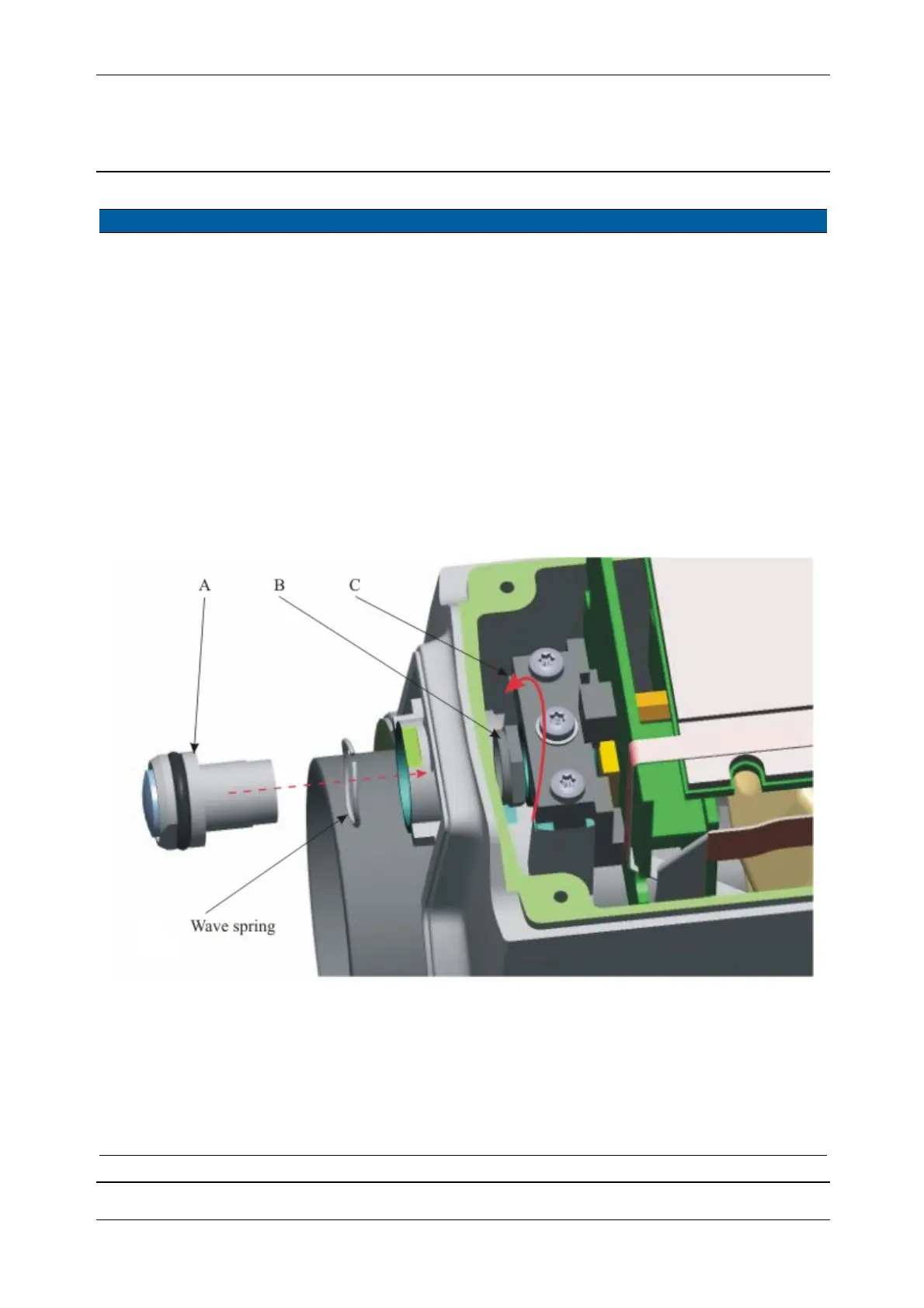
3 Mount the Video front
lens.
A. Insert the video
front lens together
with the wave
spring.
B. Mount the
adjustable focus
nut.
C. Turn
the
adjustable focus
nut until the first
resistance using a
11mm wrench
while holding the
video front lens
fixed using a
12mm wrench
.
Clean the outer
surface of the video
front lens by optical
cleaner, 2-Propanol.
Fig. 5-118 Mount Video front lens.
4 Focus Video front lens. See page 6-159.
5 Mount tracker unit
cover.
See page 5-3.
6 Perform Tilt sensor
offset.
See page 6-29.
7 Perform HA/VA
collimation
See page 6-47.
Item Performance Action Result Notes

Table of Contents

Related product manuals