EasyManua.ls Logo

Trimble S - Page 330

Default Icon
596 pages
Print Icon
To Next Page IconTo Next Page
To Previous Page IconTo Previous Page
Loading...
Chapter 5
Maintenance and Repair
Trimble S, VX, SPS & RTS Service Manual5 - 144 P/N 57150002, Revision 5.0
F
4 Set config number. Key in the new
configuration number(s)
and Click
Store
configuration
.
The new
configuration
number has
been stored in
the instrument.
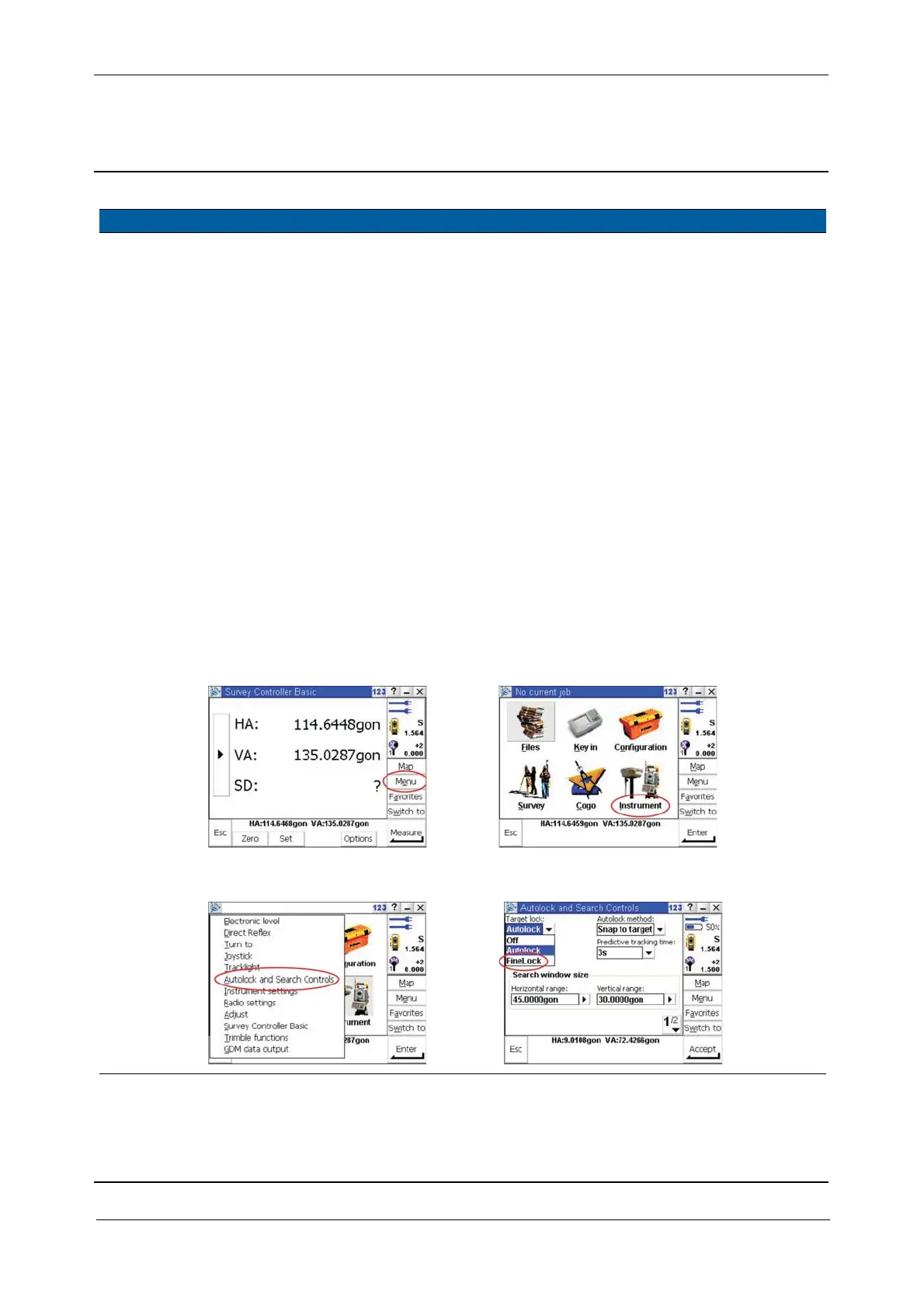
5 Verify FineLock
option.
A. Connect a contol unit
with Survey Controller
to the instrument
B. Start Survey
Controller
C. Select
Menu
D. Select Instrument
E. Select Autolock and
Search Controls
F. Select the Autolock
drop down list
G. If FineLock is
selectable, the option
has been set correctly.
Fig. 5-140 Verify FineLock option
Item Performance Action Results Notes
C
D
E
F,G

Table of Contents

Related product manuals