10. Controller orientation
10.17 System Function Button Group (EC-200 only)
Overview
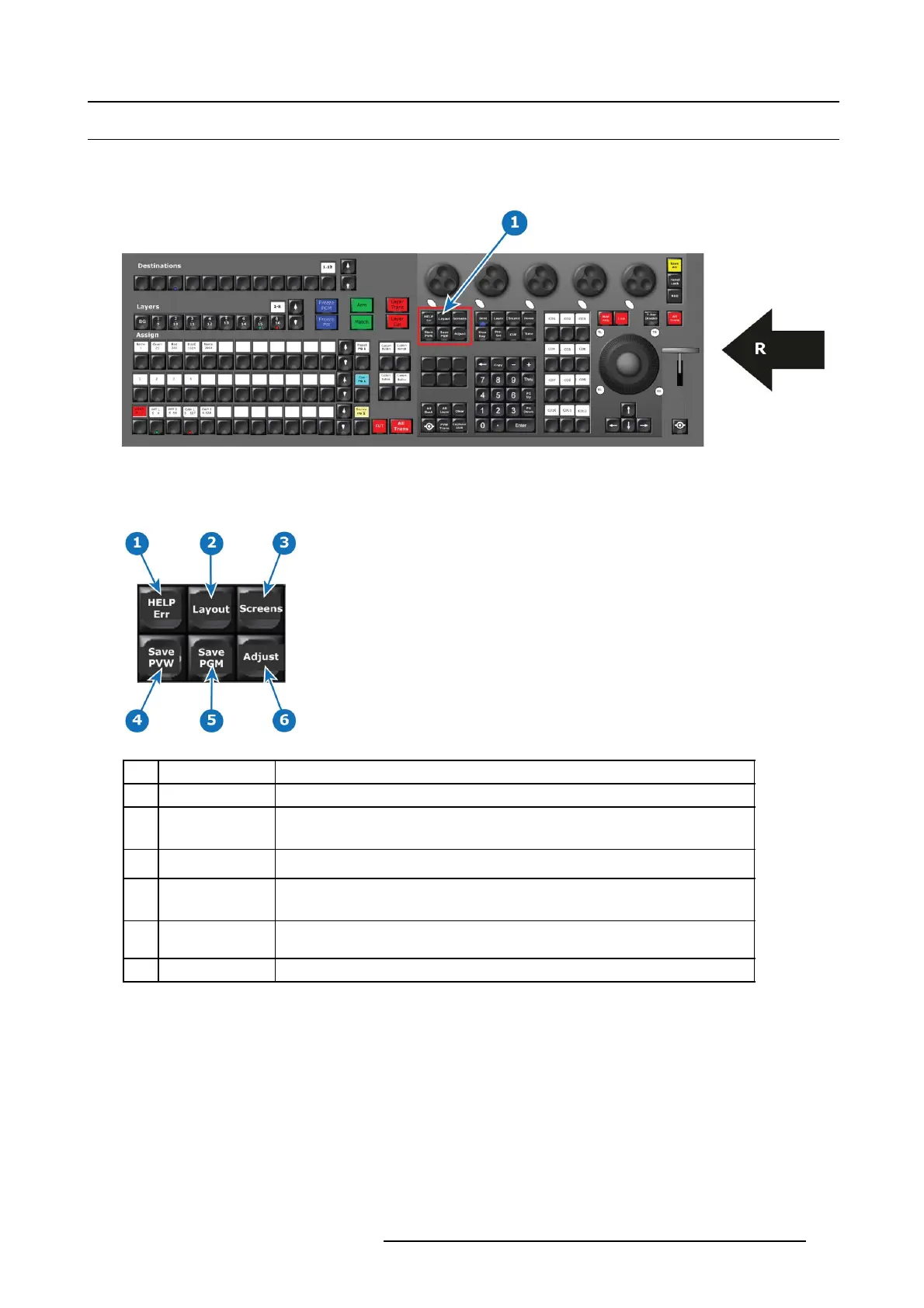
This group of buttons is present only on the large c ontroller.
Image 10-19
1 System function Button Group
R Right Side of the Controller
Description
Image 10-20
Button Name Description
1HELPErr
This button has currently no function.
2 La yout
The Layout Function B u tton allows for recording and recalling layou ts where applicable
like Multi-viewer, Assign Bu ttons and Programmer screen & Preset screen. In the
future o ther features will benefit from this function.
3 S creens This is the function to select the windows of the G UI currently in the displays o f the
controller. 2 internal and 2 ex ternal are possible.
4
Save PVW
(Save Preview)
Latches and lights a RED led and activates a Store/Record Mo de w ith a pplicable
functions from Preview. The Save PVW of the GUI will be RED as long this mode
is ac tive.
5
Save PGM
(Save Program)
Latches and activates a Store/Record Mode with applicable functions from Preview.
The Save P G M of the GUI will be RED as long this mode is active.
6 A djust Pressing the Adjust Button opens the Adjus t tab.
R5905948 EVENT MASTER DEVICES 17/07/2017 303



 To Next Page