6. EM GUI orientation
6.7 Configuration M enu
General
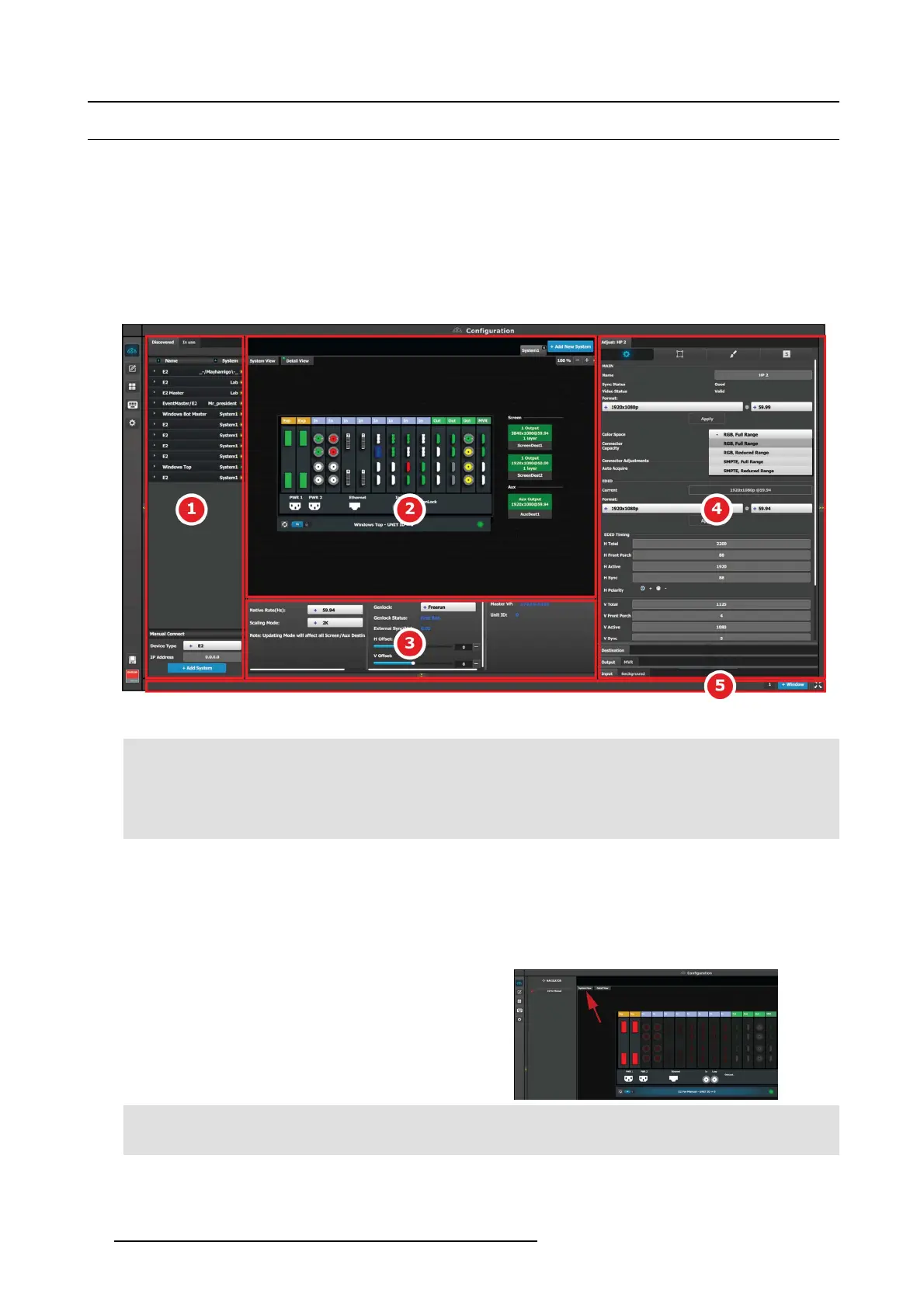
The Con figuration m enu is the module used to edit the P resentation Systems (creation, modification, deletion). T his page is the
first page that appe ars when you launch t he EM GUI software.
The user will us e this page to add or remove dev ices to the selected system. The user a lso could modify the param eters of these
devices like inputs, backgrounds, outputs an d destinations.
Description
The System configuration Menu is divided in 4 parts:
Image 6-6
System Con fi guration Menu
1 Network resource area Available resources on the network are listed in this area.
There are 3 tabs in this sec tion:
• Devices in use in the selec ted system.
• Discovered devices on the local network.
• Simulated dev ices.
2
System diagram area The workspace has two different views, Detail and
System.
The selected system s details are graphically rep resented
in this are a. To view a different system you select the
corresponding tab from the top.
WhentheSystemisselectedanoverviewofalldevices
connected to one system is shown.
3 System modifier area System information is displayed in this ar ea. To view a
different system you selec t the corresponding tab from the
top. This area also includes Workspace related tools.
96
R5905948 EVENT MASTER DEVICES 17/07/2017



 To Next Page