13. E2 Maintenance
13.17 Bottom Panel
Necessary tools
1 x Phillips Screwdriver #2
How to remove the Bottom Panel
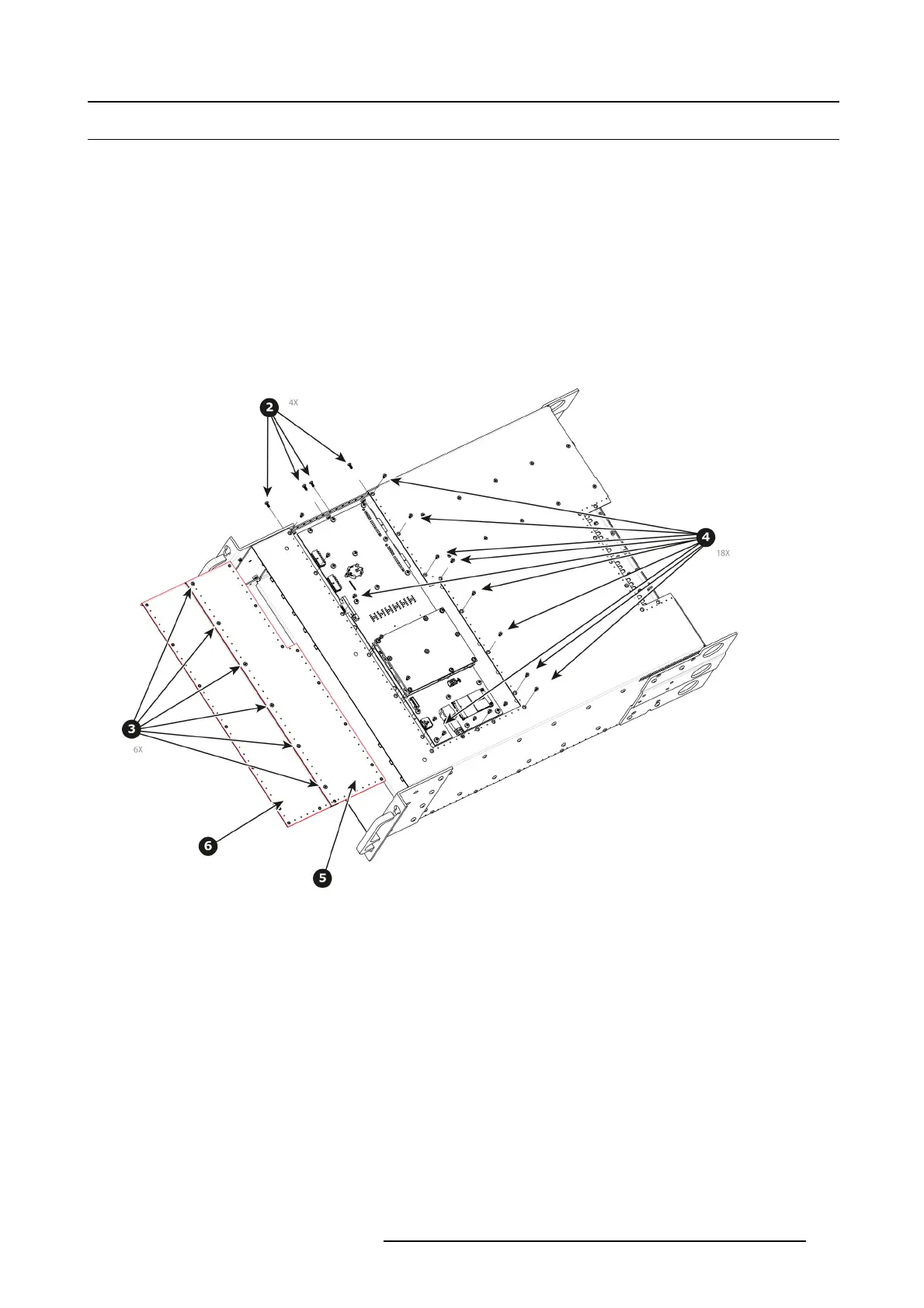
1. Turn the unit over to remov e the bottom panel. The bottom panel is compos ed of two pieces.
2. Remove t he 4 black round-head screws (4-40x1/4) that attach the pan els to the side of the unit.
3. Remove the 6 screws that hold the two sides together.
4. Remove the rest of the screws from the perimeter of the panel as shown below.
5. Push on the edge of the piece that is in the middle of the c hassis until it’s loosened and release f rom the unit. Carefully remove
this piece from the unit.
6. Remove the other piece.
Image 13-40
How to install the Bottom Panel
To install the Bottom Panel follow the same procedure in the reverse order.
R5905948 EVENT MASTER DEVICES 17/07/2017
373



 To Next Page