14. S3 Maintenance
14.8 3RU Fan Tray
Image 14-15
Concerned parts
R767280K 3R U Fan Tray
Necessary tools
1 x Phillips Screwdriver #2 ( optional).
How to remove the 3RU Fan Tray
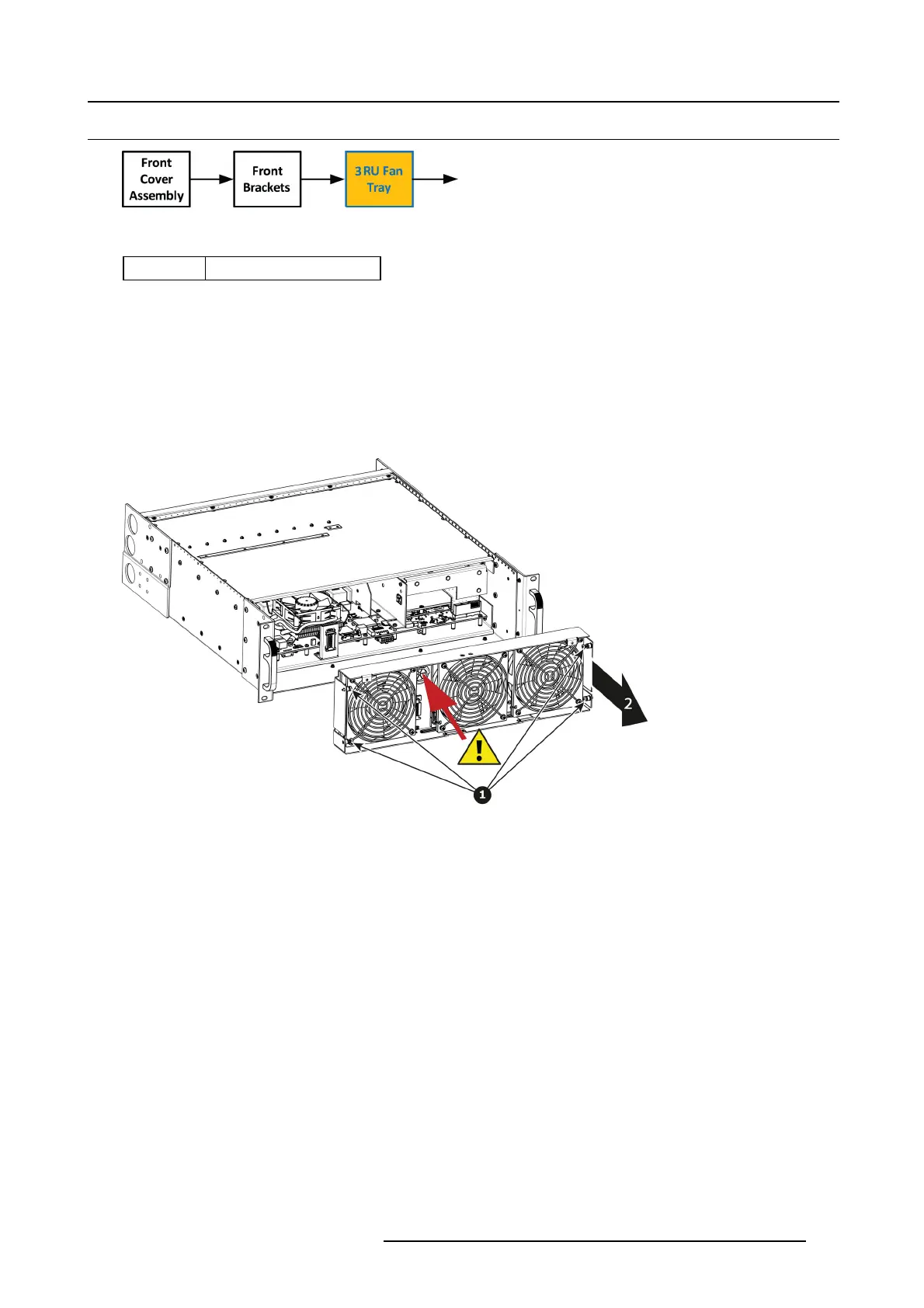
1. Loosen an d unsc rew the 4 thumbscrews holding the 3RU fan tray to the chassis.
Note: You may need a screwdriver if the thumbscrews are ver y tight.
2. Pull the tray out.
Note: You need to tilt the tray a nd maneuver it to go ar ound the dimples located on the side of the chassis.
Image 14-16
Caution: B efore you completely r emov e it from the unit c arefully push t he USB and Front panel cables through the grommet
located between the two fans at left hand side.
How to install the 3RU Fan Tray
Follow the same procedure in the reverse order and in addition per form the following:
1. Pass the U SB and VFD cable through the grommet.
2. Make sure that the front panel flat cable (keyboard cable) goes through the s lot located on the bottom side.
R5905948 EVENT MASTER DEVICES 17/07/2017
427



 To Next Page