11. Controller Configuration
11.3 EC-50 c ontroller connection
Prerequisites
Event M aster Toolset revision 2.0 or higher must be installed on the Host com puter p rior to the connec tion of the E C-50.
Verify that the Host comp uter is equipped with the latest software version available on the Barco web site
(URL:h
ttps://ww w.barco.com/). Refer to the chapters "Download of Even t Master To olset Software", p age 90
and "Software installation", p age 91 f or m ore information on the so ftware dow nloading and h ow install it on
the Ho s t com puter.
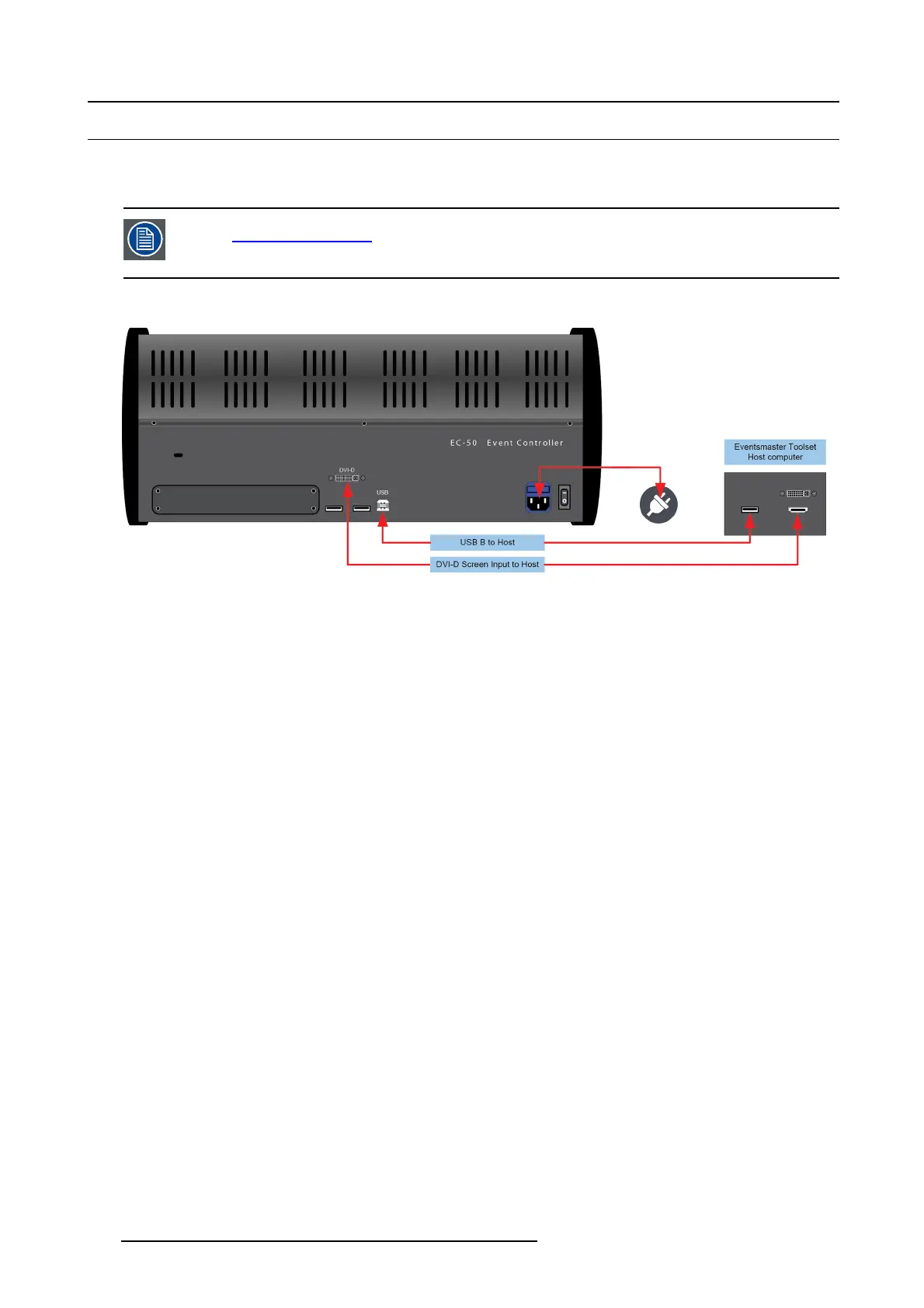
Connection diagram
Image 11-2
EC-50 connections
Description
Connect the external screen and USB c omm unication from the host c omputer to the DVI and USB B connector on the EC-50.
Plug the cord to the power outlet.
Necessary cables ar e provided in a new sy stem. In the case that th e original cables are missing, simply use standard computer
cabling to make these connections.
316 R5905948 EVENT MASTER DEVICES 17/07/2017



 To Next Page