214603 274 Revision A
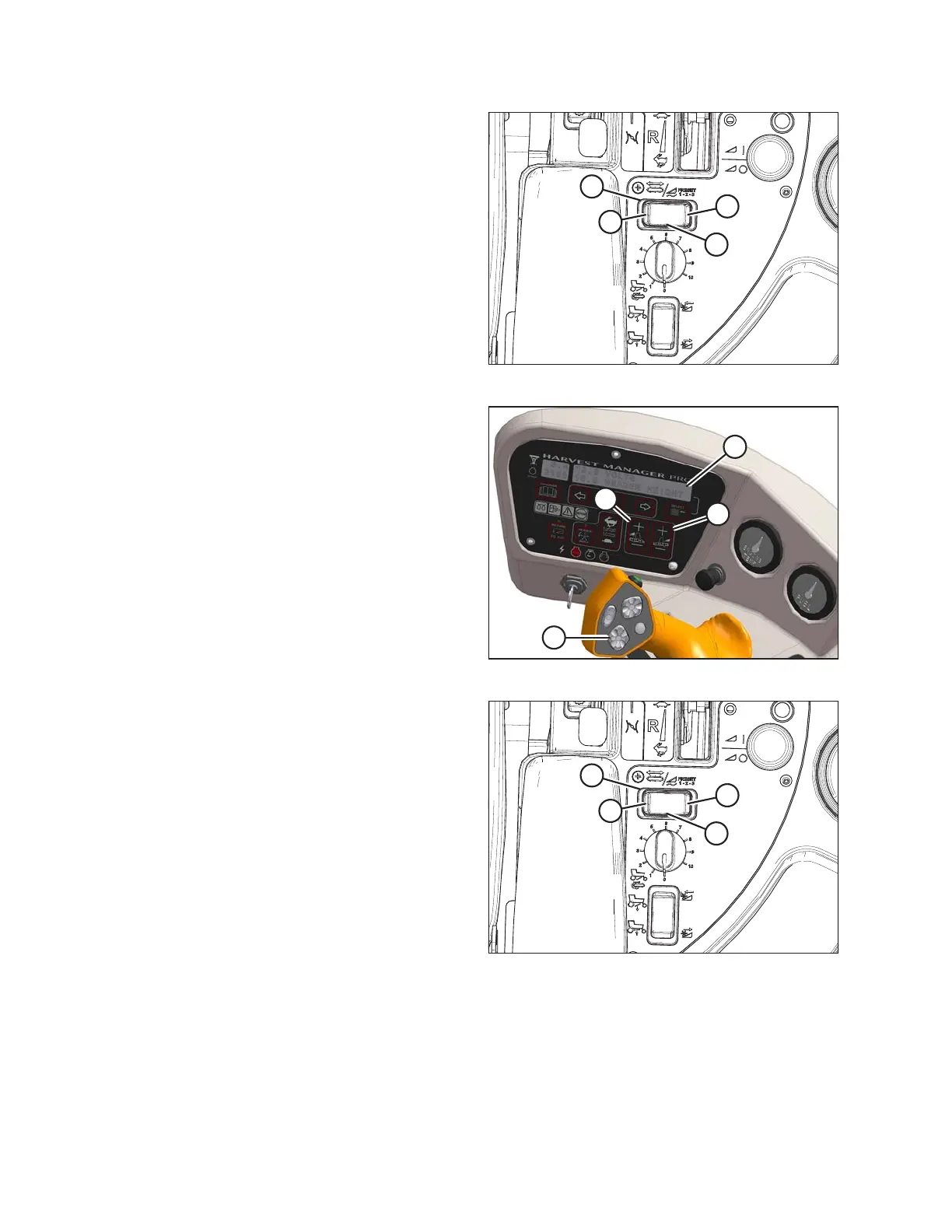
Figure 4.231: Deck Shift Switch
3. Select a deck position with DECK SHIFT switch (A)
from one of the following delivery options:
• B - Left-side delivery
• C - Center delivery
• D - Right-side delivery
Figure 4.232: Operator Console
4. Using HEADER DOWN switch (A) on the GSL, lower
header fully with lift cylinders fully retracted.
5. Using LEFT FLOAT SWITCH (B), push + to increase
float or – to decrease float on left side of header.
Display (D) will indicate selected float value for left side,
for example (8.0 L FLOAT R ##.#).
6. Repeat for right side float with RIGHT switch (C).
Display (D) will indicate float value for both sides, for
example (8.0 L FLOAT R 3.0).
Figure 4.233: Deck Shift Switch
A - Deck Shift Switch B - Left-Side Delivery
C - Center Delivery D - Right-Side Delivery
7. Select a second deck position with the DECK SHIFT
switch (A).
8. Repeat Step 5, page 274 and Step 6, page 274 to set
the float for the second deck position.
9. Select a third deck position with the DECK SHIFT
switch (A).
10. Repeat Step 5, page 274 and Step 6, page 274 to set
the float for the third deck position.
OPERATION





 To Next Page