GBC AdvancedPunch Pro 09/11/2018 General Procedures and Information
6-69
GP 6.17 Optical Sensor Cleaning
Do the following to inspect and clean the Optical Sensors.
Maintenance Schedule
Inspect and clean every 500K cycles.
Procedure
Inspect and clean per the maintenance schedule or as needed.
Supplies Needed
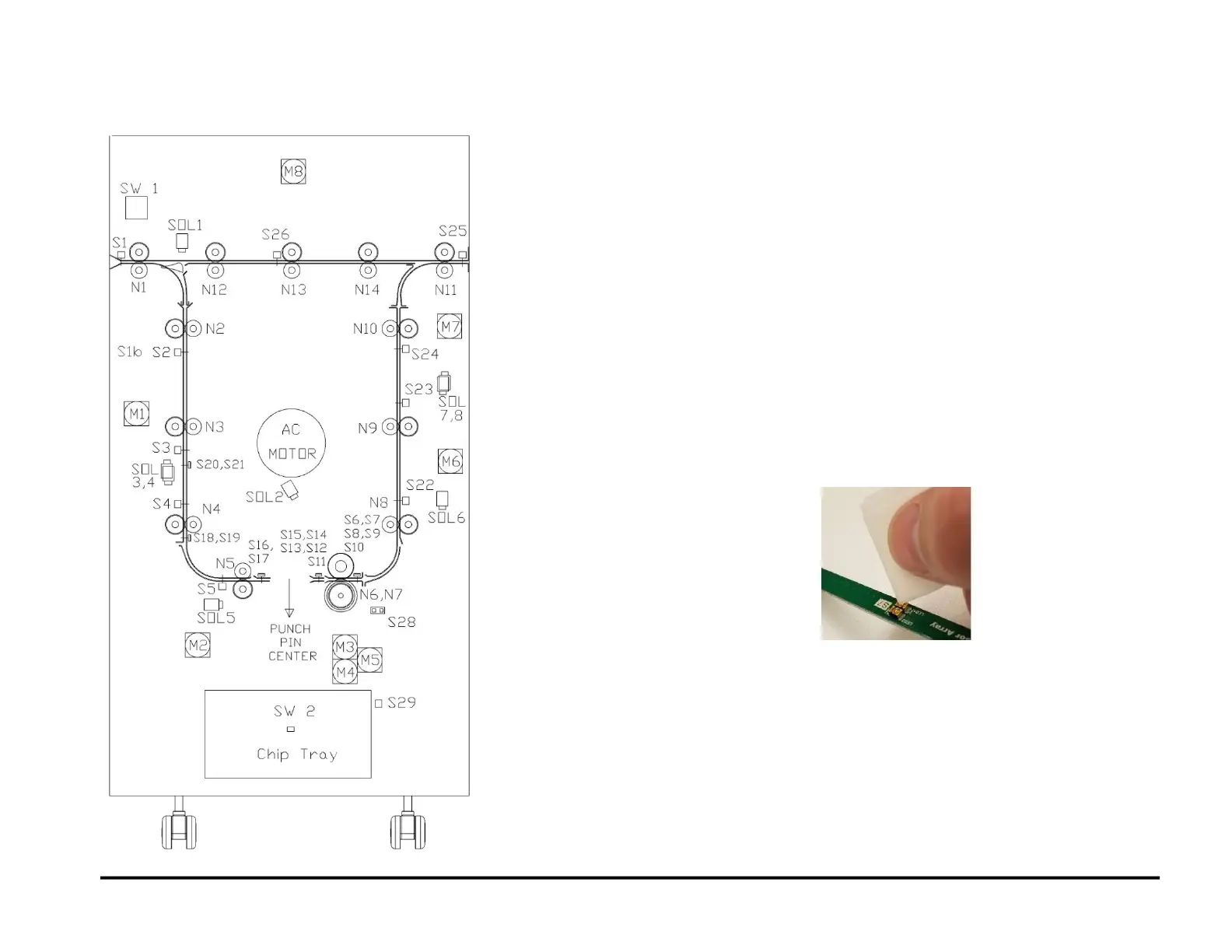
For paper path sensors S1–S5, S22–S26 use canned air or a clean cloth
and alcohol.
For edge detection sensors S6-S21 use an anti-static, pre-moistened lens
cleaning wipe (non- alcohol based) for cleaning the LED (see parts list)
and canned air for the sensor slot.
Cleaning
For paper path sensors use canned air or a clean cloth with alcohol to
remove the debris off each sensor eye.
For edge detection sensors use the folder corner of the wipe to clean the
lens of the LED’s as shown. Wipe the LED lenses until the dust/debris is
completely removed. Use canned air to remove dust/debris from the slot
between the 2 LED’s.
For sensor locations, refer to:
PL 4.1
PL 4.2
PL 4.3
PL 4.4
PL 4.5
PL 5.4
PL 5.7
PL 3.5



 To Next Page