GBC AdvancedPunch Pro 11/07/2018 RAPS
2-33
3 SENSOR CHECKS
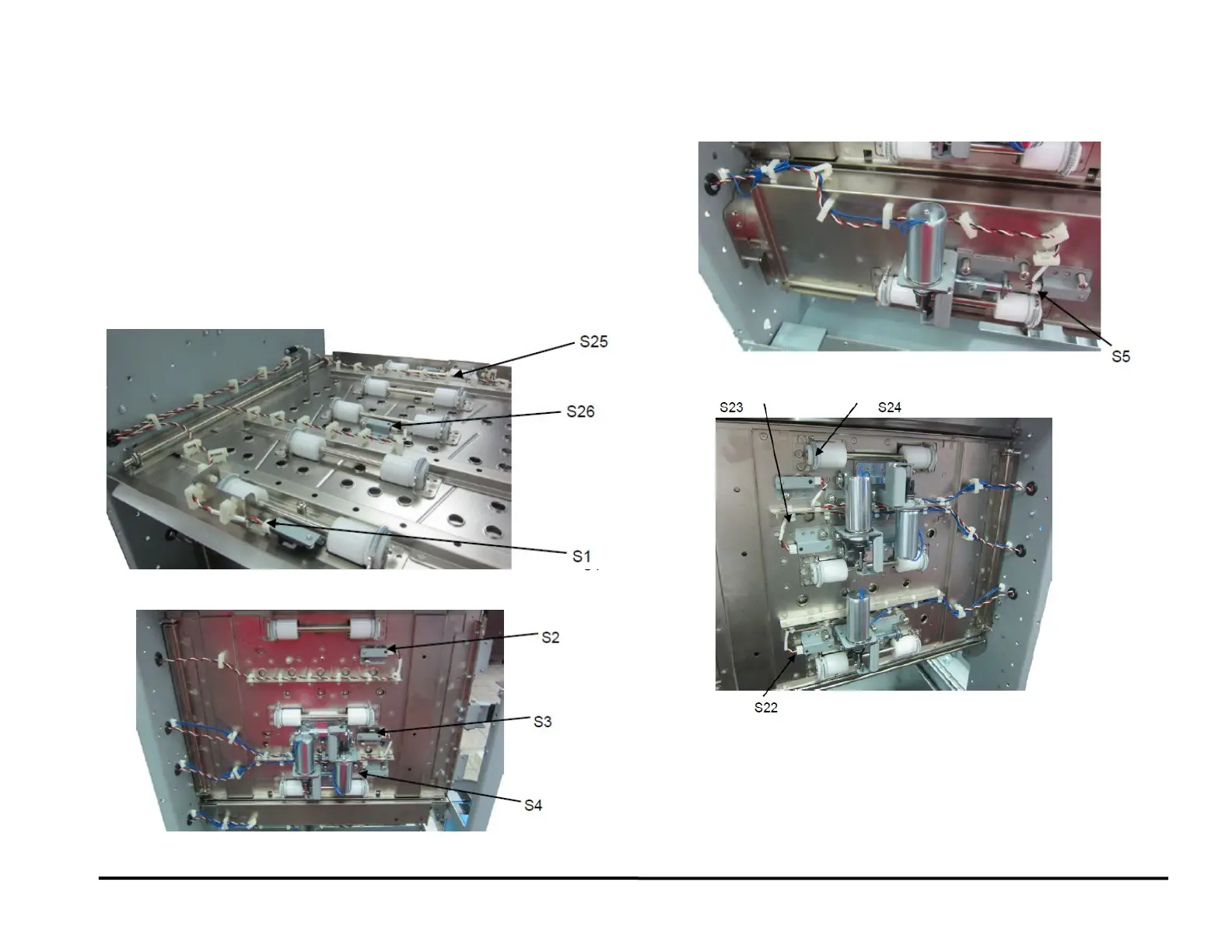
RAP 3.1 Check Sensors S1, S2, S3, S4, S5, S22, S23, S24,
S25, S26
Use this RAP to check sensors S1, S2, S3, S4, S5, S22, S23, S24, S25,
S26.
1. Ensure that the front door is properly closed. Interrupted interlock
connection can trigger sensor paper jam codes.
2. Do GP 6.2.7 SENSORS Procedure. Check to make sure all sensors
should show “0” on the LCD when uncovered and “1” when covered.
If any sensor shows “1” when uncovered, clean that sensor. Also
check is there us any obstacle in the sensor window.
Sensors S1, S25, and S26 are on the Upper Bypass Panel (PL 4.5).
Sensors S2, S3, and S4 are on the Entrance Idler Panel (PL 4.2).
Sensor S5 is on the Acceleration Roller Idler (PL 4.3)
Sensor S22, 23 and 24 are on the Exit Idler panel (PL 4.4)
All sensors show “0” when uncovered and “1” when covered
Yes- Return to the RAP that directed you here.
No- Go to Step 2
S26
S25
S1
S2
S3
S4
S5
S24
S23



 To Next Page