CCW-R-2**B INSTRUCTION MANUAL 6 FUNCTIONS OF THE OPERATION SCREENS
6-63
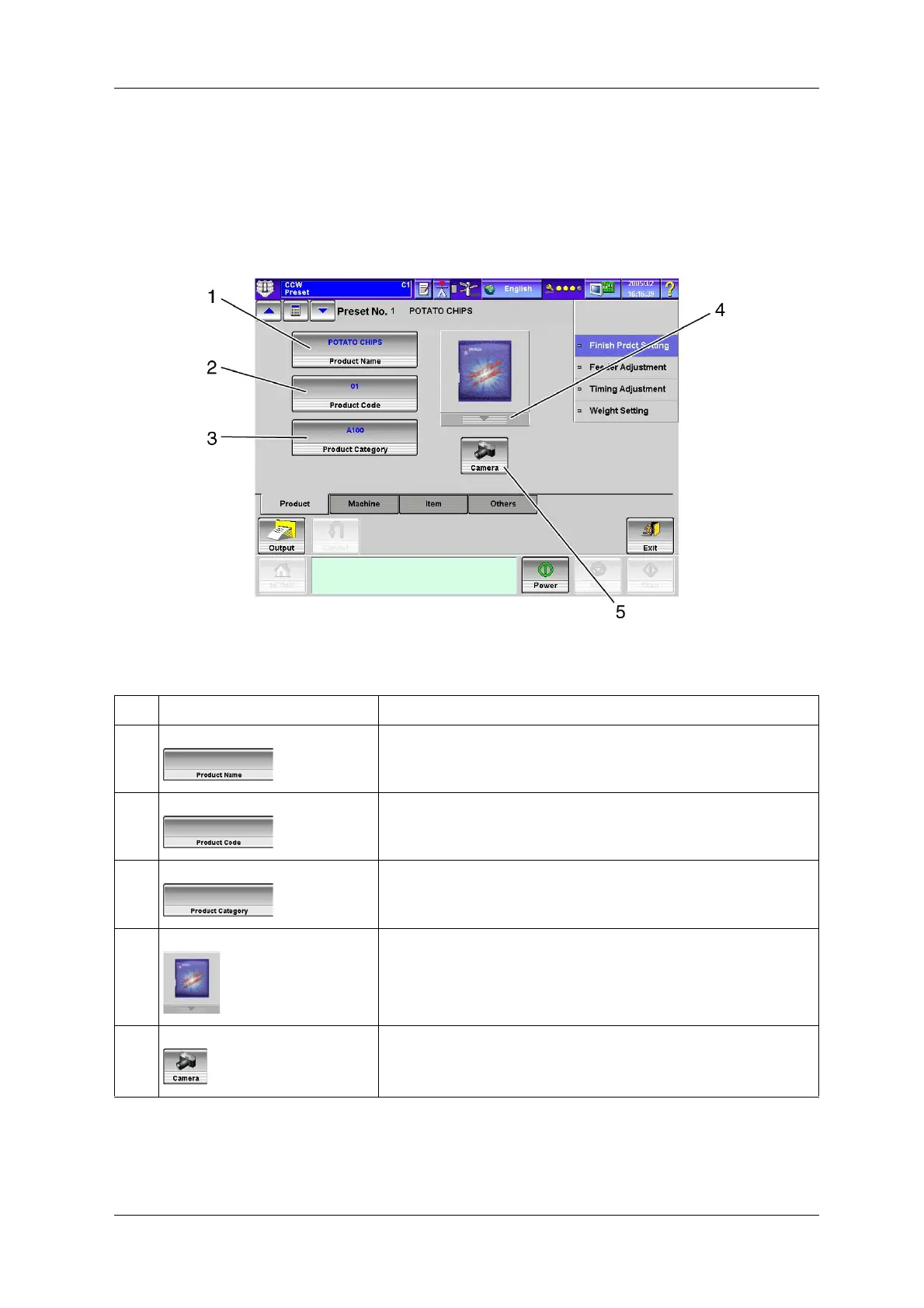
6.11.2.1 [Product] Tab Screen
The [Product] tab screen is the screen that appears first in the [Preset] screen.
While another [Preset] screen is displayed, press the [Product] tab screen in the [Finish Prdct Setting]
index screen to display the [Product] screen.
Fig.6-69 [Product] Tab Screen ([Preset] Screen)
Table 6-22 Items and Functions of the [Product] Tab Screen
No. Name Function
1 [Product Name] key Sets the product name by inputting it from the [Keyboard] screen.
The set product name is displayed on the key.
Up to 24 characters can be specified.
2 [Product Code] key Sets the product code by inputting it from the [Keyboard] screen.
The set product code is displayed on the key.
Up to 12 characters can be specified.
3 [Product Category] key Sets the product category by inputting it from the [Keyboard] screen.
The set product category is displayed on the key.
Up to 4 characters can be specified.
4 [Photo Selection] drop-down key Selects the product photo or illustration.
5 [Camera] key Takes photos of the products.


 To Next Page
 Loading...

