CCW-R-2**B INSTRUCTION MANUAL 6 FUNCTIONS OF THE OPERATION SCREENS
6-115
6.15.1 [Manual Adjustment] Screen
To display the [Manual Adjustment] screen, select [Manual Adjustment] in the [Machine Set] pop-up
menu.
The [Manual Adjustment] screen is used to adjust and display items in the weighing adjustment and the
combination calculation screens. Select the screen to be displayed with the tab.
6.15.1.1 [Weighing Adjst] Tab Screen
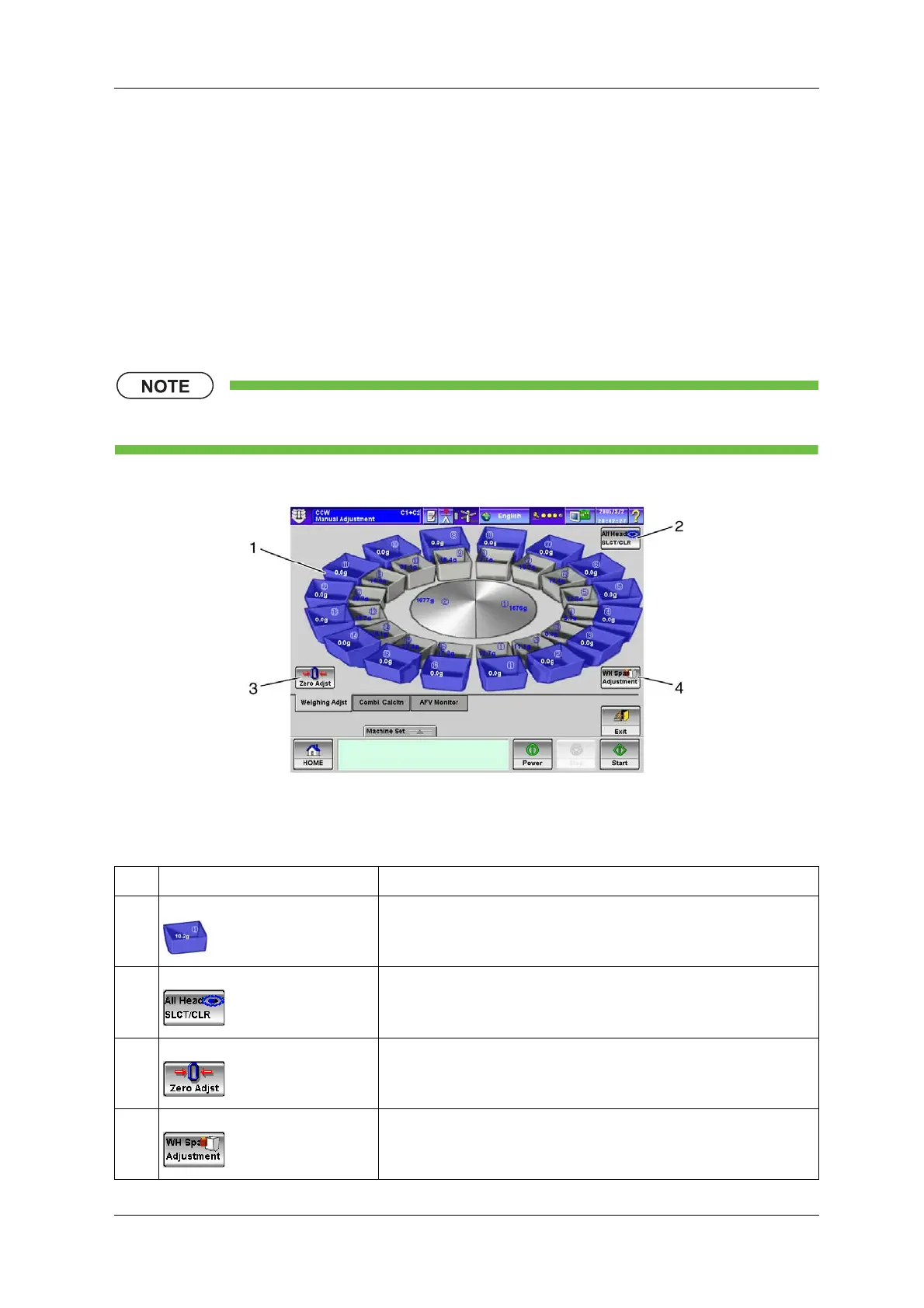
The [Weighing Adjst] tab screen is used for WH manual zero adjustment and span adjustment.
• The [Weighing Adjst] tab screen is available to [Installation] or higher level personnel.
Fig.6-113 [Weighing Adjst] Tab Screen ([Manual Adjustment] Screen)
Table 6-54 Items and Functions of [Weighing Adjst] Tab Screen
No. Name Function
1 [Head] key Selects or deselects the head to be adjusted.
2 [All Head SLCT/CLR] key Selects or deselects all WHs.
3 [Zero Adjst] key Starts zero adjustment for the selected WH.
4 [WH Span Adjustment] key Starts span adjustment for the selected WH.



 To Next Page
 Loading...
