6 FUNCTIONS OF THE OPERATION SCREENS CCW-R-2**B INSTRUCTION MANUAL
6-116
Zero adjustment procedure
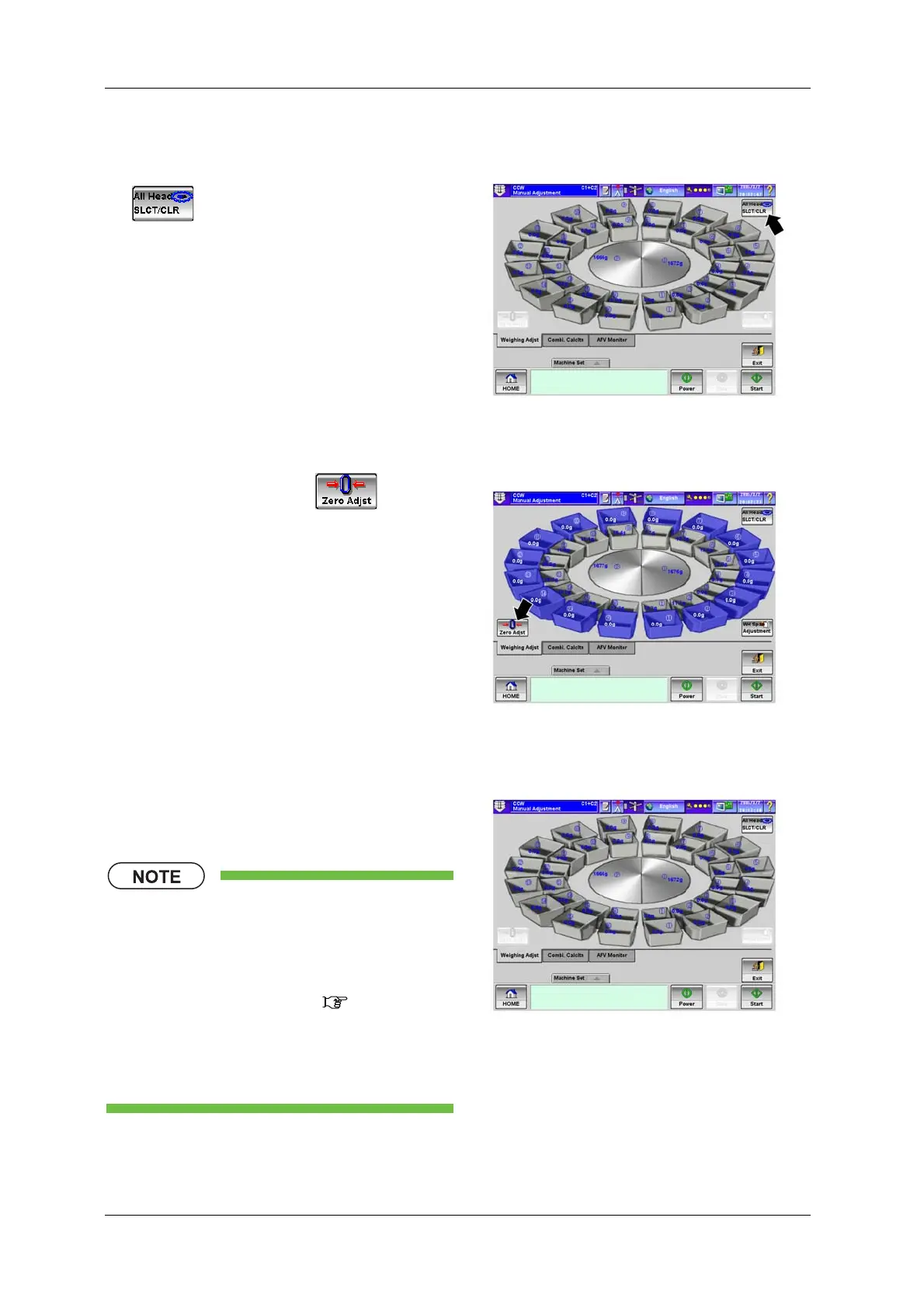
1. Press the [ALL Head SLCT/CLR] key
.
X All the weigh heads are selected.
Fig.6-114 [Weighing Adjst] Tab Screen
([Manual Adjustment] Screen)
2. Press the [Zero Adjst] key .
X The hopper opens/closes, and along with the
message “Please wait a moment”, the zero
adjustment starts.
Fig.6-115 [Weighing Adjst] Tab Screen
([Manual Adjustment] Screen)
3. After the zero adjustment is completed, check
that the weight display of each weigh head is
within 0.0g±0.1g.
• If the weight display of each head
exceeds 0.1g or falls below -0.1g,
repeat the procedure from step 3.
• The operation details of the zero
adjustment procedures ( 6.6 [Zero
Adjustment] Screen)
• Then, perform the span adjustment.
(See the following.)
Fig.6-116 [Weighing Adjst] Tab Screen
([Manual Adjustment] Screen)


 To Next Page
 Loading...

