CCW-R-2**B INSTRUCTION MANUAL 6 FUNCTIONS OF THE OPERATION SCREENS
6-111
6.14 [Timing Adjustment] Screen
Timing adjustment is the function to adjust the operation timing of each drive unit of the equipment,
aiming at efficient product infeed, weighing and discharge.
The [Timing Adjustment] screen appears when the [Timing Adjust] tab or the [Timing Adjustment]
index is pressed in the following screens:
• [Production] screen
• [Drain] screen
• [Preset] screen
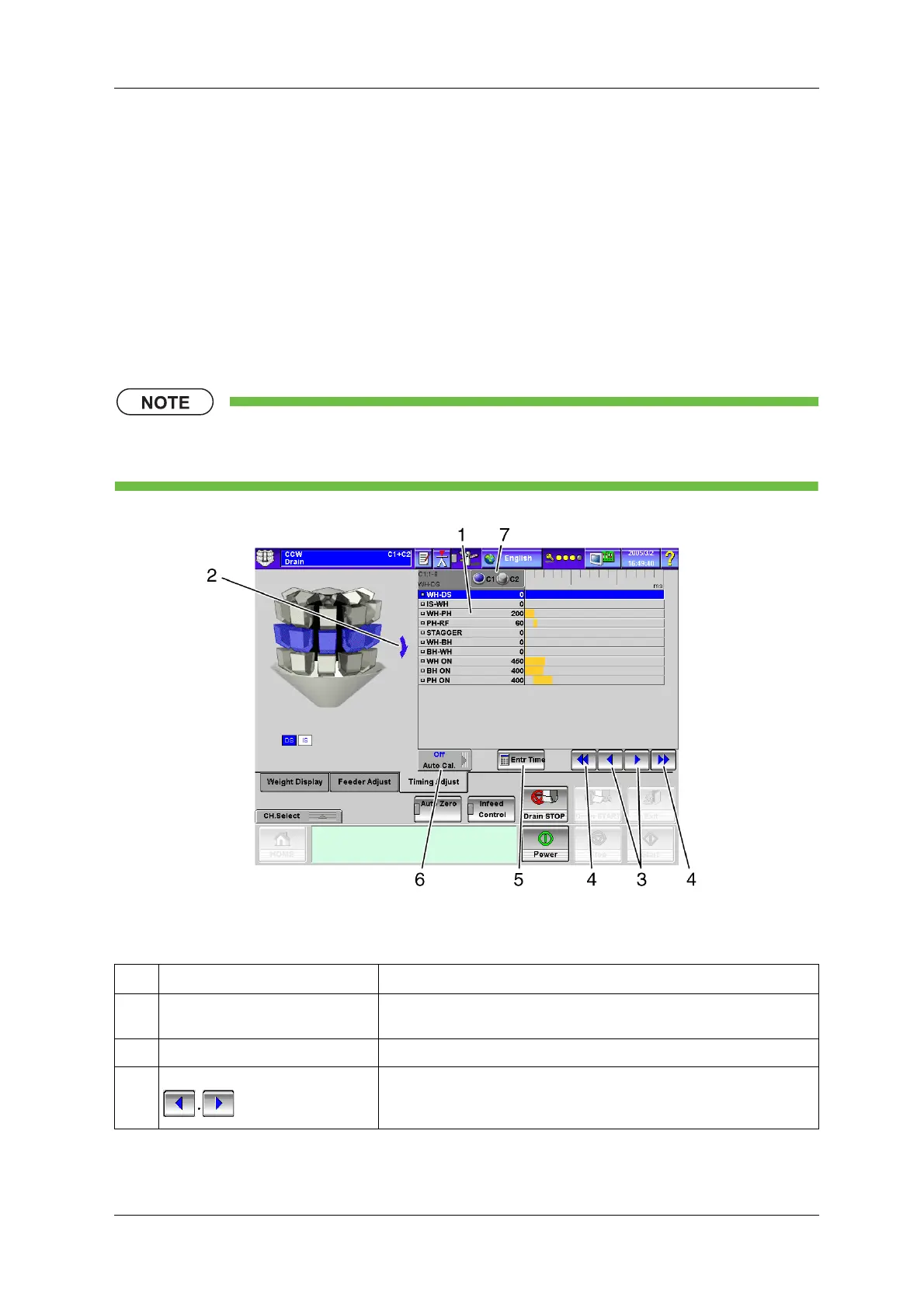
• The following is explained taking the [Timing Adjust] tab screen of the [Drain] screen as an
example.
Fig.6-110 [Timing Adjust] Tab Screen ([Drain] Screen)
Table 6-52 Items and Functions of Each Timing Adjustment Item
No. Name Function
1 Each timing adjustment item Each item can be used as a key to select the item for which timing is to be
adjusted.
2 Adjustment direction Indicates the direction of adjustment between the units displayed in blue.
3 [Increase/Decrease] key (10ms) Increases/decreases a value in units of 10ms.


 To Next Page
 Loading...

