CCW-R-2**B INSTRUCTION MANUAL 6 FUNCTIONS OF THE OPERATION SCREENS
6-161
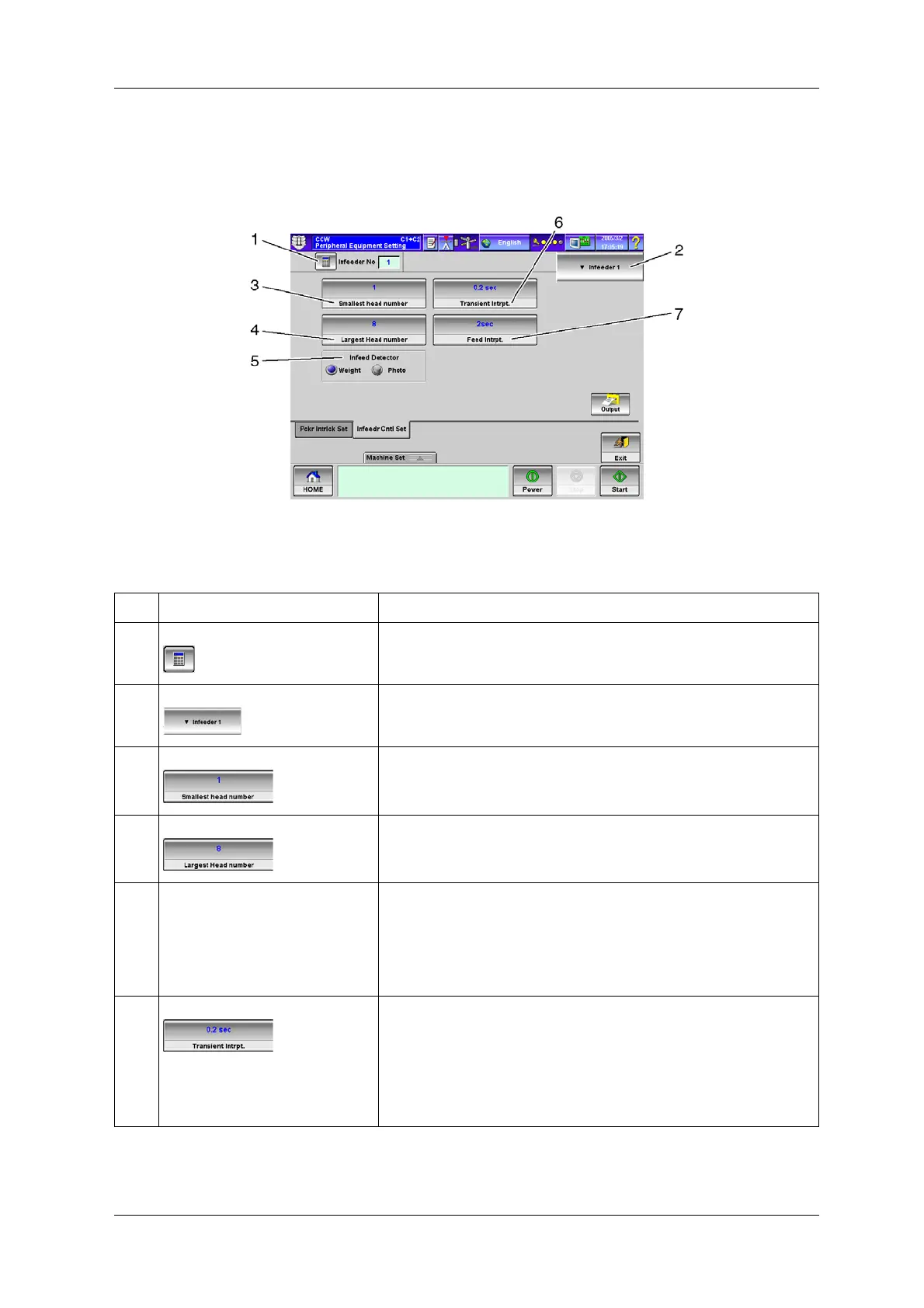
6.15.6.2 [Infeedr Cntl Set] Tab Screen
This screen is used to set the configurations for interlocking this device and the infeeder.
Fig.6-176 [Infeedr Cntl Set] Tab Screen ([Peripheral Equipment Setting] Screen)
Table 6-78 Items and Functions of [Infeedr Cntl Set] Tab Screen
No. Name Function
1 [Infeeder No] key Sets the number of infeeders to be used for product infeed from the [Numeric
Keypad] screen.
2 [Infeeder No. Select] drop-down key Selects the infeeder number subject to the following settings.
3 [Smallest head number] key Sets the smallest head number of the heads in the section to which infeeder 1
or 2 supplies products from the [Numeric Keypad] screen.
Setting range: 1 to max head count.
4 [Largest Head number] key Sets the largest head number of the heads in the section to which infeeder 1 or
2 supplies products from the [Numeric Keypad] screen.
Setting range: 1 to max head count.
5 [Infeed Detector] radio button Selects whether to control the products delivered to the Dispersion Table
based on weight or volume.
[Weight]: Controls the products delivered to the Dispersion Table based on
weight.
[Photo]: Controls the products delivered to the Dispersion Table based on
volume.
6 [Transient Intrpt.] key Sets the minimum time to judge that the products are loaded on the Dispersion
Table from the [Numeric Keypad] screen.
If excess or shortage of products is detected after the set time has passed, the
infeeder turns on/off automatically. However, shorter time than the set time is
disregarded to prevent the infeeder from turning on/off frequently.
Setting range: 0.0-25.5 sec.
This setting is available only when the infeed detector is in photo mode.


 To Next Page
 Loading...

