CCW-R-2**B INSTRUCTION MANUAL 6 FUNCTIONS OF THE OPERATION SCREENS
6-71
6.11.3 Product Setting (Only When Selecting Section with Two or
More Divisions in Mix Mode)
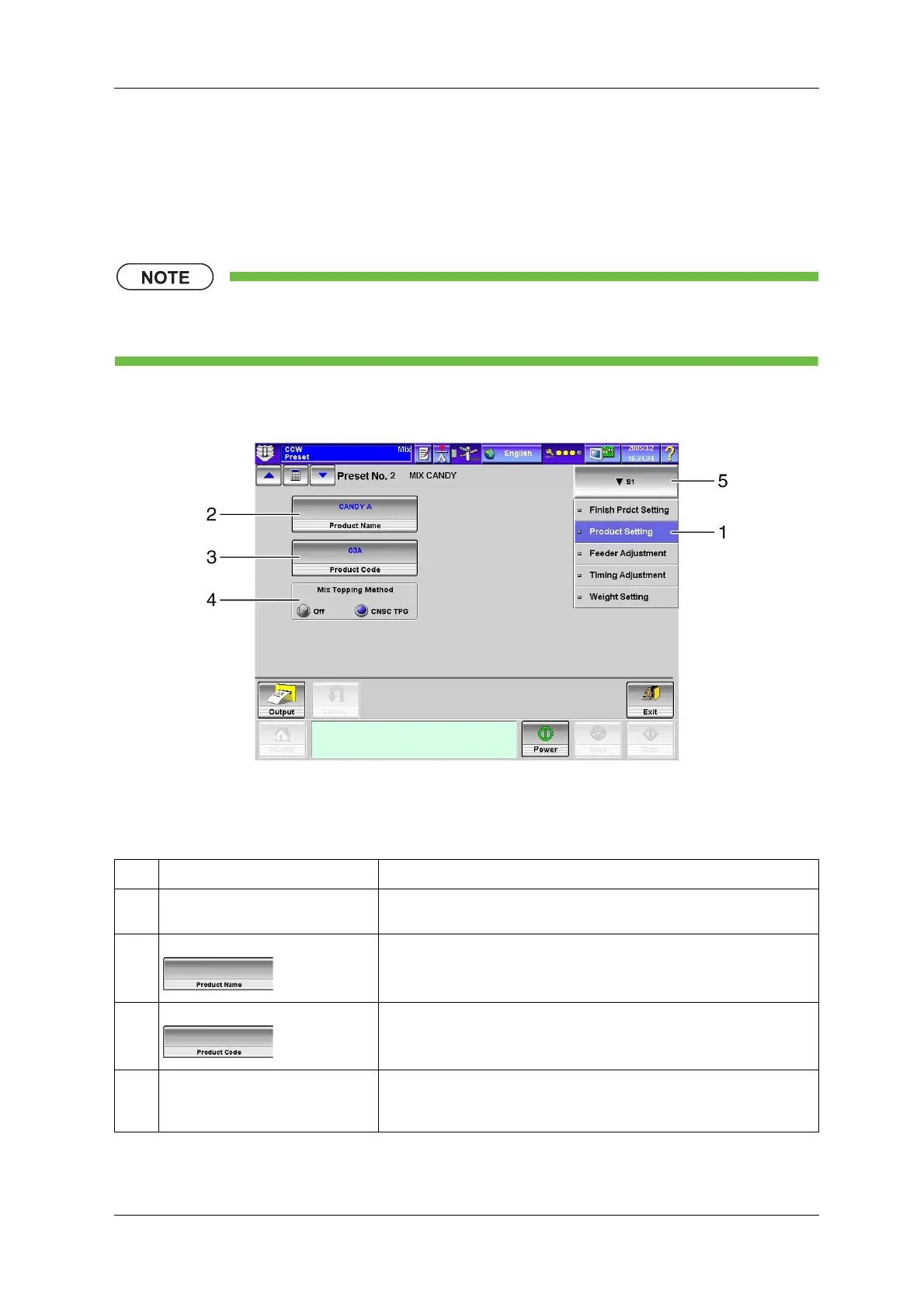
To display the [Product Setting] index screen, press the [Product Setting] index on the [Preset] screen.
When the weigher is used in the mix mode, product information for each section is set in this screen.
• This index is displayed only when a section with two or more divisions is selected in the mix
mode.
If two or more sections are set, a drop-down key to select the desired section appears.
Fig.6-78 [Product Setting] Index Screen ([Preset] Screen)
Table 6-28 Item and Functions of the [Product Setting] Index Screen
No. Name Function
1 [Product Setting] index Displays the [Product Setting] screen in the preset.
(Mix weigher only)
2 [Product Name] key Sets the product name for the selected section.
Up to 24 characters can be specified.
3 [Product Code] key Sets the product code for the selected section.
Up to 12 characters can be specified.
4 [Mix Topping Method] radio button Selects whether or not to perform correction when mixing.
[Off]: Correction is not performed.
[CNSC TPG]: Weight correction is performed when mixing.



 To Next Page
 Loading...
