CCW-R-2**B INSTRUCTION MANUAL 6 FUNCTIONS OF THE OPERATION SCREENS
6-13
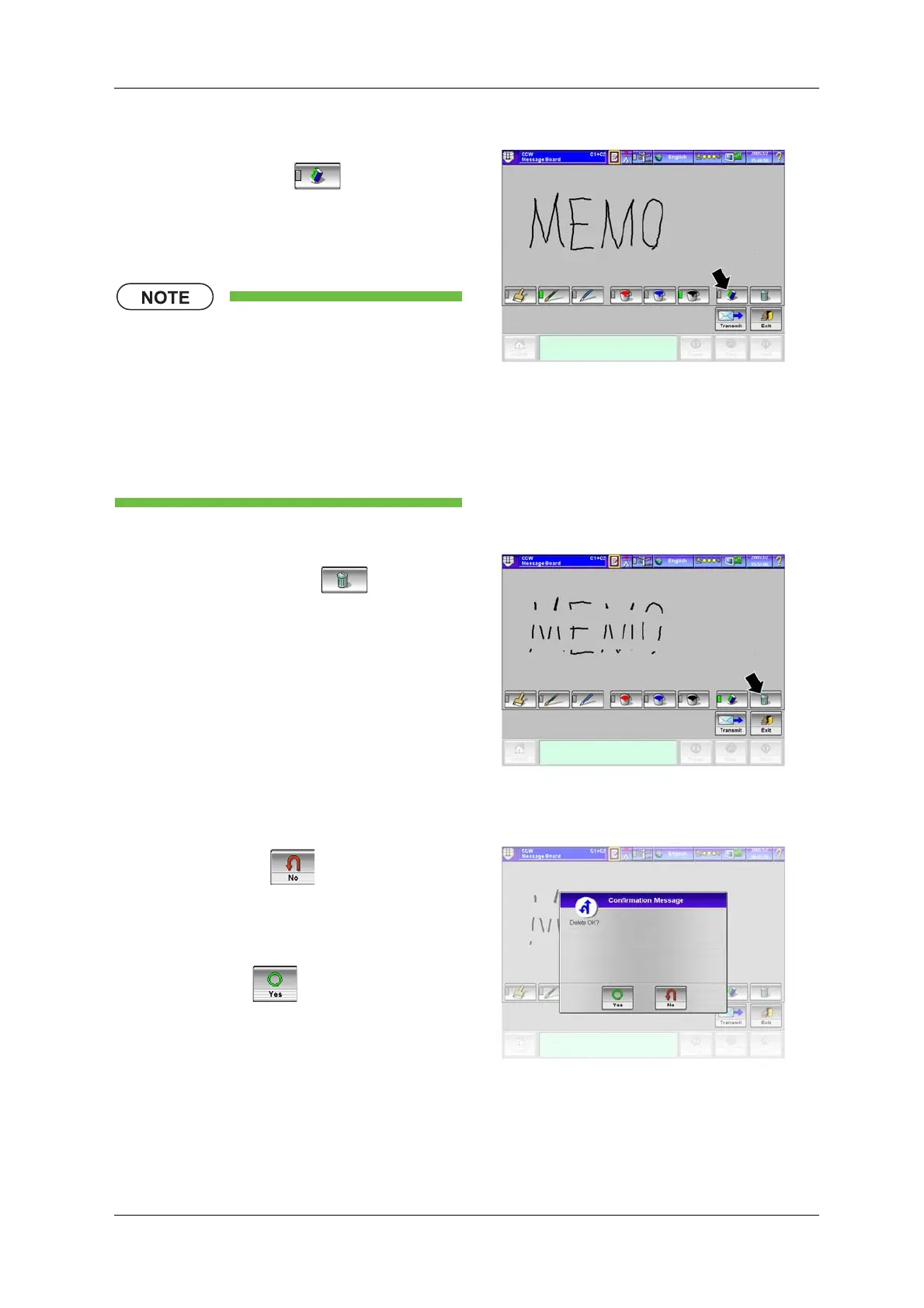
<To erase a part of message>
4. Press the [Eraser] key .
5. Trace the part to be erased with your fingertip.
X The traced part is erased.
• Even if the entire message is erased
with the [Eraser] key, the entire memo
data is not deleted and the [Message
Board] key keeps blinking. If the
[Delete All] key is used, the entire
memo data is deleted and the [Message
Board] key blinking is canceled. (See
the following.)
Fig.6-5 [Message Board] Screen
<To delete all memo data>
6. Press the [Delete All] key .
X The confirmation message screen appears.
Fig.6-6 [Message Board] Screen
7. When not deleting the message board data,
press the [No] key .
X Deleting of the entire message board is
canceled.
When deleting the message board data, press
the [Yes] key .
X All memo data is deleted.
X The [Message Board] key stops blinking.
Fig.6-7 [Confirmation Message] Screen
([Message Board] Screen)


 To Next Page
 Loading...

