CHAPTER13 Network
Mediant 1000 Gateway & E-SBC | User's Manual
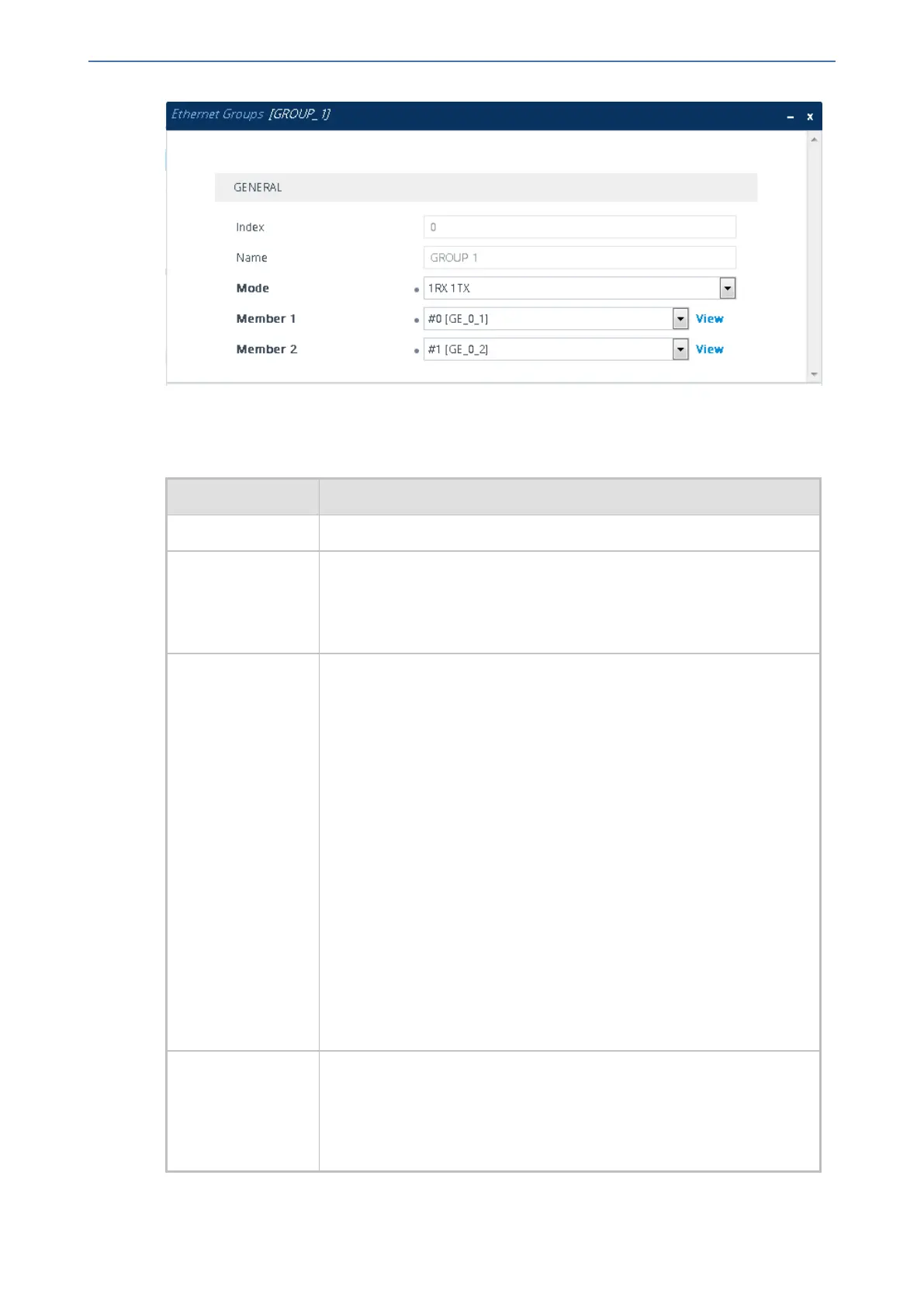
3. Configure the Ethernet Group according to the parameters described in the table below.
4. Click Apply, and then reset the device with a burn-to-flash for your settings to take effect.
Table 13-3: Ethernet Groups Table Parameter Descriptions
Parameter Description
'Index' (Read-only) Displays the index number for the table row.
'Name'
group
[EtherGroupTable_
Group]
(Read-only) Displays the Ethernet Group number.
'Mode'
mode
[EtherGroupTable_
Mode]
Defines the mode of operation of the ports in the Ethernet Group. This
applies only to Ethernet Groups containing two ports.
■ [2] 1RX/1TX = (Default) At any given time, only one of the ports in
the Ethernet Group transmits and receives packets. If a link exists
on both ports, the active one is either the first to have a link up or the
lower-numbered port if both have the same link up from start.
■ [3] 2RX/1TX = Both ports in the Ethernet Group can receive
packets, but only one port can transmit. The transmitting port is
determined arbitrarily by the device. If the selected port fails at a
later stage, a switchover to the redundant port is done, which begins
to transmit and receive.
■ [4] 2RX/2TX = Both ports in the Ethernet Group can receive and
transmit packets.
Note: This option is currently not supported.
■ [5] Single = Select this option if the Ethernet Group contains only
one port.
■ [6] None = Select this option to remove all ports from the Ethernet
Group.
'Member 1'
member1
[EtherGroupTable_
Member1]
Assigns the first port to the Ethernet Group. To assign no port, set this
field to None.
Note: Before you can re-assign a port to a different Ethernet Group, you
must first remove the port from its current Ethernet Group. To remove
the port, either set this field to None or to a different port.
- 94 -






 To Next Page