SHOP MANUAL
Ch 6 page 34
ELECTRICAL SYSTEM
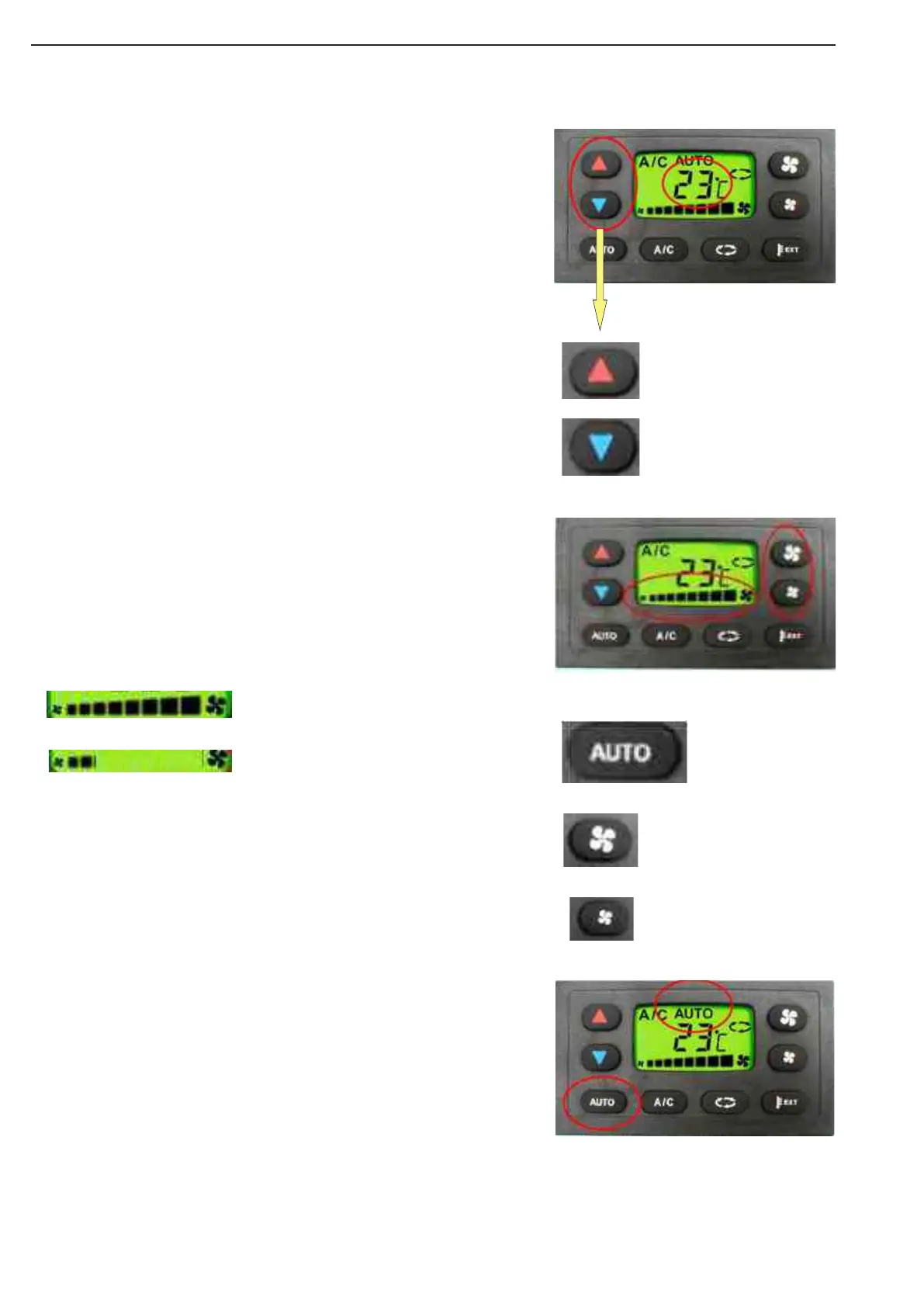
The screen displays the cab temperature setting, the desired tem-
perature in the cab.
Pressing “1” will increase the displayed value. Each touch on “1”
increases the value on the display by 1°C.
The maximum value to be set is 28°C. Beyond 28°C, the display
shows “HI” (High). In this case the control will run for the maximum
cab temperature the HVAC system can deliver under the existing
conditions.
Selecting “HI” = Fastest Way to reach a higher cab temperature
Pressing “2” will lower the display value (= desired cab temperature).
Each touch on “2” lowers the value on the display by 1°C.
The minimum value to be set is 18°C. Below 18°C the display shows
“LO” (Low) which means the control system goes for the lowest cab
temperature that the HVAC can reach under the existing conditions.
Selecting “LO” = Fastest Way to reach a lower cab temperature
Pushing one of the ventilation bottoms will interrupt the Auto Blower
Speed Control and bring it in manual use - the Controller continues
to control for the set Temperature without airflow control. AUTO sym-
bol is turned off.
Return to automatic control by pushing Auto “3”
Pressing “4” increases the fan speed in steps to the maximum value.
Pressing “5” decreases the fan speed in steps to zero.
Pressing again when blower display is at zero stops the control-
ler and the “OFF” symbol appears on the display - all functions are
disabled.
Pressing AUTO “3”: all the functions are automatically controlled. The
AUTO symbol will appear on the display.
According to the cab setting and external temperatures, the controller
will monitor the connected devices (water valve, compressor, blower)
in order to achieve and maintain the required cab temperature.
Use of the A.T.C
1
2
VENTILATION SETTINGS
3
4
5AUTOMATIC MODE
Figure 20
Figure 21
Figure 22


 To Next Page