Mixer : Mixer Components
10 - 228
Aux Send Bus Context Menu
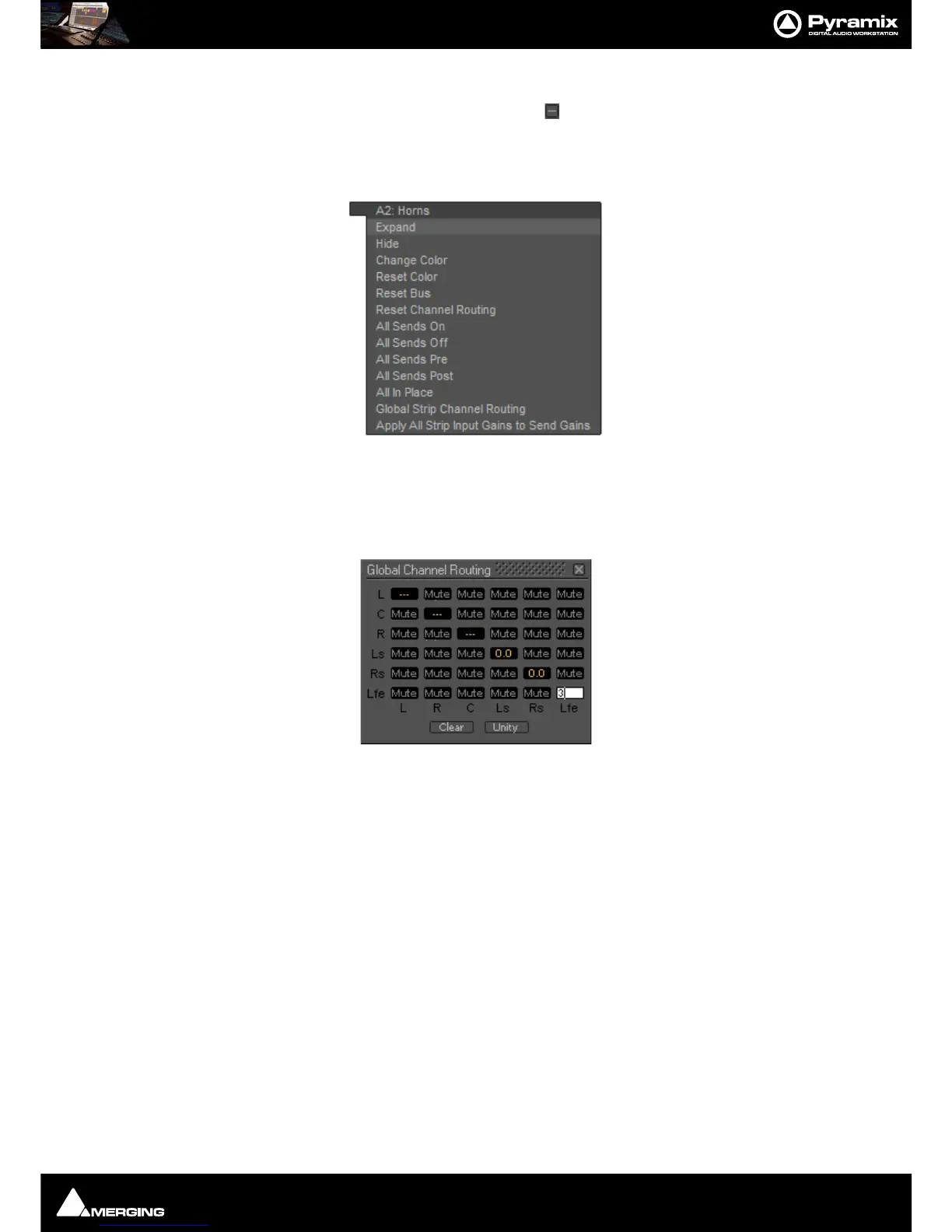
As with other buses, Clicking on an Aux Send bus’s small gray box on the right-hand edge of the mixer window
Expands / Collapses the send display. When the cursor is above the box the Aux Send Bus pop-up context menu
opens:
Most of the entries are the same as other buses, but the last two entries are specific to Aux Send buses.
Global Strip Channel Routing
Opens the Global Channel Routing window for the Aux Send bus
This routing grid groups together the Channel Types of all the input Strips present in the current mixer, shown
horizontally (L, R, C, ...). The vertical channels are the Channel Types of this Aux Send bus. When a node’s value is
edited, the static aux send gain of all strips having this channel type is updated with the new value for this Aux
Send Bus. When some strips are already set to different values for a specific node “
---” is displayed.
Clear Sets the entire grid to Mute
Unity Sets the entire grid to Mute
Note: Invoking either Clear or Unity will affect all Strips Aux Sends to this Aux Send Bus.
Apply All Strip Input Gains to Send Gain
The current input gain value of every strip in the mixer will be applied to all the Aux sends feeding this Aux Send
Bus.



 To Next Page