Mixer : Mixer Components
10 - 232
Basic Strip
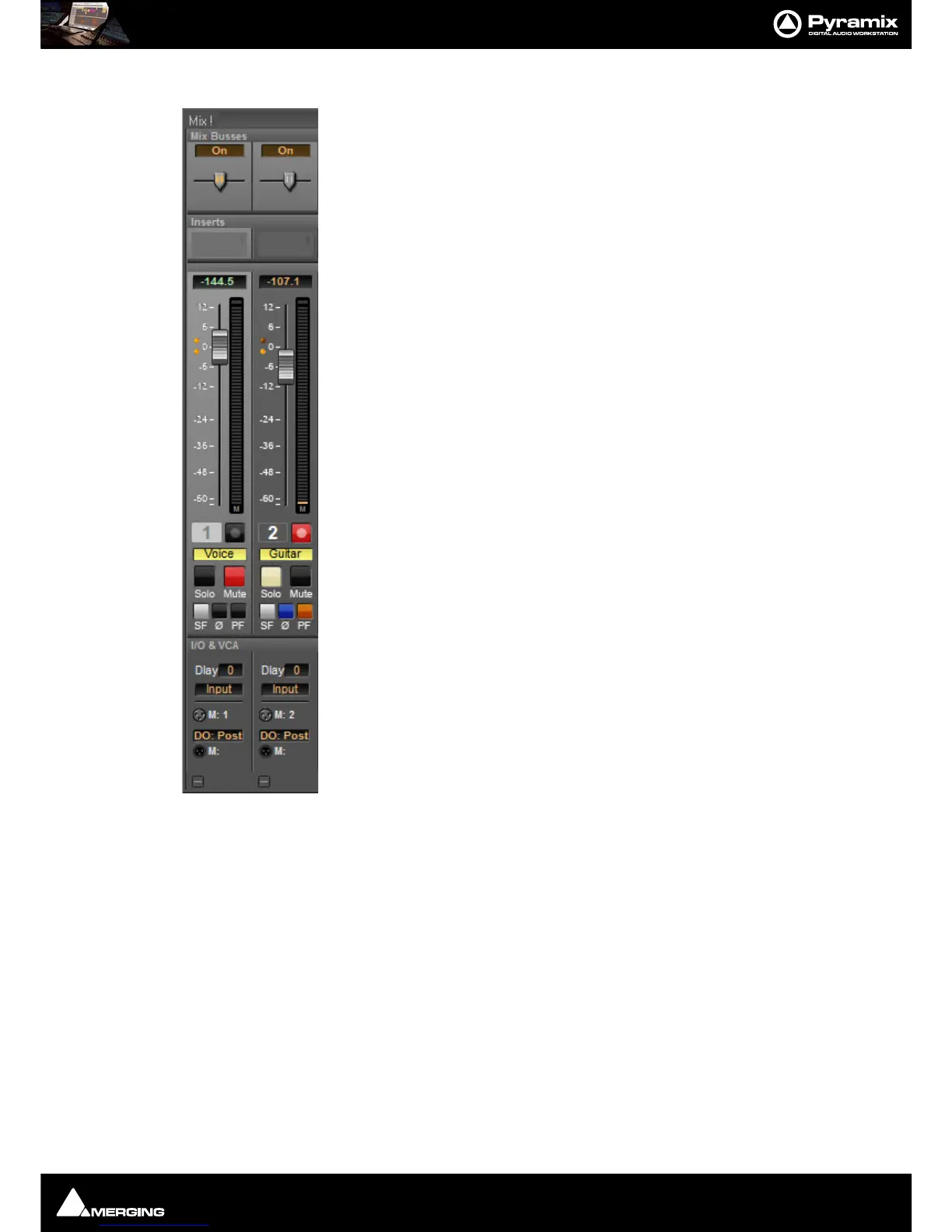
A basic mono channel strip contains:
On /Off toggle switch
Pan slider to Main output bus. In this case there is just a single stereo mix bus.
Inserts area. Expands to suit the number of plug-ins applied.
Numeric display of fader output level value, if cursor is over a fader knob shows fader
gain. If cursor is over pan-slider, shows current pan position. May be clicked to enter a
fader gain value directly.
Level Bargraph Rotary Controls and Faders
Rotary Controls, sliders and Faders may be adjusted by grabbing them with the mouse
and dragging. Rotary controls and horizontal sliders are adjusted by dragging left or
right and faders by dragging up or down. Double-clicking a Fader, slider or Rotary knob
returns the value to the default. E.g. unity gain on a Channel Strip Fader. Holding down
the
Ctrl key increaes the resolution to 0.1dB Keyboard up and down arrows adjust
gain by 0.1dB per press, with
Shift 0.5dB per press and with Ctrl + Shift 1.0dB per
press. Bargraph shows peak level.
Buttons
Buttons on the main mixer surface are black when inactive. When active they ‘light up’.
Rec enable(d) Enables/disables recording for the associated track. Lights red when
enabled. (Purple when source is after effects.)
Solo solos the strip, Mute mutes the strip Ctrl + Solo cancels all other Solos.
SaFe prevents the strip being muted by solo operations elsewhere. Ø reverses the
channel phase.
PF changes the metering position to Pre-Fader.
Delay A delay value (in samples) can be set in this box.
Input Clicking on Input pops-up a box with the choice of the strip taking its input from
a physical connection or any output bus.
Logical Input and Direct Output Assignment
Right-click on the XLR icons to pop-up a drop down list of valid assignments.
Note: Direct Outputs must first be enabled in the Configure page. Please see: Channel Direct
Outputs on page 226
Stereo Strips
In a Stereo Strip feeding a stereo bus the single bargraph meter is replaced by a pair and the simple pan pot is
replaced by a choice of
Balance control, Dual Panner, Pan/Width or 5.x Legacy Stereo Panner accessible from
the right-click context menu. (See below)
Stereo Strips can reverse the
Phase of both the Left and Right channels. The single button has four possible states:
Black: No phase inversion
White: Left channel inverted
Red: Right channel inverted
Blue: Both channels inverted



 To Next Page