Project Processes : Mixing Down Projects
17 - 405
Mixing Down Projects
Exporting a Composition to a File
Once you have finished editing your Composition, the complete Composition or any selected area can be
exported to an audio file (or files). This is really the same as mixing down the
Composition to a file instead of to an
audio output.
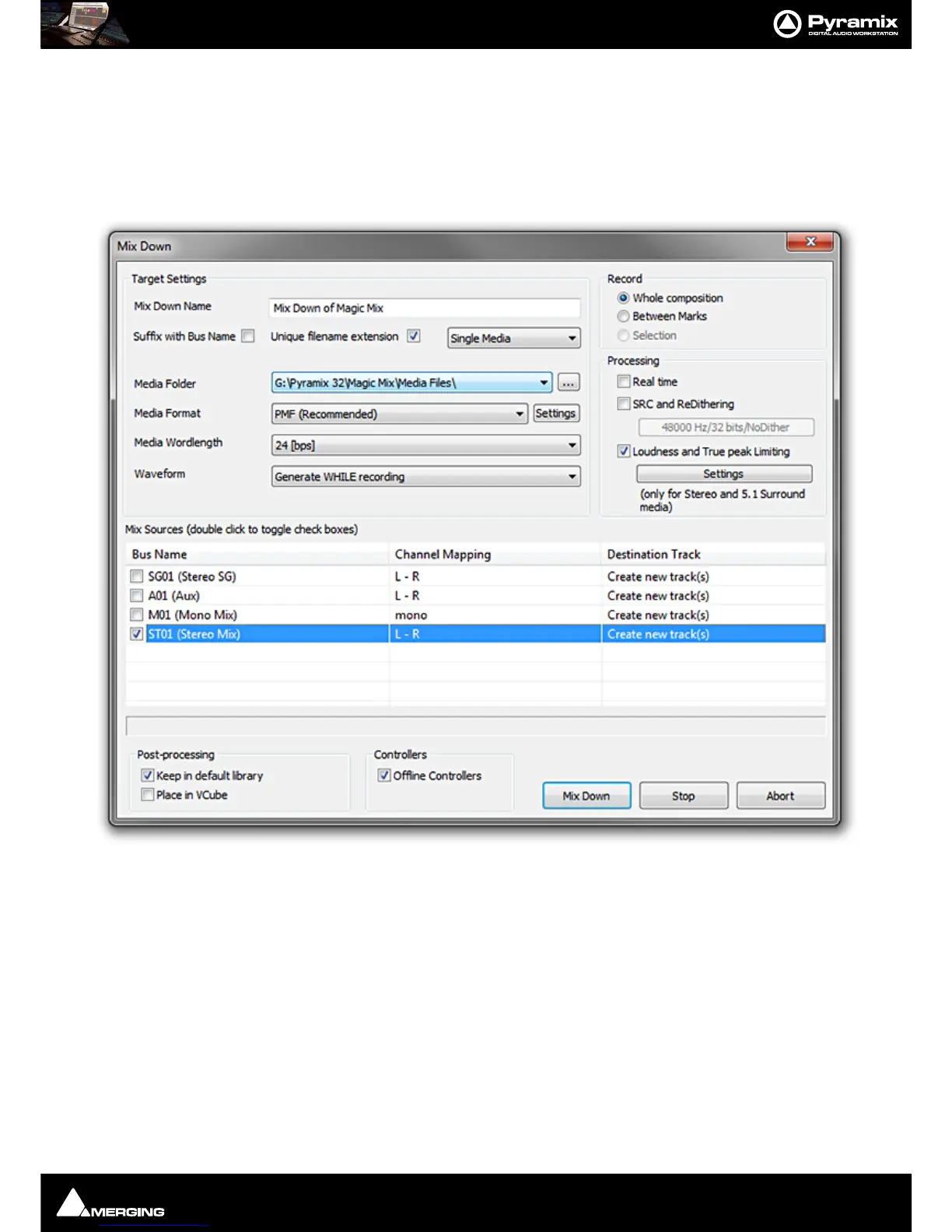
1. Choose Project > Mix Down to open the Mix Down dialog box.
2. In the Target Settings section, type in an appropriate file name under Mix Down Name or use the default
which will be
Mix Down of “Project Name”; choose the folder to which the file will be saved from the Media
Folder
drop-down list (only previously mounted folders will be available as options) or use the ... open a
browser to navigate to and mount an alternative.
3. The Suffix with Bus Name option will create files named like:
Terminator_Final-M&E-Stem1-L.wav
Terminator_Final-M&E-Stem1-C.wav
Terminator_Final-M&E-Stem1-R.wav
Unique filename extension when checked, produces files with a unique identifier.
4. The Single Media drop-down list offers the choice of Singe Media to make a single multi-track audio file, or
One file per Track to generate separate audio files for each Track or One file per Bus/Stem and choose the



 To Next Page