Appendices : Appendix VII - Network Connections
30 - 741
Appendix VII - Network Connections
Note: Direct Ethernet connection of Workstations (i.e.: 1x VCube and 1x Pyramix) with stan-
dard factory default DHCP settings and without a proper DHCP server available in the net-
work may lead to unexpected behavior, E.g. software or system freezes. (ISIS controller will
default to a fixed IP address, if no DHCP server is available).
At all times proper, individual, TCP-IP addresses for each machine, assigned either automati-
cally (DHCP, if available) or manually (Fixed IP) are required, as described below.
This caution is not relevant for machines operating without network connection.
Ethernet Connection & Settings
1. Create an Ethernet connection between the machines, via an Ethernet switch or using a direct, cross-wired,
Ethernet cable. (100Mbit for Sync/Control, 1000Mbit for file sharing recommended)
2. If, on your existing network, an Admin DHCP server is giving TCP/IP addresses to all connected clients, leave
all Pyramix, Isis and VCube machines with the default "DHCP" settings ("Obtain IP address automatically" in
the Local Area Connection Properties / Internet Protocol (TCP/IP) properties. (If you are connected to an exist-
ing network with no active DHCP server, please contact the (human) server administrator to obtain a range of
available IP address from him, and enter these as shown below).
3. If no admin DHCP server is available, manually give each of your machines a unique TCP/IP number, in the
Local Area Connection Properties / Internet Protocol (TCP/IP) properties. Typically, IP addresses can be,
respectively: 192.168.0.3 (PMX) 192.168.0.4 (VCube) and 192.168.0.5 (Isis), with a common Subnet mask being
255.255.255.0. No default gateway is necessary.
Set-up for Pyramix & VCube in:
Control Panel > Network Connections > Local Area Connection > Proper-
ties / Internet Protocol TCP/IP / Properties
.
Set-up for Isis: Press
STOP key for 5 seconds during power up. Set-up address with left/right cursor and Track
keys 1 to 10, then
Set key. See also ISIS User Manual page 14.
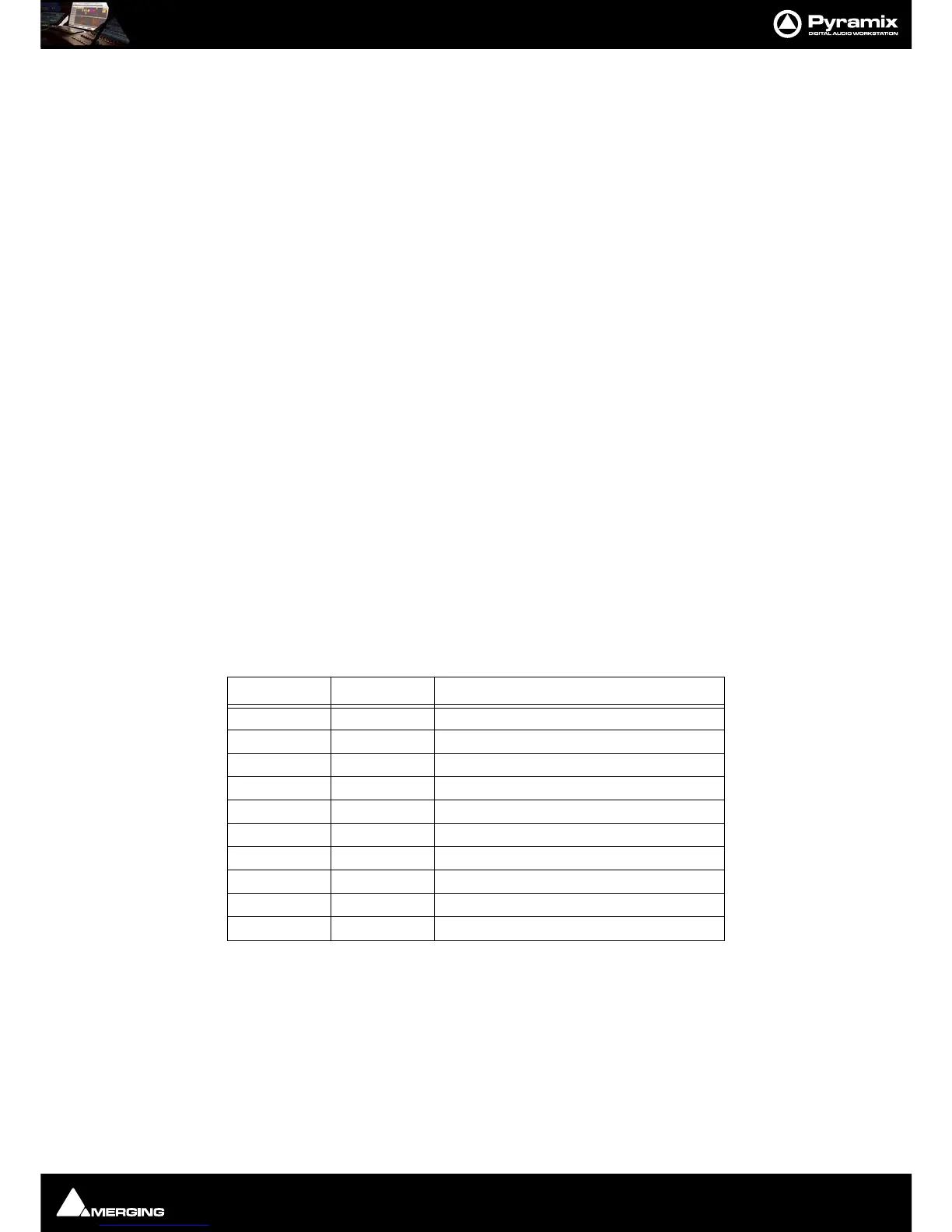
Fixed IP address range, examples:
*Use an address from column A or B, then stick to the selected range for all machines connected on a single
network.
Set subnet mask to
255.255.255.0
Checking IP Configuration
To check the IP Configuration of the machine you are working on do the following:
Open a Command Prompt window. (
Start > All programs > Accessories > Command Prompt) then type in
the following command:
Choice A* Choice B* Typical use
192.168.0.1 10.0.0.1 Usually reserved (for Gateway or Server)
192.168.0.2 10.0.0.2 Usually reserved
192.168.0.3 10.0.0.3 Pyramix A
192.168.0.4 10.0.0.4 VCube A
192.168.0.5 10.0.0.5 ISIS A
192.168.0.6 10.0.0.6 Pyramix B
192.168.0.7 10.0.0.7 VCube B
192.168.0.8 10.0.0.8 ISIS B
192.168.0.9 10.0.0.9 Pyramix C
etc. etc. Increase only right-most number (up to 254)



 To Next Page