Mixer : Mixer Delay Compensation
10 - 243
Recording Bus Returns
When recording the output of an input strip taking an Aux or Bus return, for example to “freeze” a reverb Track, the
recorded media will be placed too early in the Timeline. In this situation it may therefore be desirable to designate
this Aux or Bus return as a normal
Input in order to ensure correct time-alignment of the recorded Clip.
Note: For Power Users the SABR debug windows show the delay values applied to each bus /
aux node and may prove useful. (Accessible by right-clicking on the Info Bar and selecting from
the Debug sub-menu.)
Delay Compensation Detail
All digital processing takes a finite amount of time. When Internal Return Buses are used to route Master output
buses back into channel inputs (by selecting an
Internal Return Bus input from the routing pop-up for the Bus
output, and selecting an Internal Return Bus output as the return channel input) all other buses not so routed
must be delayed if the Mixer is to be ‘time-aligned’ I.e. If a signal is fed to two inputs, the first feeding the Main
Output direct and the second routed back to an input via (say) an
Stereo Send bus with the return input strip
routed to the Main Output, then the second will be delayed with respect to the first. Selecting
Settings > Enable
Delay Compensation
from the mixer context pop-up menu will automatically ensure both signals remain in sync
by delaying the signals directly routed to the Main Output by an amount equivalent to the delay introduced by
the extra processing in the second path.
Note: For obvious reasons a strip fed by an Internal Bus or buses cannot be routed back to the
same internal buses.
Input Strip Mode
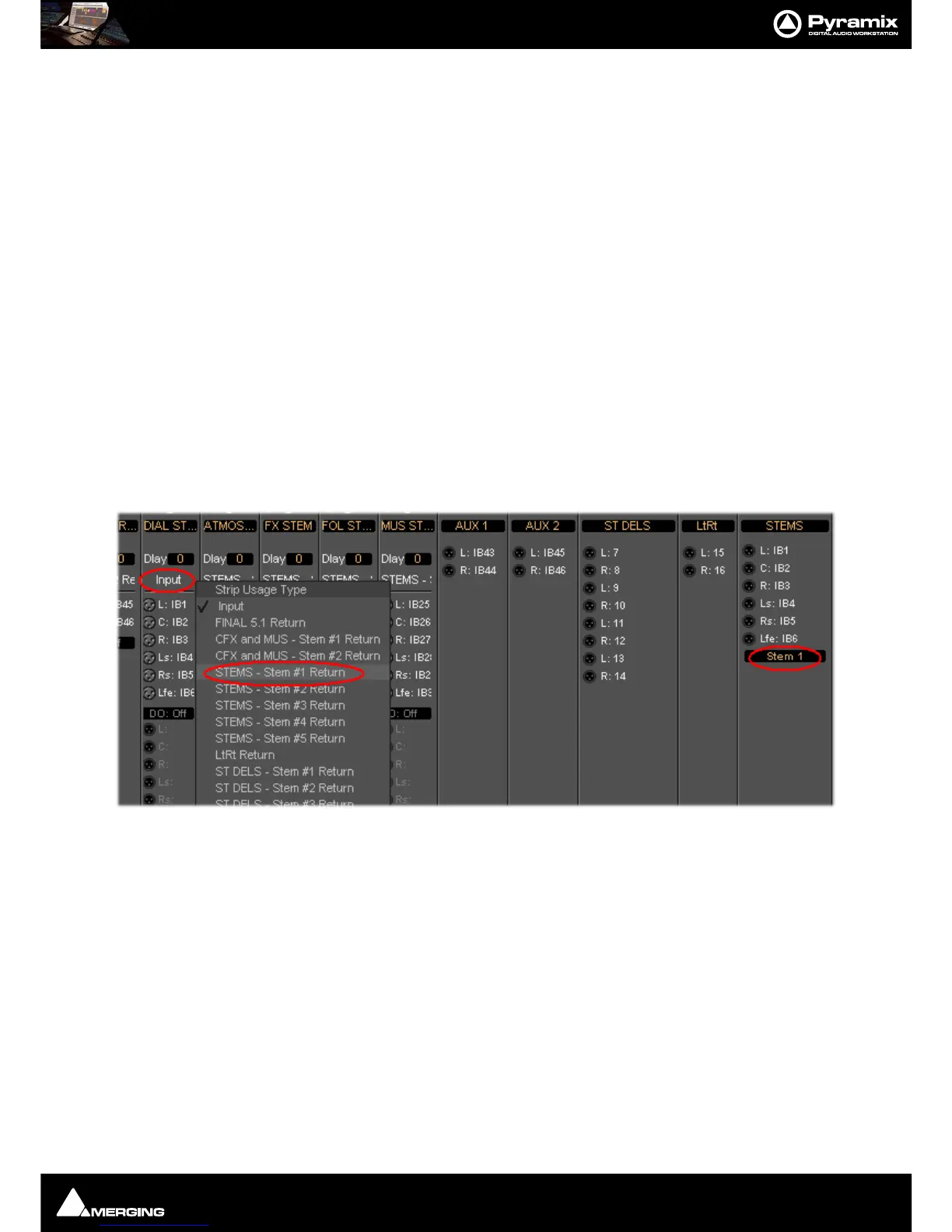
In order for Pyramix to correctly calculate the required delay you have to tell it which bus is the source for the
Internal Return Bus. Clicking
on Input at the bottom of the strip, above the XLR icon, pops-up a list of all the out-
put buses and
Input. Input is the default and means the strip is fed from a physical live input and no delay com-
pensation is required. If any Internal or External Return Bus is ticked and
Automatic Delay Compensation is
turned on, Pyramix calculates the required delay and applies it to all Output buses not feeding a return bus.
Note: Since effect inserts on Multi-Stems buses are per Stem, it is necessary to select the appro-
priate Stem when returning the output to an input channel or channels. Otherwise Pyramix has
no means of determining the correct delay compensation.
Delay vs. Delay Compensation
When the Input Strip Mode is set to Input the delay setting affects the only the delay on the strip’s signal. When
{any Bus name} Return is selected as the Input Strip Mode the delay setting affects the delay on all other output
bus signals to ensure correct time-alignment.



 To Next Page