Tracks and Track Groups : Track Types
5 - 91
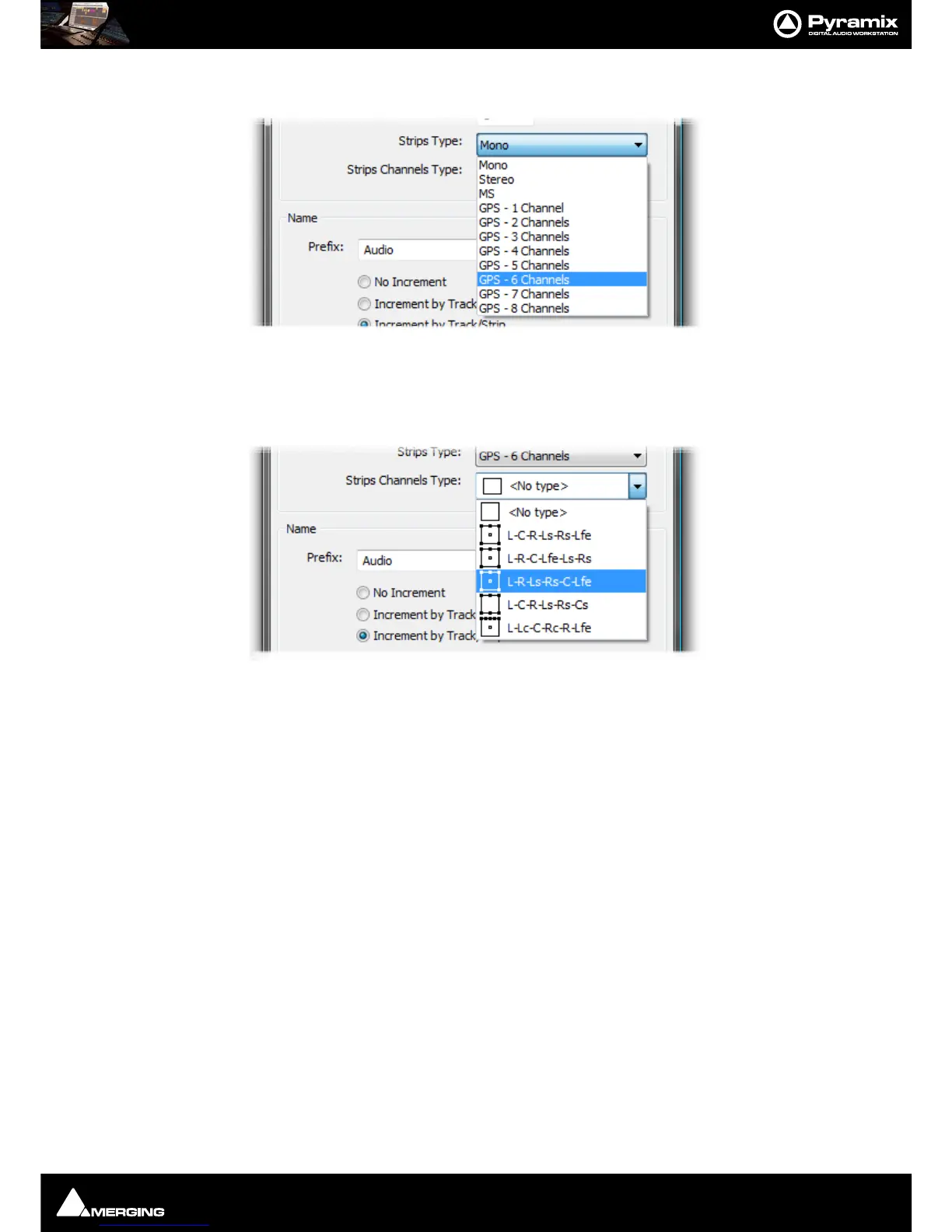
Other types of strip can be selected from the Strips Type drop-down list.
If you choose anything other than
Mono the appropriate number of Tracks will be created to suit the chosen strip
type. The strip inputs and outputs will be ‘tagged’ with a letter or letters indicating channel assignments depend-
ing on the choice made in the
Strips Channels Type drop-down list.
The formats on offer vary according to the Strip Type chosen. A six channel example is shown above. As a further
example, if you choose
MS. <No Type> is the only available choice and the strip I/O is tagged C and W for Centre
and
Width since this is the logical format.
Track Types
Overview
In Pyramix there are two basic types of Track. Audio Tracks which can be single or multi-channel and Automation
Sub-Tracks
which are a vehicle for displaying extra automation data relating to Audio Tracks. A third possibility
exists, which is to use an
Audio Track to display Bus Automation.
Audio Tracks
When Multi-channel Tracks are created with a Strip Channels Type format, certain functions are automatically
linked, namely: Automation, Solo, Mute, Monitor mode, Record mode, Waveform display.
By default and to reduce on-screen clutter Stereo or Multichannel Tracks only display the full complement of but-
tons on the first channel. For example, the right-hand Track of a stereo pair will only show a pale gray
+ button



 To Next Page