Media Management & Libraries : Media Management and Library Tab Windows
4 - 56
Media Management and Library Tab Windows
Media Management and Library Tab Columns
The Columns displayed in Libraries and the Media management window are determined by the Columns dialog
accessed from View > Options
Rearranging Columns
Columns present in Library, Media Management and Search Results frames can be rearranged by simply clicking
and dragging the column headers.
Reordering Columns
Clicking on a column header does two things on Columns where this is appropriate. It orders all Library entries
according to the numerical or alphabetical order of that Column and it toggles that order between Ascending and
Descending.
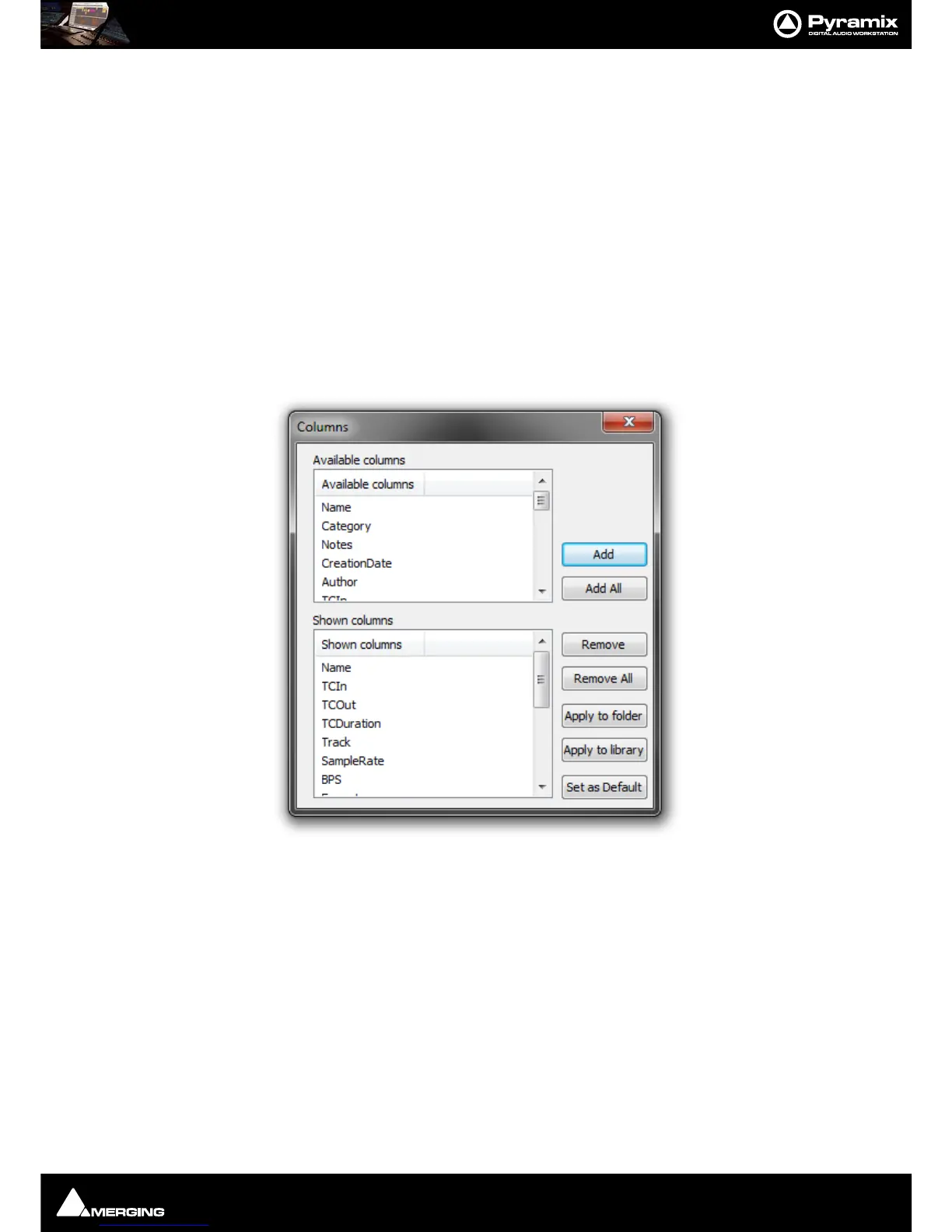
Options Opens the Columns dialog box:
The dialog box shows two lists, Available Columns and Shown Columns.
Available Columns buttons:
Add Adds the column(s) selected to the Shown columns list
Add All Adds All the available columns to the Shown Columns list
Shown Columns buttons:
Remove Removes the column(s) selected from the Shown columns list
Remove All Removes all column from the Shown columns list
Apply to Folder Applies the changes made in this dialog to the current Folder
Apply to library Applies the changes made in this dialog to all Folders in the current Library
Set as Default Sets the changes made in this dialog as the default column content for all Folders
in all Libraries.



 To Next Page