Conforming and Reconforming : Conforming
21 - 473
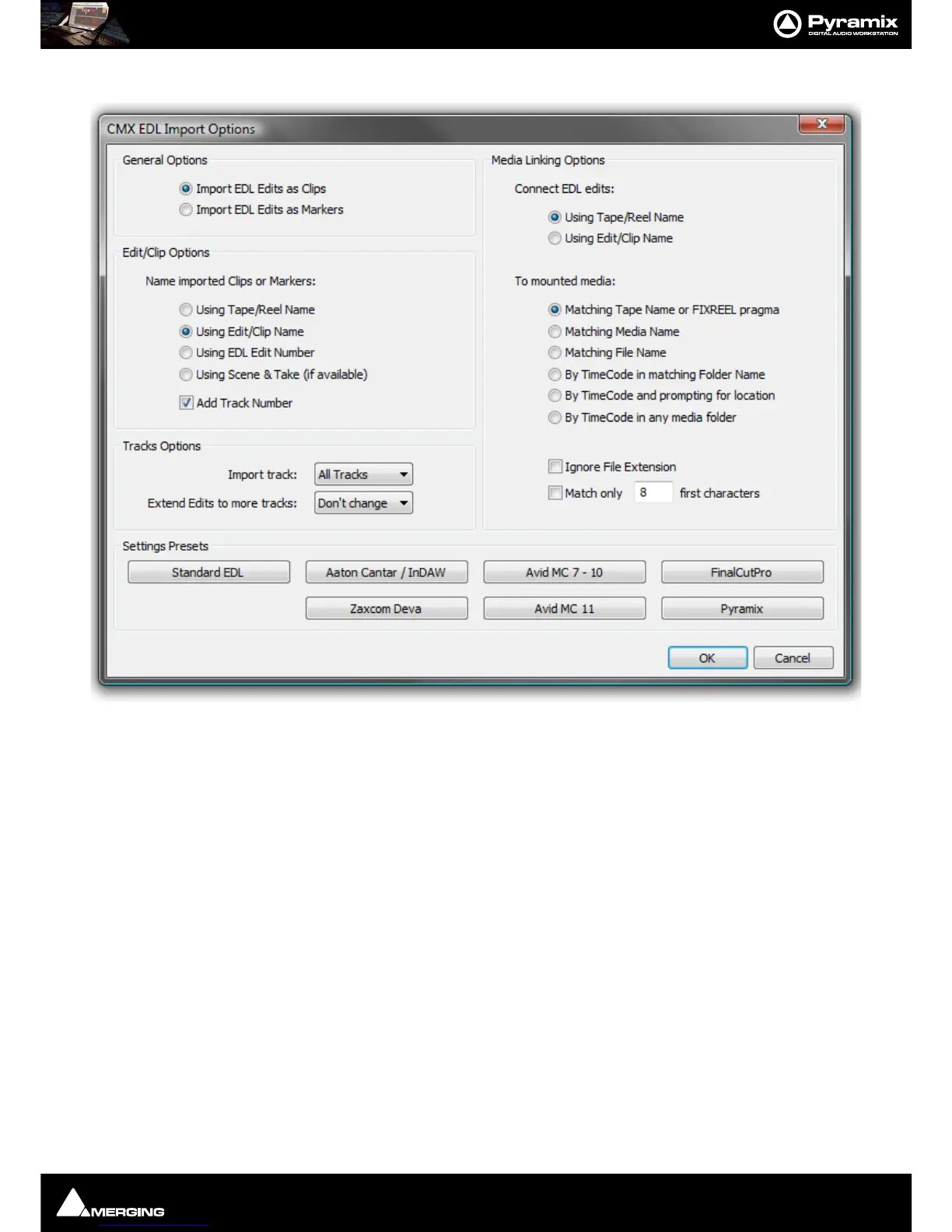
The CMX EDL Import Options main dialog opens:
Common CMX Variants
The Settings Presets buttons at the bottom of the box set the options for a variety of common CMX variants. If
the edl you wish to import matches one of these, simply click the appropriate Preset button. The settings are
reflected in the rest of the dialog. Click the
OK button to begin the Import.
If the EDL is not one of the common variants or the intention is to perform a partial or re-conform, make the
appropriate choices in the dialog before clicking on the
OK button to begin the Import.
CMX EDL import Options
General Options
Import EDL Edits as Clips
Import EDL Edits as Markers
Edit/Clip Options
Choose to name created Clips from either:
Using Tape/Reel Name
Using Edit/Clip Name
Using EDL Edit Number
Using Scene & Take (if available)
of linked media file. (E.g. BWF PMF etc. files with information in the Scene &
Take
fields)
Tracks Options



 To Next Page