Automation : Display and Editing of Automation Data
15 - 376
Automation Tracks Versions
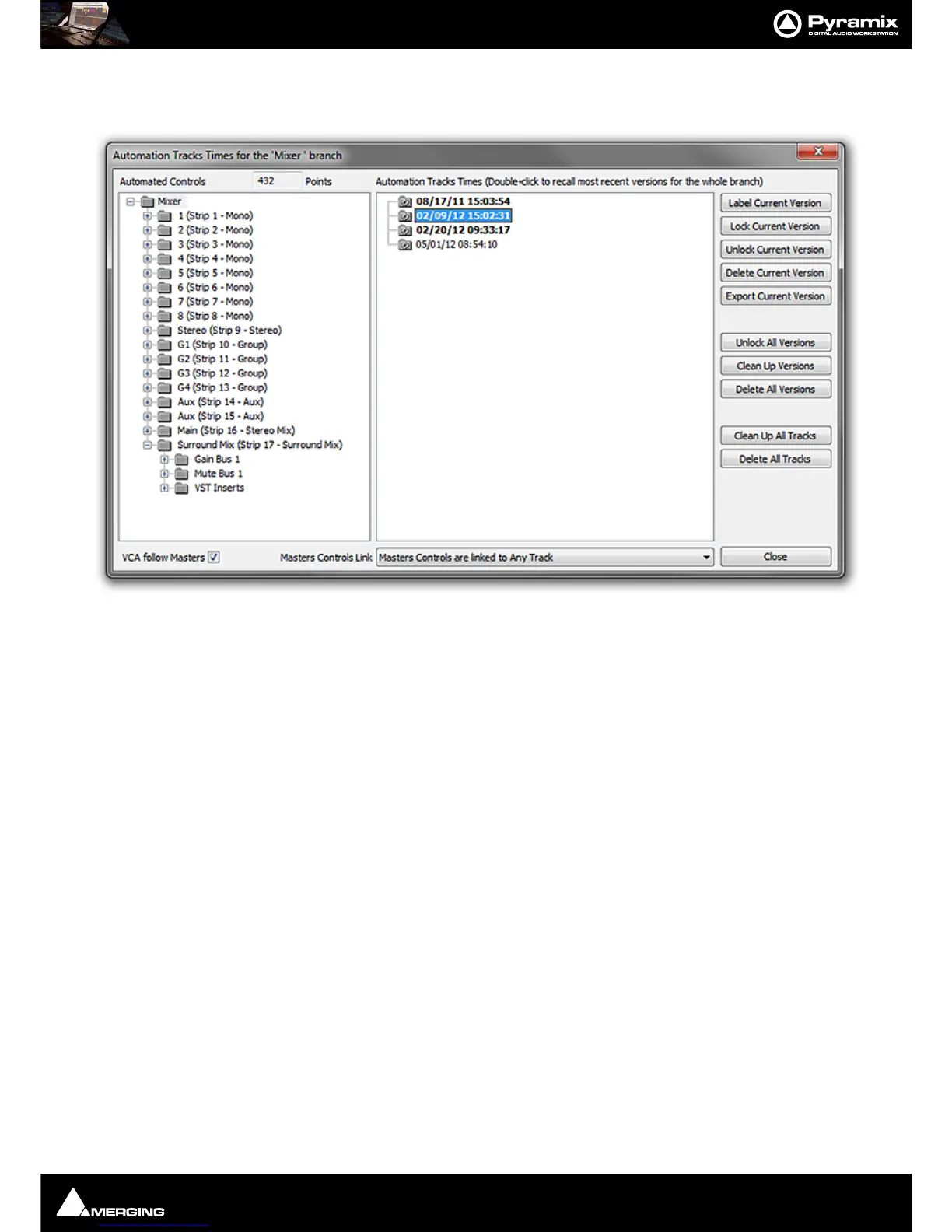
Automation > Automation Tracks opens the Automation Tracks Times window:
Automated Controls
The Automated Controls pane displays all the automatable controls in a tree structure. Double-clicking an entry
in the tree brings the automation passes for the entry into the
Automation Tracks Versions pane. This shows all
the automation passes for the selected Control, Strip or the entire mixer. Double-clicking a version makes it cur-
rent.
Label Current Version creates a copy of the current version for the selected control or branch of controls,
gives it a name that will be displayed in the version Tree and locks it/them. This
makes it easy to recall a given and easily identifiable version of the automation for
the whole mixing console. A warning dialogue is shown if the item selected is any-
thing other than
Mixer.
Lock Current Version Locks the current version
Unlock Current Version Unlocks the current version
Delete Current Version Deletes the current version. Subsequent passes are re-numbered as necessary.
Export Current Version Exports the current Track or Branch as an XML file.
Unlock All Versions Unlocks all versions in the tree.
Clean Up Versions Deletes all versions except the most recent.
Delete All Versions Deletes all the automation passes for the selected control.
Clean Up All Tracks Deletes all versions except the current one for all Tracks.
Delete All Tracks Deletes all automation information for all Tracks.
Locked Versions
Locked versions will be preserved when:



 To Next Page