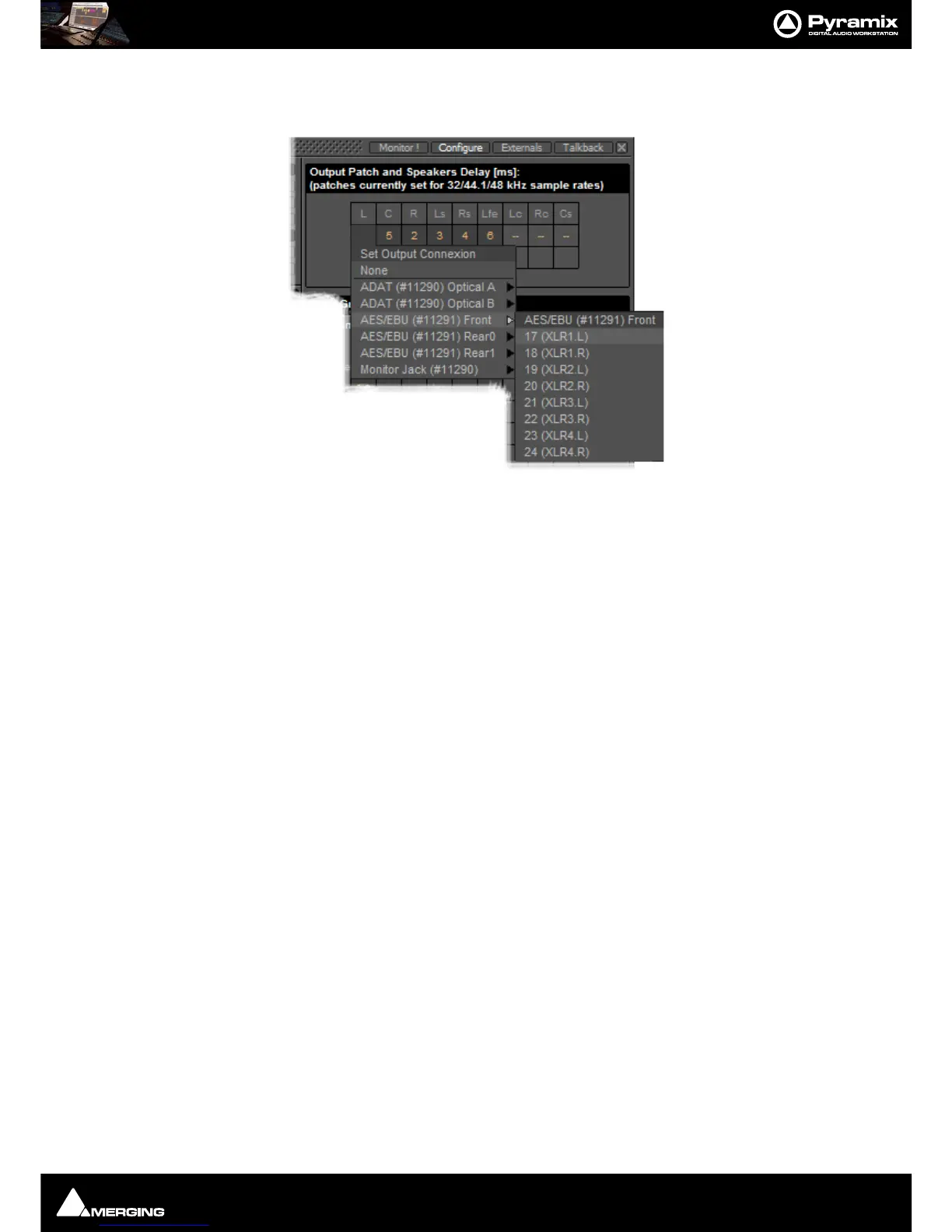
Monitor : Configure page
11 - 275
Output Patch:
This is where the Monitor’s Speaker Set outputs are patched to physical outputs.
Clicking on a cell pops up the
Set Output Connection menu with all available physical outputs grouped by their
connectors. The sub-menus list the group and the individual channels. Select an individual channel to connect it
or select the group, e.g.
AES/EBU (#11291) Front to connect the whole group in ascending order from the cell
clicked on.
Note: Each Speaker Set has its own Output Patch associated with it. This is useful where differ-
ent speakers are used for different formats. If there is only one set of speakers patch all Speaker
Sets to the same physical outputs.
Double Assignment
When an output of the Mixer and an output of the Monitor are connected to the same physical output then these
are summed and the Mixer displays the connection in orange as a warning.
Speaker Delays
Delay can be set per Speaker by clicking in the box below the Output Connection and typing in a value. Speaker
delays are typically used to compensate for the physical positioning of the loudspeakers for example where the
Left Centre and Right speakers are placed in a straight line, the Centre speaker will be nearer to the listening posi-
tion and should be delayed accordingly.
Saving Speaker Sets
Mixer to Monitor connection status is saved in the project.
The Speaker Set settings are saved when you leave the page to go back to the
Monitor ! page; otherwise, modifi-
cations are not saved.



 To Next Page