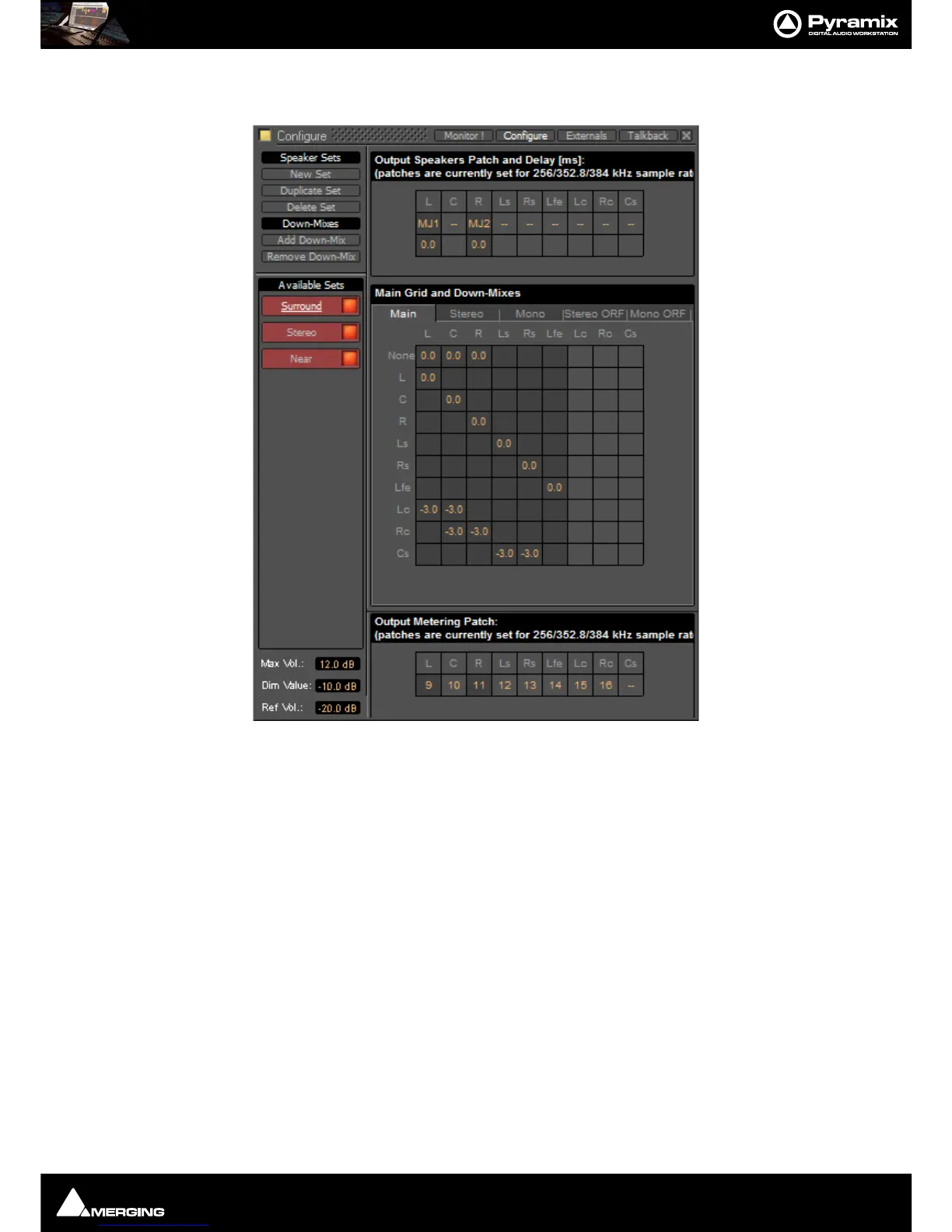
Monitor : Configure page
11 - 273
They and each of their down-mixes can be enabled/disabled in order to determine which ones are visible in the
main Monitor page.
The
Configure page is divided into four main areas; Speaker Sets and Down-Mixes, Available Sets, Output
Speakers Patch and Delay[ms]
, Main Grid and Down-Mixes and Output Metering Patch.
Available Sets
To select an existing Speaker Set in order to view or alter its settings, click on its title in the Available Sets list. The
label will become underlined and the Set’s parameters will appear in the grid. If the Set has Down-Mixes already
defined there will be one or more tabs next to the
Main Tab in the Main Grid and Down-Mixes area.
Two sets,
Stereo and Surround 5.1 are factory defined and cannot be altered. New Sets and Down-Mixes can be
Created, Duplicated and Deleted using the Command buttons.
Max Vol
To set the maximum volume attainable click on the value box to highlight it and type the desired value then hit
Enter or click elsewhere on the window to save the change.
Dim Value
To change the Dim Level, click on the value box to highlight it and type the desired attenuation value then hit
Enter or click elsewhere on the window to save the change.
Note: Only negative values are accepted. Positive values revert to 0dB. I.e. Type “-15”



 To Next Page